Here you can post guides and tutorials you have written for Silkroad Online. If submitting a guide from another forum, please post credit to the author.
13g
Common Member
Posts: 173 Joined: Sat May 19, 2007 12:09 amQuick Reply: YesLocation: Xian
Post
by 13g Thu Jul 05, 2007 6:53 am
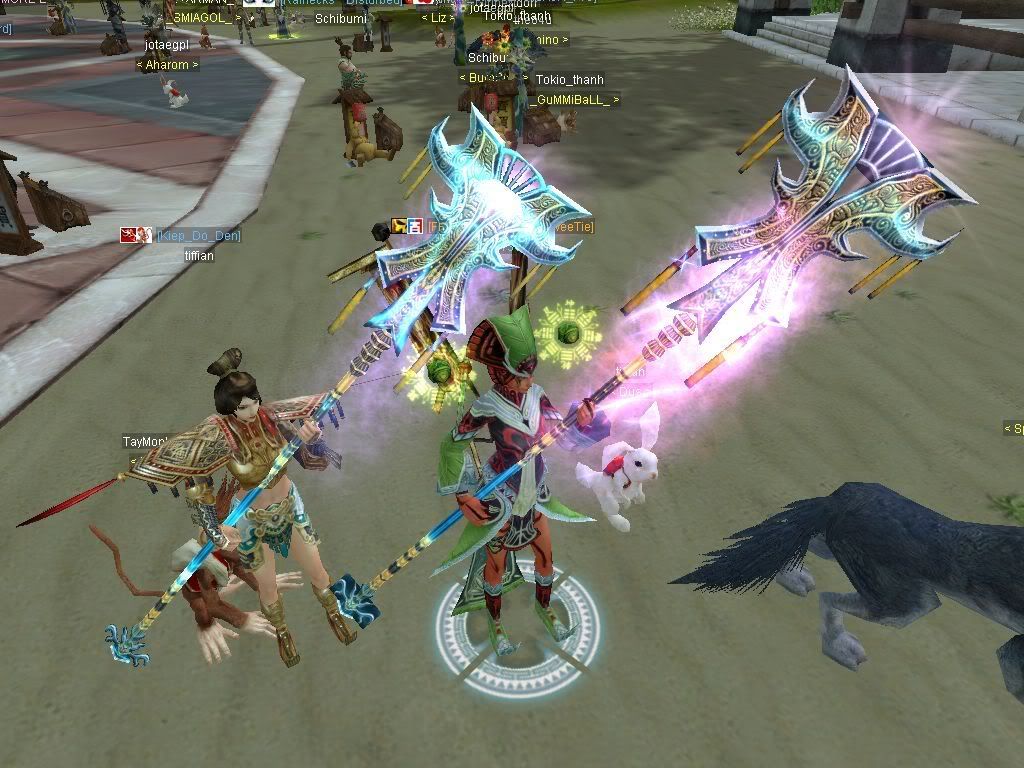
well im on the right, and this is lazy man guide on the changing glows, well i changed +5 to +9, and you can tell diffrence between real +9, and pk2 +9, fake is right, real is left why isnt it the same?
butcha
Active Member
Posts: 681 Joined: Mon Jan 22, 2007 7:16 amQuick Reply: YesLocation: Estonia
Post
by butcha Thu Jul 05, 2007 7:29 am
I think u have to do it on clean spear... idk anything about pk2 editing but i think its about it.
XuChu
Advanced Member
Posts: 2429 Joined: Thu Apr 20, 2006 9:30 amQuick Reply: YesLocation: here
Post
by XuChu Thu Jul 05, 2007 7:34 am
13g wrote: well im on the right, and this is lazy man guide on the changing glows, well i changed +5 to +9, and you can tell diffrence between real +9, and pk2 +9, fake is right, real is left why isnt it the same?
because real is real and fake is fake
mosiac
Active Member
Posts: 808 Joined: Thu May 03, 2007 3:30 pmQuick Reply: YesLocation: ಠ_ಠ
Post
by mosiac Thu Jul 05, 2007 7:34 am
+9 glows aren't the same color constantly, you simply took a SS when the two were changing.. if that makes any sense.
Cruor
Loyal Member
Posts: 1999 Joined: Wed Apr 12, 2006 1:22 amQuick Reply: YesLocation: Off topic
Post
by Cruor Thu Jul 05, 2007 7:44 am
Different alpha map texture. You have the lower level, less intense texture on there still.
13g
Common Member
Posts: 173 Joined: Sat May 19, 2007 12:09 amQuick Reply: YesLocation: Xian
Post
by 13g Thu Jul 05, 2007 7:47 am
Cruor wrote: Different alpha map texture. You have the lower level, less intense texture on there still.
explain plz?
[SK]Paddo
Valued Member
Posts: 466 Joined: Tue Apr 24, 2007 4:44 pmQuick Reply: YesLocation: Troy
Post
by [SK]Paddo Thu Jul 05, 2007 7:52 am
theres was some number you gotta change to raise the intensity... it was somewhere in guides/tutorials, im gonna search it when im @ home.
out of business since 10/2007.
Cruor
Loyal Member
Posts: 1999 Joined: Wed Apr 12, 2006 1:22 amQuick Reply: YesLocation: Off topic
Post
by Cruor Thu Jul 05, 2007 7:54 am
Look in your modified itemtypenumber.txt file at your glaive's line. You have either "option_texture13.ddj" or "option_texture14.ddj" on that line. Change it to "option_texture20.ddj".
XuChu
Advanced Member
Posts: 2429 Joined: Thu Apr 20, 2006 9:30 amQuick Reply: YesLocation: here
Post
by XuChu Thu Jul 05, 2007 7:59 am
cruor arent u from venice?
Cruor
Loyal Member
Posts: 1999 Joined: Wed Apr 12, 2006 1:22 amQuick Reply: YesLocation: Off topic
Post
by Cruor Thu Jul 05, 2007 8:03 am
XuChu wrote: cruor arent u from venice?
Yeah, was messing with the server flags to see why no one had Poseidon.
Garrett
Casual Member
Posts: 62 Joined: Fri Feb 23, 2007 4:55 pmQuick Reply: YesLocation: Tibet
Post
by Garrett Thu Jul 05, 2007 8:04 am
Because you took the pic while the "glow wave" was on the shaft of our glavie while it was on the head of the other person's glavie.
InviSniper | Level: 7X | STR Fire Glavie Mystic_Gods * 2Hot2Handle | Union: Mystic_Gods | Level 3 Thief
XuChu
Advanced Member
Posts: 2429 Joined: Thu Apr 20, 2006 9:30 amQuick Reply: YesLocation: here
Post
by XuChu Thu Jul 05, 2007 8:07 am
Cruor wrote: XuChu wrote: cruor arent u from venice?
Yeah, was messing with the server flags to see why no one had Poseidon.
venice ftw!
13g
Common Member
Posts: 173 Joined: Sat May 19, 2007 12:09 amQuick Reply: YesLocation: Xian
Post
by 13g Thu Jul 05, 2007 8:17 am
you lost me =(
Cruor
Loyal Member
Posts: 1999 Joined: Wed Apr 12, 2006 1:22 amQuick Reply: YesLocation: Off topic
Post
by Cruor Thu Jul 05, 2007 8:48 am
The line you changed should look like this now:
Code: Select all
4 5 0.000000,0.005000 prim\mtrl\itemoption\option_texture20.ddj 5 7 0.388,0.502,0.890 0.094,0.580,0.380 1000 1Check to see if you have any differences. Don't cut and paste because the tabs were changed to spaces by the BBCode.
Crumpets
Forum Legend
Posts: 7800 Joined: Mon Aug 14, 2006 4:58 pmQuick Reply: YesLocation:
Post
by Crumpets Thu Jul 05, 2007 9:58 am
Yup what cruor said .. and it's what I said in the guide .. tweak the intensity if it don't seem right.
<< banned for being a constant problem. -cin >>
penfold1992
Senior Member
Posts: 4059 Joined: Sun Apr 22, 2007 9:48 amQuick Reply: YesLocation: Uranus
Post
by penfold1992 Thu Jul 05, 2007 2:58 pm
pk2 editing doesnt look "fake" if follow cruor and u get it wrong then thats ur problem.
StealMySoda
Ex-Staff
Posts: 5245 Joined: Sun Sep 03, 2006 2:37 pmQuick Reply: YesLocation: Off Topic
Contact:
Post
by StealMySoda Thu Jul 05, 2007 3:15 pm
Moving to guide section, seems more related to pk2 now
Ooh, I got a sexy ex-staff title!
DrunkiMunki
Active Member
Posts: 609 Joined: Mon Jul 31, 2006 9:34 pmQuick Reply: YesLocation: xian
Contact:
Post
by DrunkiMunki Thu Jul 05, 2007 3:22 pm
is pk2 editing allowed here? Joymax told us they dont want us to..
<<banned from SRF for bot admission. -SG>>
13g
Common Member
Posts: 173 Joined: Sat May 19, 2007 12:09 amQuick Reply: YesLocation: Xian
Post
by 13g Thu Jul 05, 2007 6:20 pm
Cruor wrote: The line you changed should look like this now:
Code: Select all
4 5 0.000000,0.005000 prim\mtrl\itemoption\option_texture20.ddj 5 7 0.388,0.502,0.890 0.094,0.580,0.380 1000 1Check to see if you have any differences. Don't cut and paste because the tabs were changed to spaces by the BBCode.
im still very lost, i looked in there, it looks exactley like that, so whats wrong?