Page 1 of 1
PC Fan(Cooling Fan)
Posted: Sat Apr 26, 2008 8:09 am
by Skyve
Hello, ^_^
Here the situation,
Lately(been 2 months now),for some reason my Computer Fan does lots of noise,its pretty annoying,You can hear it from 2 rooms -_-
Well first of all is there any software dat could make it less noisier,I guess a program that could make the fan go slower/less noise.
If there no such software,I had an idea
I got another computer with a really quiet fan,
Would it be hard to open the computer,unplugg the fan,and plug into my current computer?
Or is it a lot of wire to connect,Im thinking of putting my previous fan into my new computer,if it's not to hard;
All come to a conclusion,if I get to change the fan with no problem,would it affect my computer(hes speed/ram) or w/e =)
Thanks/
-Loki
Re: PC Fan(Cooling Fan)
Posted: Sat Apr 26, 2008 8:27 am
by greeneye
Hi Ex!
Actually it is easy to change the fan...however what fan is it? Is it the side intake fan? Or the rear outtake one? In any case, all you just need to do is unscrew it, and to completely remove it, just disconnect its wires to the standard connector of the power-supply (it is just a male-female connector so you should not go wrong).
Just make sure that the fan of your other computer would fit on the mount or is the same size as the fan that you are replacing....

Re: PC Fan(Cooling Fan)
Posted: Sat Apr 26, 2008 9:40 am
by Razorhead
There are a lot of fans in your computer...
Fan of ur powersuply, fan on ur motherboard, fan on ur graphics card.
But my guess is, it's your power supply.
Power Supply is easy to remove/install if u have a case with some space. In a small case it can be a real bitch to switch a power suply

But before u switch them; make sure it has enough pins!
Older computers (motherboards) have 20 pin-connecters and new ones have 24 pins!
Also connection problems could occur with new graphic cards and sata disks if ur old power suply doesn't have those connectors.
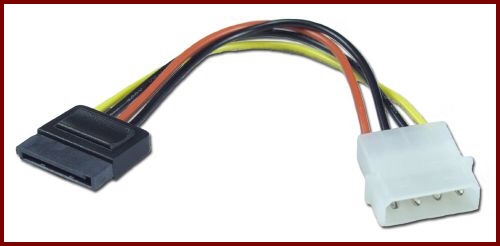
This transforms a normal connector into a sata connector (hard drive)
Re: PC Fan(Cooling Fan)
Posted: Sun Apr 27, 2008 2:48 am
by Skyve
Okay,
Thanks for help,I'll rish my self
I guess the 2 computer got 24 pins,bought them like year ago,
Let ya know how it went
Re: PC Fan(Cooling Fan)
Posted: Sun Apr 27, 2008 11:55 am
by mac
This happen to me b4. Chance are inside ur CPU is FULL of dust, try to clean it up. But becareful when u do that, cause last time that i clean up my CPU, i broke the powersupply

. Get some thing like an air pressurer or something, to blow all the dust out.
Re: PC Fan(Cooling Fan)
Posted: Mon Apr 28, 2008 6:10 pm
by AngelEyes
If it's a Power Supply fan, you'll need to replace the power supply, like it was stated, make sure you get the correct pins. If it was a chassis fan, either on the back, the front or the side panel of the case, those are easy to replace as well, just make sure they are the same size so the screw holes fit, and make sure you put it in the right way, generally you have one fan on the front and one on the back or side, one sucks in cool air and one blow out the hot air, you want to make sure you place it so the blades are the same way as the one you removed, otherwise you might have two intakes or two outake fans when you want one of each. If it's a CPU fan, or chipset fan, those require a little bit more work, but just look for the instructions for your motherboard. If it's your graphix card fan, well, you need a new graphix card. (they put a lot of fans in computers these days).
As to your other question if there is software, yes some motherboards come with variations of Cool 'n' Quiet technology, but if you can hear your fan two rooms away, this is not going to help, it's most likely your fan is dying a slow death.
Re: PC Fan(Cooling Fan)
Posted: Mon Apr 28, 2008 11:15 pm
by Master_Mind
is it possible to reduce noise on laptops? Cuz when im on SRO my fan goes at max all the time and gets hot.. So i was wondering if you could turn the fan speed down somehow or will it blow less if i upgrade my ram?
Re: PC Fan(Cooling Fan)
Posted: Mon Apr 28, 2008 11:45 pm
by Skyve
I guess it because there a lot of dust,
I'll clean it,with Kleenex I guess =/
Re: PC Fan(Cooling Fan)
Posted: Tue Apr 29, 2008 7:38 am
by Master_Mind
Loki wrote:I guess it because there a lot of dust,
I'll clean it,with Kleenex I guess =/
Thats a problem cuz i cant acces my fan... atleast not without unscewring my whole pc
Re: PC Fan(Cooling Fan)
Posted: Tue Apr 29, 2008 10:46 pm
by Grandpa

I'm scared now.
Because 'noise' is annoying but 'heat' is your enemy.
Keep this thread open for the "My computer freezes or reboots all the time" comments
(that are soon to come).
Having said that, here you go ~~> Click: "
Video How To" showing how to replace your computer's power supply.
(Even though he is using a 145 watt power supply, yours is likely to be higher).
If you are gonna clean it,
DUST OFF type compressed air is cheap and worth it in the long run. Spraying air saves the risk of static electricity (especially in Winter or cold climate).
~Grandpa
Re: PC Fan(Cooling Fan)
Posted: Tue Apr 29, 2008 11:31 pm
by Skyve
Grandpa wrote::shock: I'm scared now.
Because 'noise' is annoying but 'heat' is your enemy.
Keep this thread open for the "My computer freezes or reboots all the time" comments
(that are soon to come).
Having said that, here you go ~~> Click: "
Video How To" showing how to replace your computer's power supply.
(Even though he is using a 145 watt power supply, yours is likely to be higher).
If you are gonna clean it,
DUST OFF type compressed air is cheap and worth it in the long run. Spraying air saves the risk of static electricity (especially in Winter or cold climate).
~Grandpa
\I think i'll go first with cleaning it,then if it dont work,i'll use my other fan;
What do you mean by "spraying air",with what could I do dat?I was thinking of just taking a tissue and clean the dust
Master_Mind wrote:hats a problem cuz i cant acces my fan... atleast not without unscewring my whole pc
Yea,you have to unscrew the 'sides" of ur computer,not a big deal ^^
Re: PC Fan(Cooling Fan)
Posted: Wed Apr 30, 2008 3:07 pm
by Grandpa
Loki wrote:I think i'll go first with cleaning it,then if it dont work,i'll use my other fan;
What do you mean by "spraying air",with what could I do dat?I was thinking of just taking a tissue and clean the dust ^^
You can buy '
canned air' lots of place. Wal-Mart, Home Depot <~~ like that.
Click the words ^ ^ up there 'canned air' for example.
~Granps