nVidia Ge-Force 7600GS . Need help

If your having problems installing or playing Silkroad Online, please post here. Includes general computer health and technical problems.
Post Reply
User avatar
Rubennz
Valued Member
Posts: 413
Joined: Thu Aug 30, 2007 1:34 pm
Quick Reply: Yes
Location: Netherlands, Nijmegen:)

nVidia Ge-Force 7600GS . Need help

Post by Rubennz »

Hey,
i have a problem, when i play silkroad for one whole day my video card gets heated up, or sometimes when i play for 3 hours straight or i let my pc stall one night it gets heated up too.
Then i disconnect all cables and plug-out my video card and let it cool down for an hour, then i'm ready to play again i have this for 2 months now, but it's working on my nerves now :cry: :x
I have a good pc cooler so that isn't the problem i think.

Does anyone know what to do or has this graphical card too?
Please pm or reply. :(
Image
thx cin for the sig :love:
Stopped playing silkraodOnline.

User avatar
xzaz
Loyal Member
Posts: 1574
Joined: Sat Sep 02, 2006 8:53 pm
Quick Reply: Yes
Location: Greece

Post by xzaz »

So your GPU gets to hot and crashes your comp? Or is it jsut to hot. Maby a bad airflow, maby a bad cooler, whats the RPM?
Image

User avatar
Rubennz
Valued Member
Posts: 413
Joined: Thu Aug 30, 2007 1:34 pm
Quick Reply: Yes
Location: Netherlands, Nijmegen:)

Post by Rubennz »

xzaz wrote:So your GPU gets to hot and crashes your comp? Or is it jsut to hot. Maby a bad airflow, maby a bad cooler, whats the RPM?

GPU = video card?
i got a good cooler though one of the best "Coolers masters".
and whats RPM?

i got 3 times 256 RAM btw,,
Image
thx cin for the sig :love:
Stopped playing silkraodOnline.

User avatar
xzaz
Loyal Member
Posts: 1574
Joined: Sat Sep 02, 2006 8:53 pm
Quick Reply: Yes
Location: Greece

Post by xzaz »

Rubennz wrote:
xzaz wrote:So your GPU gets to hot and crashes your comp? Or is it jsut to hot. Maby a bad airflow, maby a bad cooler, whats the RPM?

GPU = video card? = http://en.wikipedia.org/wiki/GPU
i got a good cooler though one of the best "Coolers masters". Cooler masters is fine, but its the way you use your coolers, hot air has to go out cool air has to go in
and whats RPM? = http://en.wikipedia.org/wiki/Revolutions_per_minute

i got 3 times 256 RAM btw,,

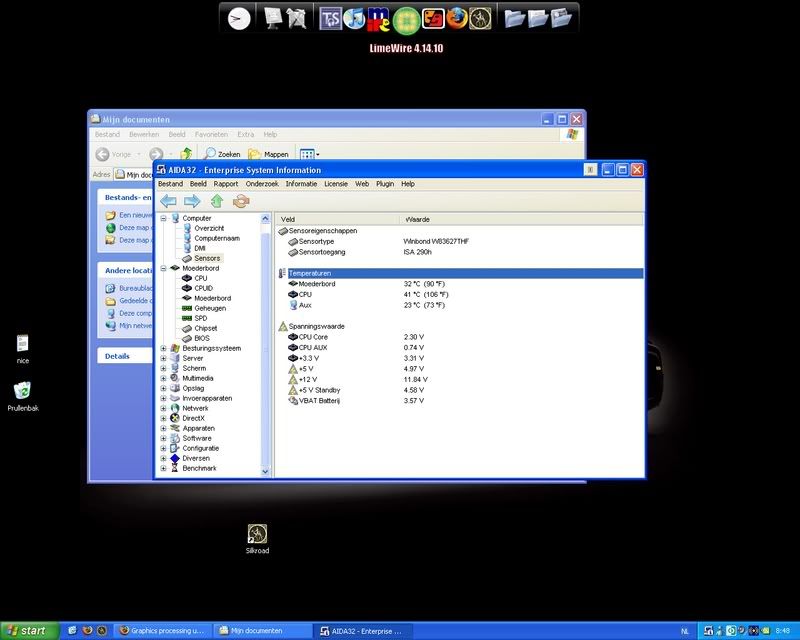
Btw whats "hot", 40? 50 degrees? Download Aida: http://users.skynet.be/com2com/aida32.exe And read out the real temps, its not bad ocmputer hardware gets hot, its pritty normal.
Image

Xonea
Hi, I'm New Here
Posts: 9
Joined: Tue Sep 25, 2007 1:24 am

Post by Xonea »

my 7800 gt gets around 80*F bit i dont have a cooling system and i live in florida so i mean theres alot of varibles as long as it doesnt get over 120 its ok

User avatar
Rubennz
Valued Member
Posts: 413
Joined: Thu Aug 30, 2007 1:34 pm
Quick Reply: Yes
Location: Netherlands, Nijmegen:)

Post by Rubennz »

xzaz wrote:
Rubennz wrote:
xzaz wrote:So your GPU gets to hot and crashes your comp? Or is it jsut to hot. Maby a bad airflow, maby a bad cooler, whats the RPM?

GPU = video card? = http://en.wikipedia.org/wiki/GPU
i got a good cooler though one of the best "Coolers masters". Cooler masters is fine, but its the way you use your coolers, hot air has to go out cool air has to go in
and whats RPM? = http://en.wikipedia.org/wiki/Revolutions_per_minute

i got 3 times 256 RAM btw,,

Btw whats "hot", 40? 50 degrees? Download Aida: http://users.skynet.be/com2com/aida32.exe And read out the real temps, its not bad ocmputer hardware gets hot, its pritty normal.

i dont see GPU or Graphical card :shock:
Image

EDIT:
I've just checked the RPM when booting pressed DEL and you get that menu u know.
SYSTEM RPM: 1854
CPU RPM: 0 :shock: (Maybe it doest recognice him, but i look in my computers and it spins fkin hard so... i dun gettit
Image
thx cin for the sig :love:
Stopped playing silkraodOnline.

User avatar
xzaz
Loyal Member
Posts: 1574
Joined: Sat Sep 02, 2006 8:53 pm
Quick Reply: Yes
Location: Greece

Post by xzaz »

Your temps are good, try and take a look in your BIOS. Aida32 is old, its still works. :roll:
Image

User avatar
Rubennz
Valued Member
Posts: 413
Joined: Thu Aug 30, 2007 1:34 pm
Quick Reply: Yes
Location: Netherlands, Nijmegen:)

Post by Rubennz »

allready did its even better there like 30 degrees.
but cant i see the temp of my GPU instead of CPU?
Image
thx cin for the sig :love:
Stopped playing silkraodOnline.

User avatar
xzaz
Loyal Member
Posts: 1574
Joined: Sat Sep 02, 2006 8:53 pm
Quick Reply: Yes
Location: Greece

Post by xzaz »

Rubennz wrote:allready did its even better there like 30 degrees.
but cant i see the temp of my GPU instead of CPU?

If you your Grapics card has such a function yes you can, take a look at the main site of your manufacture.
Image

AlanSmith
Hi, I'm New Here
Posts: 8
Joined: Mon Oct 22, 2007 3:02 am

Post by AlanSmith »

google for RivaTuner, you can change fan speeds which should help cool it down a little, my card used to idle at like 65 degrees Celcius, I installed an Antec Vcool VGA expansion slot cooler and it now idles at like 55 degrees celcius, when gaming it reaches about 70 degrees celcius on medium detail. if it reaches 80 degrees celcius it just shuts itself down to stop it from frying.

Post Reply

Return to “Technical Help”