new graphics error

If your having problems installing or playing Silkroad Online, please post here. Includes general computer health and technical problems.
Post Reply
User avatar
mosiac
Active Member
Posts: 808
Joined: Thu May 03, 2007 3:30 pm
Quick Reply: Yes
Location: ಠ_ಠ

new graphics error

Post by mosiac »

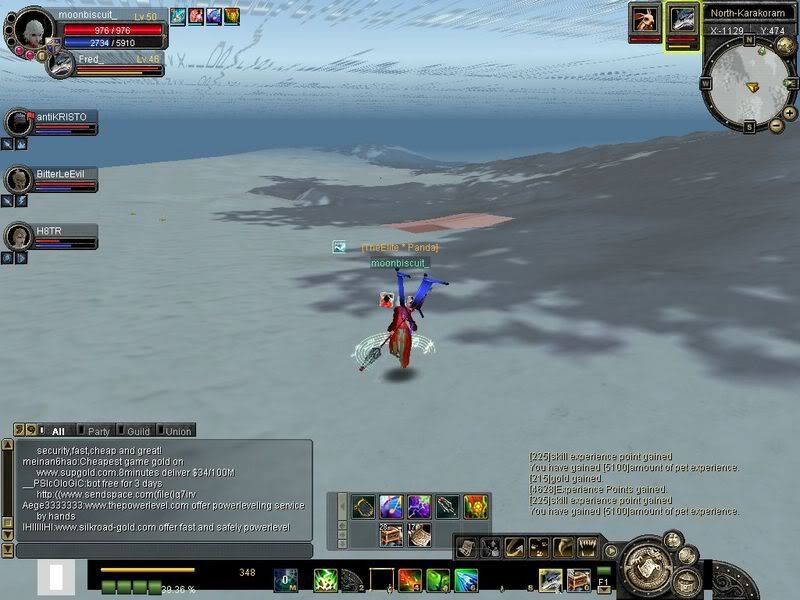
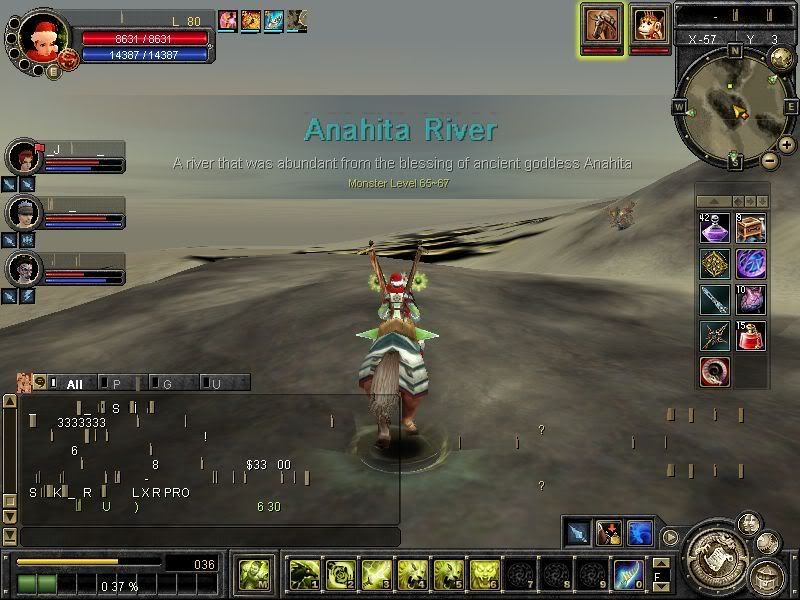
I haven't seen this one before, been getting it whenever I run SRO for x amount of time, It can happen either the second i start the game, or in a couple hours.. but it does happen eventually. First the screen freezes up, music will start looping, then either small horizontal dashes start appearing across my screen moving, or it will look like these pictures.
Image
Image
i'm running windows xp home edition service pack2, nvidia 8600 GT with newly updated drivers. my computer is an AMD athlon 64 processor 3500+, 2.21 GHz, 1GB of RAM. basically bought it two years ago, when it was a high end gaming PC. It runs other games fine, but for some reason it this error comes up with SRO. I've tried both reinstalling silkroad and reupdating my drivers and neither work. edit : zzzz i even reformatted my PC and it still doesn't work.anyone know what this is?
another thing, being that I just reformatted my pc, do you think there are any possible programs i'm missing? I downloaded the newest drivers for my gfx card and directx, and some audio drivers, could I be missing anything important?
Last edited by mosiac on Mon Oct 29, 2007 3:03 pm, edited 2 times in total.

User avatar
Hellzowner
Active Member
Posts: 820
Joined: Sat May 19, 2007 6:00 am
Quick Reply: Yes
Location: OLYMPUS

Post by Hellzowner »

Cool sky ^^
Image
Image

User avatar
mosiac
Active Member
Posts: 808
Joined: Thu May 03, 2007 3:30 pm
Quick Reply: Yes
Location: ಠ_ಠ

Post by mosiac »

bump

User avatar
Nixie
Frequent Member
Posts: 1108
Joined: Fri Aug 03, 2007 7:58 am
Quick Reply: Yes
Location: Off Topic
Contact:

Post by Nixie »

Hellzowner wrote:Cool sky ^^
True. :D

About your problem... try reinstalling you graphic drivers. Would be the only thing I can suggest... beside reinstalling SRO.

If that shouldn't fix your weird sky... :|
<< banned for proof of botting. -cin >>

User avatar
San
Loyal Member
Posts: 1562
Joined: Sun Dec 03, 2006 8:55 pm
Quick Reply: Yes
Location: Off Topic
Contact:

Post by San »

Hellzowner wrote:Cool sky ^^

it looks like the matrix, cept its gray :D
Image

:love: fena

TwelveEleven
Veteran Member
Posts: 3806
Joined: Sat Mar 17, 2007 1:11 am
Quick Reply: Yes
Location: Heaven
Contact:

Post by TwelveEleven »

If it went like that AFTER you updated your drivers, just degrade your drivers! (uninstall the nvidia drivers, in the meanwhile download your old version again, if you haven't gotten it anymore. Then install your 'old' drivers)
<<banned from SRF for proof of botting. -SG>>

Post Reply

Return to “Technical Help”