Page 1 of 1
Downloading and opening Silkroad online
Posted: Fri Aug 24, 2007 1:21 pm
by ryuko2121
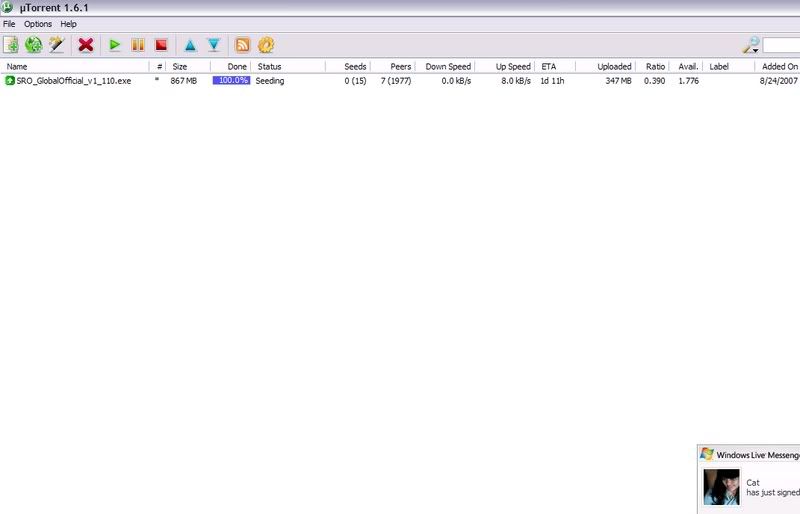
I downloaded silkroad with Utorrent and then now that it is downloaded I went to the c:/Downloads thing and opened the sro thing and it says "Please Wait..." for ages and never works! What is the problem.. also, on the Utorrent thing it says 100% done but also says "seeding"... Is that the cause of the problem?
PLEASE HELP! I love sro and ive been downloading it for ages!!
Oh and if it helps, it says only 347mb is uploaded for some reason!
Posted: Sat Aug 25, 2007 12:11 am
by ryuko2121
Anyone help please!
Posted: Sat Aug 25, 2007 1:33 pm
by _WiCkEd_
ok, i had this problem 2, it just kept on seeding..
just download an "other" SRO, u could choose 3 kinds of dl.
grtz hoped it helped

Posted: Sat Aug 25, 2007 2:23 pm
by Foss
Lol @ both of you
Seeding means your uploading to other people. Obviously you've never used torrents before. If it says Seeding and its at 100% that means your download is finished

Posted: Sun Aug 26, 2007 12:10 am
by ryuko2121
for me it says 100%| Seeding...
Posted: Sun Aug 26, 2007 1:20 am
by xRemiXx
Well if uTorrent is giving you problems..
Why not use the 3 other choses
FileFront
FileShack
FilePlanet

Download Page :
http://www.silkroadonline.net/dataroom/download.asp
Personally I would use FileFront.
I downloaded with FileFront.
I think you should be glad
JoyMax gave everyone 3 EXTRA links of downloads.
To exaclty prevent this kind of problems.
Cheers

Posted: Sun Aug 26, 2007 6:22 am
by bloop
sigh.
Seeding -> You downloaded the file fully. Now it just means that your uploading it to other people. Go read what a torrent is/does if your not happy with this explanation.
Now, when you went in to C:\Downloads or whatever other path it downlaoded too and double clicked, you said that it says Please Wait and takes ages then nothing happens.
Just wait. Don't touch anything on your pc and wait. It *will* load eventually. The loading of the installer depends on your pc specs + the fact if you have an aggressive anti-virus on or not.
So, simply double click the file you downloaded and go for a walk. You'll have the install thingy up and running eventually.