Vista and SRO - Problems and solutions here
Posted: Thu Jul 05, 2007 11:45 pm
-Get everything updated and clean-
Make sure you got this:
- You got a good smoothly windows Vista running
- You got the lastest sro version running (at least launghing) and installed
- You got Administrator rights
- You got the newest Windows Vista updates.
-Put compatibility on-
Because JoyMax did "updated" sro for Windows Vista users it should all work directly after installing sro. But most of the time it dosnt work
- Right click on the sro icon on your desktop
- Click on the tab compatibility
- Put this on "Windows XP (Service Pack 2)"
- Press OK
-Alsow-
Try this:
- Allow SRO to access/trusted Program.
- Disable auto updates from windows vista
--------> Try not to run xfire, msn enc kind of programs. First try a "clean" laungh. <--------
Now try to run sro.
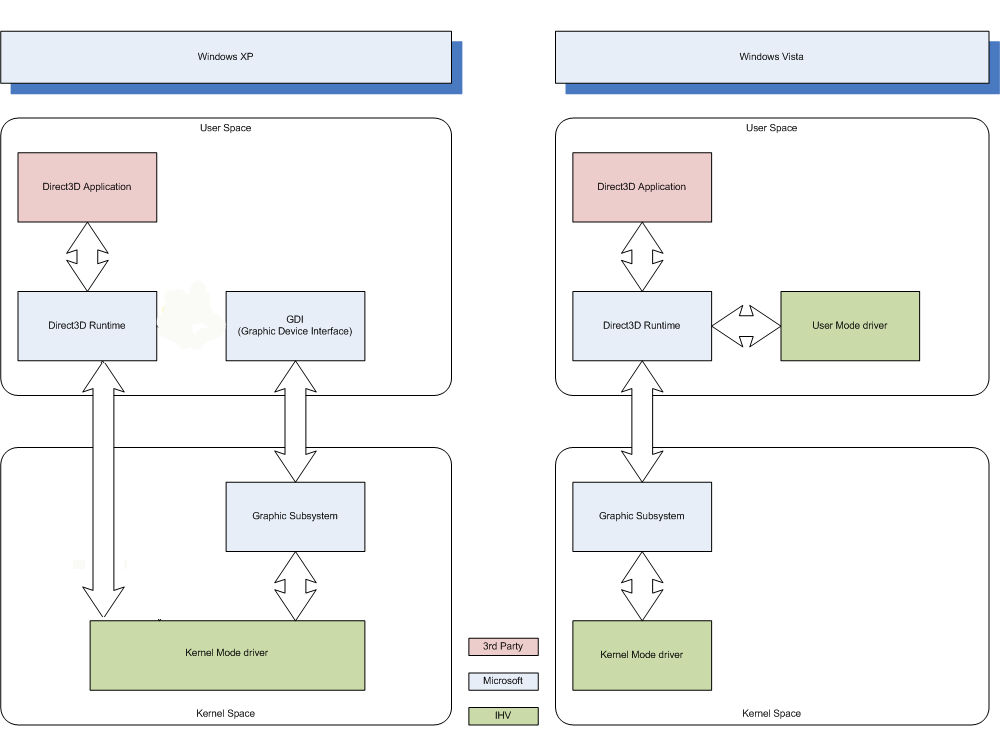
I think the most of the problems should be fixed with this. I think the most of the problems are because of Windows Vista with the new Dx 10 version has a completly new system. Alsow there is a option that its the fault of Game Guard. On their website Here You can see here that GameGuard isnt compatible with Vista.
-Not working?-
- Try to run SRO as Administrator
-Alright if it dosnt work-
- Go to Control Panel
- Add a program to Windows Firewall
- Add here sro_client.exe and silkroad.exe
- Search for new updates on Windows Vista.
- Restart your computer
-Try to update the following stuff-
- http://www.microsoft.com/downloads/deta ... laylang=en
And if you think its impossible, it aint because i (and many others) run SrO on Vista.
If you stil got problems pleas post this:
If you want your computer information (spec for DirectX) press WinKey + R and type: "dxdiag" and press "enter".
-Other (download) links-
- [Europe update Mirror 1] http://files.filefront.com/SilkroadOnli ... einfo.html
- [Europe update Mirror 2] http://files.filefront.com//;7974758
- [Europe update Mirror 3] http://www.silkroadonline.net
- [Europe update Mirror 4] -
- [Europe update Mirror 5] http://files.filefront.com//;7966156;;/
- [Europe update Mirror 6] http://lsob.de/pub/SRO_GlobalOfficial_v1_110.exe
- [Europe update Mirror 7] Google is your friend
- [Other faq about vista ] http://members.cox.net/ddchen/troubleshoot.htm#vista tnx to pengachu
- [Other Technical Help topic ] http://www.silkroadforums.com/viewtopic.php?t=52682
- [Other Technical Help topic ] http://www.silkroadforums.com/viewtopic.php?t=53167
- [ Nvidia drivers ] http://www.nvidia.com/content/drivers/drivers.asp
- [ Ati drivers ] http://ati.amd.com/support/driver.html
I should try to continue help and expent this faq/tuto with lovely sro and vista
Make sure you got this:
- You got a good smoothly windows Vista running
- You got the lastest sro version running (at least launghing) and installed
- You got Administrator rights
- You got the newest Windows Vista updates.
-Put compatibility on-
Because JoyMax did "updated" sro for Windows Vista users it should all work directly after installing sro. But most of the time it dosnt work
- Right click on the sro icon on your desktop
- Click on the tab compatibility
- Put this on "Windows XP (Service Pack 2)"
- Press OK
-Alsow-
Try this:
- Allow SRO to access/trusted Program.
- Disable auto updates from windows vista
--------> Try not to run xfire, msn enc kind of programs. First try a "clean" laungh. <--------
Now try to run sro.
I think the most of the problems should be fixed with this. I think the most of the problems are because of Windows Vista with the new Dx 10 version has a completly new system. Alsow there is a option that its the fault of Game Guard. On their website Here You can see here that GameGuard isnt compatible with Vista.
-Not working?-
- Try to run SRO as Administrator
-Alright if it dosnt work-
- Go to Control Panel
- Add a program to Windows Firewall
- Add here sro_client.exe and silkroad.exe
- Search for new updates on Windows Vista.
- Restart your computer
-Try to update the following stuff-
- http://www.microsoft.com/downloads/deta ... laylang=en
And if you think its impossible, it aint because i (and many others) run SrO on Vista.
If you stil got problems pleas post this:
Code: Select all
[b]OS version (Ultimate enc):[/b]

[b]Error:[/b]

[b]Screenshot:[/b]

[b]Your configuration:[/b]
CPU:
Memory:
Graphic card:
Motherboard:

[b]Comment:[/b]
If you want your computer information (spec for DirectX) press WinKey + R and type: "dxdiag" and press "enter".
-Other (download) links-
- [Europe update Mirror 1] http://files.filefront.com/SilkroadOnli ... einfo.html
- [Europe update Mirror 2] http://files.filefront.com//;7974758
- [Europe update Mirror 3] http://www.silkroadonline.net
- [Europe update Mirror 4] -
- [Europe update Mirror 5] http://files.filefront.com//;7966156;;/
- [Europe update Mirror 6] http://lsob.de/pub/SRO_GlobalOfficial_v1_110.exe
- [Europe update Mirror 7] Google is your friend
- [Other faq about vista ] http://members.cox.net/ddchen/troubleshoot.htm#vista tnx to pengachu
- [Other Technical Help topic ] http://www.silkroadforums.com/viewtopic.php?t=52682
- [Other Technical Help topic ] http://www.silkroadforums.com/viewtopic.php?t=53167
- [ Nvidia drivers ] http://www.nvidia.com/content/drivers/drivers.asp
- [ Ati drivers ] http://ati.amd.com/support/driver.html
I should try to continue help and expent this faq/tuto with lovely sro and vista