Page 1 of 1

Solutions to 7 common errors (By: dragonlord76)

Posted: Fri Mar 30, 2007 4:43 pm
by Fracture
I did not write this list, dragonlord76 did, and all solutions provided are a compilation of his findings. This is by no means a solution to everyones problem, so take it at face-value!

SILKROAD GAME ERRORS SOLUTIONS
Error 1 - Gamegaurd Errors (3)
Error 2 - Microsoft Error
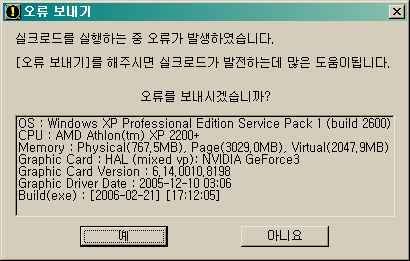
Error 3 - ??? Error
Error 4 - Access Error
Error 5 - Screenshot Error
Error 6 - Restart Error
Error 7 - Login Crash Error


===================================[ Error #1 ]===================================

Image

+ Solution #1

Code: Select all

 Open REGEDIT and CTRL+F then find these 2 registries.
NprotectGameGuard and Gameguard

NOTE: BACK UP YOUR ENTIRE REGISTRY BEFORE YOU CONINTUE, OR YOU COULD SERIOUSLY SCREW UP YOUR COMPUTER.

Delete it

Select Find more, F3, and delete all registries

(continue until you can't find anymore)

Reinstall Gameguard with this file

http://update.nprotect.net/gameguard/install/SilkroadGlobal_GameGuard.exe


To Back Up Your Registry
Image
Image
MAKE SURE YOU SELECT ALL UNDER THE SAVED NAME LIKE THE ABOVE PICTURE

+ Solution #2

Code: Select all

Open your HOSTS file with notepad in your C\WINDOWS\system32\drivers\etc directory and add one of following line under your 127.0.0.1 localhost line.

222.111.150.111 nprotect.nefficient.com
80.15.232.4 nprotect.nefficient.com

It should look something like this:

# Copyright c 1993-1999 Microsoft Corp.
#
# This is a sample HOSTS file used by Microsoft TCP/IP for Windows.
#
# This file contains the mappings of IP addresses to host names. Each
# entry should be kept on an individual line. The IP address should
# be placed in the first column followed by the corresponding host name.
# The IP address and the host name should be separated by at least one
# space.
#
# Additionally, comments such as these may be inserted on individual
# lines or following the machine name denoted by a # symbol.
#
# For example
#
# 102.54.94.97 rhino.acme.com # source server
# 38.25.63.10 x.acme.com # x client host

127.0.0.1 localhost
222.111.150.111 nprotect.nefficient.com

NOTE: There are 2 IP addresses, if one of them don't work, try the second one.

THE HOST FILE IS HERE
Image

+ Solution #3

Code: Select all

 If you are running a router, firewall, or anti-virus that has an integrated firewall such as NORTON ANTI-VIRUS. Please make sure to allow these two addresses to have access.

222.111.150.111 nprotect.nefficient.com
80.15.232.4 nprotect.nefficient.com


===================================[ Error #2 ]===================================

Image

+ Solution #1

Code: Select all

Open your HOSTS file with notepad in your C\WINDOWS\system32\drivers\etc directory and add one of following line under your 127.0.0.1 localhost line.

222.111.150.111 gwgt1.joymax.com

It should look something like this.

# Copyright c 1993-1999 Microsoft Corp.
#
# This is a sample HOSTS file used by Microsoft TCP/IP for Windows.
#
# This file contains the mappings of IP addresses to host names. Each
# entry should be kept on an individual line. The IP address should
# be placed in the first column followed by the corresponding host name.
# The IP address and the host name should be separated by at least one
# space.
#
# Additionally, comments such as these may be inserted on individual
# lines or following the machine name denoted by a # symbol.
#
# For example
#
# 102.54.94.97 rhino.acme.com # source server
# 38.25.63.10 x.acme.com # x client host

127.0.0.1 localhost
222.111.150.111 gwgt1.joymax.com


===================================[ Error #3 ]===================================

Image

+ Solution #1

Code: Select all

Update your video card drivers to the lastest version.
Nvidia cards go here - www.nvidia.com
ATI cards go here - www.ati.com

Those who have integrated graphic cards such as those in Dell, and Intel computers you need to go the product company site, go to their drivers search section, input your PC model in the search bar, and look for the lastest drivers. Please note that most integrated Graphic cards DO NOT support direct3d and thus WILL not run Silkroad.


===================================[ Error #4 ]===================================

Image

+ Solution #1

Code: Select all

So far, the only thing thats been found about this error is that its caused due to blocked access. So what you have to do is make sure you either DISABLE any firewalls you have running that includes Window's Firewall.  External programs such as ZoneAlarm or First AID will also need to be closed. Also most Anti-Virus Programs now have built in worm protection/firewalls. Either allow access to silkroad through those programs or disable the option.


To Disable windows firewall.

Image
Image
Image

===================================[ Error #5 ]===================================

Fracture wrote:The image provided was broken, I believe it was a runtime error.


+ Solution #1

Code: Select all

So far, the cause of this problem is unknown, and thus the solution is unknown. Make sure your SRO directory contains a screenshot folder. Because this problem seems to be ISP-Sided problem (Internet Service Provider) theres not much you can do.


Image

===================================[ Error #6 ]===================================

Image

+ Solution #1

Code: Select all


Right Click My Computer > Properties.


Image
Image


Code: Select all

Uncheck it.


===================================[ Error #7 ]===================================

Code: Select all

 MY GAME FREEZES/CRASHES AT THE BOAT/LOGIN SCREEN! HELP!!!


+ Solution #1

Image


I hope it helps.

Posted: Thu May 31, 2007 8:36 am
by truez
Nice Guide - Really worth a Sticky :)
But for Error 6 & 7 - gotta make sure it is not a hardware problem and by hardware i mean Memory (RAM) or Mobo (Motherboard) or graphics card....power supplies.... etc...etc...

Posted: Fri Jun 01, 2007 11:48 am
by tediboyz
i have problem with error 2, ur's solution didn't work. what else can i do??

Posted: Sat Sep 08, 2007 12:27 pm
by matsjc
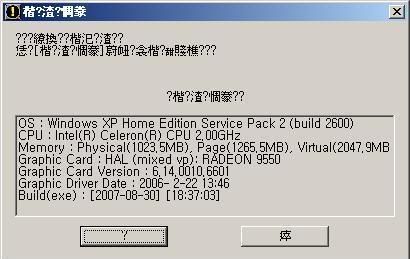
heya. im helping my brother in installing silkroad online. he managed to install the game perfectly but after clicking the start button this error always shows up:

Image

we already updated his video card driver but the error is still there.

his pc's specs are:

win xp home edition service pack 2 build 2600
CPU : Intel(R) Celeron(R) CPU 2.00GHz
Memory : Physical(1023.5MB), Page(1265.5MB), Virtual(2047.9MB)
Graphic Card : HAL (mixed vp): ATI Radeon 9550 / X1050 Series
Graphic Card Version : 6.14.0010.6715
Graphic Driver Date : 2007- 7-28 13:30
Build(exe) : [2007-08-30] [18:37:03]

are there any other alternatives in solving this problem? thanks in advance! :)

Posted: Thu Oct 25, 2007 2:58 pm
by mahumps
matsjc wrote:heya. im helping my brother in installing silkroad online. he managed to install the game perfectly but after clicking the start button this error always shows up:

Image

we already updated his video card driver but the error is still there.

his pc's specs are:

win xp home edition service pack 2 build 2600
CPU : Intel(R) Celeron(R) CPU 2.00GHz
Memory : Physical(1023.5MB), Page(1265.5MB), Virtual(2047.9MB)
Graphic Card : HAL (mixed vp): ATI Radeon 9550 / X1050 Series
Graphic Card Version : 6.14.0010.6715
Graphic Driver Date : 2007- 7-28 13:30
Build(exe) : [2007-08-30] [18:37:03]

are there any other alternatives in solving this problem? thanks in advance! :)


i'm not so sure about this but i guess u need to download the latest version of ur driver..

Posted: Thu Oct 25, 2007 9:43 pm
by Casey613
Why isn't this thread a sticky? I mean, it's not only REALLY complete and awesome but it also would prevent from spam from people unaware of such thing called "search engine"

Posted: Thu Oct 25, 2007 10:01 pm
by Shadowman20818
Casey613 wrote:Why isn't this thread a sticky? I mean, it's not only REALLY complete and awesome but it also would prevent from spam from people unaware of such thing called "search engine"

Because it's in the Guides sticky here.

Posted: Thu Nov 01, 2007 3:46 am
by Manhor
mahumps wrote:
matsjc wrote:heya. im helping my brother in installing silkroad online. he managed to install the game perfectly but after clicking the start button this error always shows up:

Image

we already updated his video card driver but the error is still there.

his pc's specs are:

win xp home edition service pack 2 build 2600
CPU : Intel(R) Celeron(R) CPU 2.00GHz
Memory : Physical(1023.5MB), Page(1265.5MB), Virtual(2047.9MB)
Graphic Card : HAL (mixed vp): ATI Radeon 9550 / X1050 Series
Graphic Card Version : 6.14.0010.6715
Graphic Driver Date : 2007- 7-28 13:30
Build(exe) : [2007-08-30] [18:37:03]

are there any other alternatives in solving this problem? thanks in advance! :)


i'm not so sure about this but i guess u need to download the latest version of ur driver..


i have this problem too. i already downloaded the newset driver form nvidia, but i still get this error.

Posted: Thu Nov 01, 2007 8:49 pm
by Pericles
Nice Guide helps a lot


NEED A STICK!

Posted: Fri Nov 02, 2007 12:41 am
by San
for #6, also check your PSU, this is what caused my computer to reboot, as it was loose and it ended up corrupting my harddisks

wow

Posted: Sat Nov 03, 2007 6:17 pm
by i_ml_ll2d3r_stob
this guide rox thnx dragon and thnx guy who posted this, butt my problem is not one of these, or at least it does not seem to be, my thread is in this board if some one would like to check it out.

Posted: Mon Nov 05, 2007 1:58 am
by prod1gy
i have problem #7
what should i do to fix it. i have been playing sro for months and this is the first time this came up.

Re: Solutions to 7 common errors (By: dragonlord76)

Posted: Sun Mar 30, 2008 11:15 am
by mergyte537
what doing if get more DC ? whent to connect to game and in game was only 5 min and DC ;(

Re: Solutions to 7 common errors (By: dragonlord76)

Posted: Sun Mar 30, 2008 2:28 pm
by cpinney
stickyed it shall be :) very nice :)

Re: Solutions to 7 common errors (By: dragonlord76)

Posted: Fri May 02, 2008 8:01 pm
by InsertName
damn i'm using a dell laptop FireGL v3100 graphic card keep getting error3 when trying to start my sromu but no problems when playing csro or isro

any suggestions? i already updated my graphic drivers

is there a way to change the graphic card on my laptop?

Re: Solutions to 7 common errors (By: dragonlord76)

Posted: Wed May 21, 2008 2:00 pm
by XMoshe
I like it how the pic for solution on #7 isnt working for me, and that is just the one I keep on getting >.<

Re: Solutions to 7 common errors (By: dragonlord76)

Posted: Mon May 26, 2008 2:50 pm
by Pondus
WOW NICE!!! my friend almost get his pc rebooted every time he runns silk but turning of auto-reboot will hopefully help :D :D

thx

Re: Solutions to 7 common errors (By: dragonlord76)

Posted: Sat Jun 28, 2008 2:52 pm
by xxxtatertotxxx
how do u get to the regional and language options?

Re:

Posted: Sat Jun 28, 2008 11:14 pm
by CloudThe2H
Manhor wrote:
mahumps wrote:
matsjc wrote:heya. im helping my brother in installing silkroad online. he managed to install the game perfectly but after clicking the start button this error always shows up:

Image

we already updated his video card driver but the error is still there.

his pc's specs are:

win xp home edition service pack 2 build 2600
CPU : Intel(R) Celeron(R) CPU 2.00GHz
Memory : Physical(1023.5MB), Page(1265.5MB), Virtual(2047.9MB)
Graphic Card : HAL (mixed vp): ATI Radeon 9550 / X1050 Series
Graphic Card Version : 6.14.0010.6715
Graphic Driver Date : 2007- 7-28 13:30
Build(exe) : [2007-08-30] [18:37:03]

are there any other alternatives in solving this problem? thanks in advance! :)


i'm not so sure about this but i guess u need to download the latest version of ur driver..


i have this problem too. i already downloaded the newset driver form nvidia, but i still get this error.


Its because you don't have enough ram, like let say your in hotan and theres a lot of people and you have 1gb ram and it requires 1.5gb ram. Or something like that I think, I get it sometimes too

Re: Solutions to 7 common errors (By: dragonlord76)

Posted: Sun Aug 10, 2008 1:04 am
by jordyap
for solution 2, how do i know which graphics card i am meant to get?? i got the NVIDIA....but sometimes i still get the question mark error? PLZ HELP!!!!!!
:x :x :banghead: :banghead: :banghead: :banghead: :banghead: :banghead:

Re: Solutions to 7 common errors (By: dragonlord76)

Posted: Fri Mar 20, 2009 11:52 pm
by Leepeg
I have error two and i added the line to the text and everything.... but it still doesn't work. I have played SRO on this comp b4 so i have no idea whats wrong. Anymore more ideas would be awesome and thanks.

Re: Solutions to 7 common errors (By: dragonlord76)

Posted: Sat Mar 21, 2009 10:00 pm
by lookanapple
Well, help...i have vista and problem 7, it keeps closing on the login screen.
if i leave it there its fine, but if i touch the keyboard, like press a button, it closes and says, sro_client not working, looking for a solution, and then it always closes. I dunno how to fix it and ya..help :P :banghead: :banghead: :banghead: :banghead: :banghead:

Re: Solutions to 7 common errors (By: dragonlord76)

Posted: Sat Jun 06, 2009 10:00 pm
by irishmulletm
can you do one on the C++ error?

Re: Solutions to 7 common errors (By: dragonlord76)

Posted: Fri Jan 01, 2010 2:30 pm
by HammerAmer
im getting error #7

Re: Solutions to 7 common errors (By: dragonlord76)

Posted: Mon Jul 12, 2010 12:33 pm
by Timujin
can you help me please? I have a simple error, a directx problem, when I try to start sro it tells me that I have an old version, so I went to google it, and couldn't find at least one single free download, they all require to send a mobile text message, Im getting anoyed with it, do you have a free download link to at least v 9.0c? thx for the help.