Page 1 of 1
Help me...... i just need help(a very rare problem)
Posted: Sun Mar 25, 2007 7:23 pm
by xpro0078

can someone tell what is that and how i solve it?
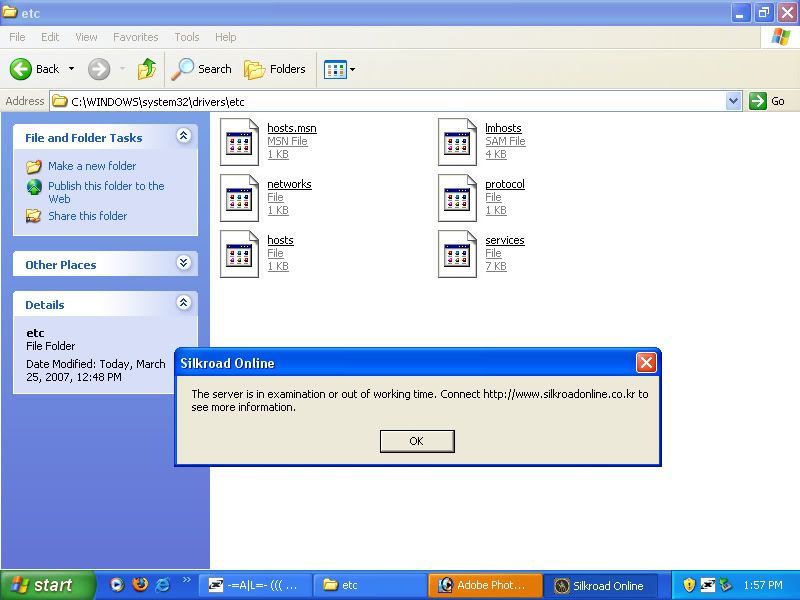
Re: Help me...... i just need help(a very rare problem)
Posted: Wed Mar 28, 2007 2:03 pm
by olaf13
xpro0078 wrote::cry: can someone tell what is that and how i solve it?
It means that the servers are going under inspexion or somthing =.='' (Read what it says)
Posted: Wed Mar 28, 2007 4:19 pm
by Fracture
olaf13 wrote:It means that the servers are going under inspexion or somthing =.='' (Read what it says)
If you also paid a little closer attention, he gets it when the servers are
not undergoing server inspection, thus it is an error.
Sunday March 25th @ 1357, there was no server inspection.
Posted: Wed Mar 28, 2007 4:20 pm
by xzaz
What version are you running of Sro?
Posted: Wed Mar 28, 2007 4:26 pm
by Fracture
xzaz wrote:What version are you running of Sro?
Also, why are you navigated to your hosts file, because last I checked, the only way to circumvent Gameguard was to edit your localhost 127.0.0.1 line to point to a seperate IP in order to manipulate the Gameguard update process into thinking it was accessing a proper server.
Posted: Wed Mar 28, 2007 4:35 pm
by xzaz
Prob was trying to edit his hostfile because of the -undergoing inspections....- error. There was a "solution" to this. Thats was the editing host file:
Open HOSTS File with notepad C\WINDOWS\system32\drivers\etc\hosts
Delete everything and change it to
127.0.0.1 localhost
121.128.133.26 gwgt1.joymax.com
121.128.133.26 gwgt1.joymax.co.kr
64.152.34.142 joymaxnpro.nefficient.com
It hasnt even workt at all i quess.
Posted: Thu Mar 29, 2007 8:23 pm
by xpro0078
i solved it thx for the host that was the problem... thx a lot
Posted: Thu Mar 29, 2007 9:37 pm
by Fracture
xzaz wrote:Prob was trying to edit his hostfile because of the -undergoing inspections....- error. There was a "solution" to this. Thats was the editing host file:
Open HOSTS File with notepad C\WINDOWS\system32\drivers\etc\hosts
Delete everything and change it to
127.0.0.1 localhost
121.128.133.26 gwgt1.joymax.com
121.128.133.26 gwgt1.joymax.co.kr
64.152.34.142 joymaxnpro.nefficient.com
It hasnt even workt at all i quess.
Lol, he didn't even try that, so I doubt he was in the hosts file to fix his problem.