Page 1 of 2
Vista RC2 Directx issue
Posted: Sun Oct 08, 2006 9:03 pm
by treefigners
Installed vista this weekend, but although I've got everything else working, this damn game just won't let me win. If I install it and run it, it asks for Directx 9.0b or higher... vista has directx 10:

If I try and run it in compatibility mode for XP, the game starts, gets to the point where it would change resolutions and actually enter the game, and then ALL HELL BREAKS LOOSE:
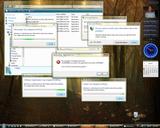
This game manages to shut down every program running on my computer. Thats impressive.
I know there probably aren't going to be many people with vista, but if you're out there and find some kind of fix, help will be appreciated! Also, if I find one, I'll post it here as well.
//begin vista-haters
Posted: Mon Oct 09, 2006 8:33 am
by liukanng
I hav the exact same problem it's SERIOUSLY pissing me off
So far the closest i've gotten to running it was
Title Screen>Game Guard>Splash Screen> then BSOD
It seems the problem is Gameguard I used a hacked version of
the client and it gets to the login page. I can't log in of course
since gameguard isn't there but I'm pretty sure that's what the problem
is. I'm not gonna mention the hack I used btw.
So basically running just silkroad.exe in compatibility mode
crashes all the programs. Running silkroad.exe AND sroclient
in compat mode will give you everything up to the splash screen
followed by the blue screen of death.
Updating vid drivers didn't help : (
Since I think gameguard is the problem and the only way to
bypass gameguard isn't working I think i'm stuck
Hopefully some pro will post here and help
EDIT: I have the solution, it's a modified exe file of the launcher which disables the directx error. If you run the modified exe and silkroad without any compatibility settings at all (don't check run in compatibility mode) then it will work. Oh yea and keep Windows Vista's video drivers, using the ATi ones gave me the blue screen.
Happy Gaming
 <<EDIT: Link Removed -EllisD>>
am i allowed to post the link? It's connected to some.. questionable
programs but the modified exe only fixes the directx error it doesn't
bypass gameguard.
Posted: Tue Oct 10, 2006 2:31 am
by treefigners
Man, YOU ROCK!
Got into the game, and it ran perfectly. Thanks a million, and I'm about to post replies all over the forums I've been posting to with a link to this thread, you're going to be thanked by quite a few people!!!
Posted: Tue Oct 10, 2006 2:41 am
by Chaud
Thats a bot site. Also that method will get your accnt banned soon. Just be happy with XP for now lol...
Posted: Tue Oct 10, 2006 6:51 am
by liukanng
chaud: yea it's a bot site but the only thing the modified exe does is disable the directx check on the splash/news screen thing, gameguard still runs and sroclient isn't modified
treefigners: it runs perfectly for u? lucky i get lag spikes -.- but it works
Posted: Tue Oct 10, 2006 1:10 pm
by Chaud
liukanng wrote:chaud: yea it's a bot site but the only thing the modified exe does is disable the directx check on the splash/news screen thing, gameguard still runs and sroclient isn't modified
SoftMod Public
SoftMod is part of a private framework developed by 0x33 to reverse Silkroad.
We are making parts of SoftMod publicly available.
Current public features are limited to:
- Disabling GameGuard
- Zoomhack
- Multiclient
Posted: Tue Oct 10, 2006 1:32 pm
by PR0METHEUS
I've been having the same issues on Vista RC1. I installed Silkroad, updated it, then when I tried to run it, I got to the launcher screen and hit the "start" button. It errored out about DX9.5 or higher. When I ran the game in XP compatibility mode, I don't think I even got the launcher screen. Vista BSOD'd and instantly rebooted.
I don't suppose there's a way to install DX 9.5 on Vista is there? Either along with DX 10 or replacing it? I suppose that might cause problems with Aero.
Posted: Wed Oct 11, 2006 1:29 am
by liukanng
chaud wrote:liukanng wrote:chaud: yea it's a bot site but the only thing the modified exe does is disable the directx check on the splash/news screen thing, gameguard still runs and sroclient isn't modified
SoftMod Public
SoftMod is part of a private framework developed by 0x33 to reverse Silkroad.
We are making parts of SoftMod publicly available.
Current public features are limited to:
- Disabling GameGuard
- Zoomhack
- Multiclient
Yes, I understand that but that is not what he is downloading. If you actually ran the program like he did in Vista then you'd see that gameguard does run, SOFTMOD is an entirely different program. Please take a little more time to research if you don't believe me. I know the main assumption is that it'd be bad if it was linked to them but believe me, all it does is fix the DirectX issue.
Prometheus, try the file I linked in my post above, it should fix the DirectX issue.
Posted: Wed Oct 11, 2006 2:37 am
by Chaud
liukanng wrote:Yes, I understand that but that is not what he is downloading. If you actually ran the program like he did in Vista then you'd see that gameguard does run, SOFTMOD is an entirely different program. Please take a little more time to research if you don't believe me. I know the main assumption is that it'd be bad if it was linked to them but believe me, all it does is fix the DirectX issue.
Prometheus, try the file I linked in my post above, it should fix the DirectX issue.
Is that a modified client or something? Because AFAIK they only had softmod for d/l...
Posted: Wed Oct 11, 2006 4:03 am
by liukanng
Someone in the forums had the same problem of us and someone posted that fix. There's no link to it anywhere on the site, only in the forums.
Posted: Wed Oct 11, 2006 4:06 am
by treefigners
The file liukanng posted is a modified Silkroad.exe; the ONLY thing modified is the directx check has been removed. Gameguard, sroclient.exe are both UNCHANGED, which is what you actually connect to the game with anyways. Silkroad.exe, as far as I can tell, is only for updates/compatibility tests.
Vista Icon
Posted: Wed Oct 11, 2006 5:26 am
by treefigners
Hey- thought I'd throw in my custom Vista icon, with high quality png goodness!! Looks great in the Games folder!
Credits go to whoever created the original art, all I did was convert it to the new scalable .ico

 http://www.filefactory.com/file/5d9b8e/
Sorry for my lack of webhosting, my servers have been down for a while

Posted: Wed Oct 11, 2006 6:49 am
by liukanng
AWESOME
i was looking for a nice icon for sro earlier this week

thnx
btw how'd u get silkroad to show up in the game folder?
cuz i didn't really install it i kinda transferred it from my window xp program files folder to vista lol
Posted: Wed Oct 11, 2006 2:45 pm
by treefigners
I just drag 'n dropped the shortcut into the games window.
Posted: Wed Oct 11, 2006 5:38 pm
by desolator144
chaud wrote:Thats a bot site. Also that method will get your accnt banned soon. Just be happy with XP for now lol...
If it's a hacked exe for SRO from a botting site, then he's either going to be banned OR get his account stolen
Putting a keylogger inside an SRO exe is super easy because everyone lets it through the firewall to connect to the internet so they can transmit the name and password you put in anywhere. Btw I'm a programmer so trust me when I say there's like 101 super-easy ways for them to detect that you're not using the real one.
As for Vista, everyone in my IT department at my college agrees that nobody should ever upgrade to a new version of Windows until the first service pack comes out for it. Before then it's just a barely useable buggy piece of crap that will drive you nuts. Plus Vista takes so much resources doing its stupid useless background crap that it's just not something you want to put on your computer ever really. Plus, if every gamer boycotts Vista, the Vista only Halo 2 for PC that's coming out will be released for XP when they realize nobody's buying it.
Posted: Wed Oct 11, 2006 7:01 pm
by treefigners
desolator144 wrote:chaud wrote:Thats a bot site. Also that method will get your accnt banned soon. Just be happy with XP for now lol...
If it's a hacked exe for SRO from a botting site, then he's either going to be banned OR get his account stolen
Putting a keylogger inside an SRO exe is super easy because everyone lets it through the firewall to connect to the internet so they can transmit the name and password you put in anywhere. Btw I'm a programmer so trust me when I say there's like 101 super-easy ways for them to detect that you're not using the real one.
As for Vista, everyone in my IT department at my college agrees that nobody should ever upgrade to a new version of Windows until the first service pack comes out for it. Before then it's just a barely useable buggy piece of crap that will drive you nuts. Plus Vista takes so much resources doing its stupid useless background crap that it's just not something you want to put on your computer ever really. Plus, if every gamer boycotts Vista, the Vista only Halo 2 for PC that's coming out will be released for XP when they realize nobody's buying it.
Like i said in my
first post, begin vista haters....
//enjoying my RC2 just fine, thank you. Works wonderfully.
Posted: Thu Oct 12, 2006 1:57 am
by liukanng
desolator144 wrote:chaud wrote:Thats a bot site. Also that method will get your accnt banned soon. Just be happy with XP for now lol...
If it's a hacked exe for SRO from a botting site, then he's either going to be banned OR get his account stolen
Putting a keylogger inside an SRO exe is super easy because everyone lets it through the firewall to connect to the internet so they can transmit the name and password you put in anywhere. Btw I'm a programmer so trust me when I say there's like 101 super-easy ways for them to detect that you're not using the real one.
As for Vista, everyone in my IT department at my college agrees that nobody should ever upgrade to a new version of Windows until the first service pack comes out for it. Before then it's just a barely useable buggy piece of crap that will drive you nuts. Plus Vista takes so much resources doing its stupid useless background crap that it's just not something you want to put on your computer ever really. Plus, if every gamer boycotts Vista, the Vista only Halo 2 for PC that's coming out will be released for XP when they realize nobody's buying it.
oi im tired of explaning
i'm just happy that i can use vista and play silkroad
as for getting my account stolen, i'll take my chances
it isn't too buggy, all of the errors i've had were from compatibility issues with silkroad.
can't knock it till you've tried it
Posted: Tue Oct 17, 2006 10:50 pm
by PR0METHEUS
liukanng wrote:Prometheus, try the file I linked in my post above, it should fix the DirectX issue.
No offense, but I tend to be very suspicious of files that have been modified like that. Maybe if I can find a way to modify it myself, or find another work around. I'll stay far away from that file.
Working in IT security makes me suspicious
Posted: Sun Oct 22, 2006 2:48 pm
by treefigners
PR0METHEUS wrote:liukanng wrote:Prometheus, try the file I linked in my post above, it should fix the DirectX issue.
No offense, but I tend to be very suspicious of files that have been modified like that. Maybe if I can find a way to modify it myself, or find another work around. I'll stay far away from that file.
Working in IT security makes me suspicious
I would like to point out that it's been 13 days since liukanng posted this exe and I have been using sro since, with no problems. I have quite a bit of expensive stuff in my inventory as well, full 6th degree sos protector set, and a 42+5 sos bow. I think if someone was trying to hack my account they would've done so by now. But then again, suit yourself, better safe than sorry, blah blah blah.
Posted: Sun Oct 22, 2006 6:56 pm
by PR0METHEUS
Well perhaps one of these days I'll create a new account to test this with. It would be interesting to see the game work in Vista and see if there are any differences in performance. Then again, I haven't even booted into Vista in a few weeks.
cannot use on vista still
Posted: Tue Oct 24, 2006 5:10 pm
by littleneutrino
i have yet to get the vista (mod/hack) to work and now that there was an update and the file has changed. is there a way that you can rehack or tell me how you edited the file thank you please send me a PM with you message.
Posted: Tue Oct 31, 2006 4:35 pm
by robotdevil
I don't get direct x issues, but I do get a win32k.sys file crash after GameGuard launches. I can't even get to the splash screen. Anyone else having this same problem? I've tried everything, running in compatability mode, non-compatibility mode, RC1, RC2 and everything gives me the exact same error.
If anyone has a fix for this I'd greatly appreciate it. Preferably a fix that doesn't involve getting my account banned, but I'm getting less picky every day....
Posted: Tue Oct 31, 2006 4:48 pm
by robotdevil
WOOT! Yes, that's right the problem has been solved!! Here's what I did to solve my problem (mind you this has been taking place over the last week):
1. Locate Vista capable drivers for your video card (they suck but it'll allow for higher compatability).
2. If you have a laptop you will need to modify the INF file to see your chip (not an easy prospect and may cause you to reload windows SEVERAL times).
3. After silkroad is installed delete the contents of the GameGuard folder (I left the forlder intact but that may not be necessary).
4. Set SRO_CLIENT.EXE to run in administrative mode.
5. Run Silkroad.exe and hope for the best.
It took me several days and scouring many different forums to find these steps, but I place them here in one place for your convenience. I hope this process works for all of you that are "testing" Windows Vista right now.
As a final note I would like to point out that at the time I got this running I am using RC2 build 5744 and that may play a role in my success.
Good luck
Posted: Tue Oct 31, 2006 5:04 pm
by Key-J
°drools° Dude vista looks so zexy
Posted: Tue Oct 31, 2006 5:37 pm
by PR0METHEUS
Key-J wrote:°drools° Dude vista looks so zexy
Yeah I agree it does, but aren't a lot of Vista's features ripped off from OS X?
Posted: Thu Nov 02, 2006 3:52 pm
by carajean
robotdevil wrote:I don't get direct x issues, but I do get a win32k.sys file crash after GameGuard launches. I can't even get to the splash screen. Anyone else having this same problem? I've tried everything, running in compatability mode, non-compatibility mode, RC1, RC2 and everything gives me the exact same error.
If anyone has a fix for this I'd greatly appreciate it. Preferably a fix that doesn't involve getting my account banned, but I'm getting less picky every day....
I am having the same problem. I would really like to play this game becuase people are giving it great reviews. Has anyone solved this win32k.sys problem. Im gonna try reinstalling.
Posted: Thu Nov 02, 2006 4:31 pm
by carajean
Reinstalling didnt help same error. I guess I just can play this game

this makes me sad.
Posted: Fri Nov 03, 2006 1:31 am
by robotdevil
If you read my 2nd post I did find a fix for the win32k.sys error. I'm not gonna repost it, but scroll up a couple of lines and you'll see it.
Good luck
Posted: Sat Nov 04, 2006 1:40 am
by carajean
yeah i followed that one and it didnt work.
Posted: Sat Nov 04, 2006 8:11 pm
by carajean
Ok i got the newest vista drivers from ati. installed. i did a regcleaner. and still i cant play silkroad. Im lost

