[Guide] Wireless Connection Fix
Posted: Sun Oct 18, 2009 7:22 pm
This is a guide for those of you who are having frequent Disconnects/Reconnects while playing Silkroad on a Wireless Connection.
The likely cause of these disconnections would be "Wireless Zero Configuration" which is standard in Windows XP. Sometimes this service restarts the connection for no apparent reason.
The easiest fix for this problem is to Disable Wireless Zero Configuration.
Here's How:
Step 1:
Open up Control Panel, and go into Performance and maintenance.

Step 2:
Open up Administrative Tools.

Step 3:
Open Services
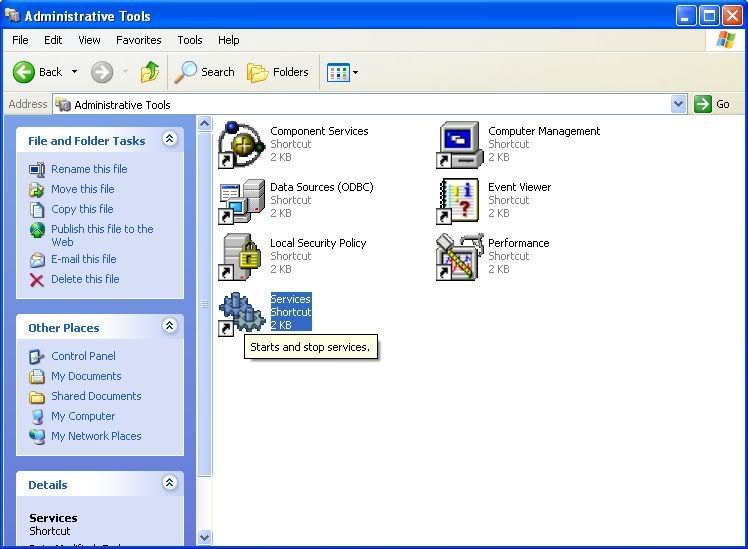
Step 4:
Scroll to the bottom of the list where there should be a Service named Wireless Zero Configuration. Right click on it, and click Stop.
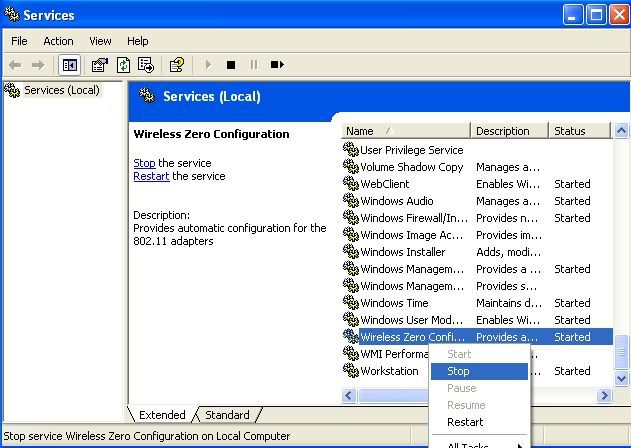
Wireless Zero Configuration should now be disabled, and your wireless connection should stop Restarting. Wireless Zero Configuration will be Enabled every time you restart your computer, so you will have to disable it again. If disabling Wireless Zero Configuration causes any problems just re-enable it and your connection should be back to usual.
If you are having other problems with your wireless connection, try to install the latest drivers from your OEM's website. If that doesn't help, I suggest you seek further help from a professional.
- If you are having a problem with losing your internet access after leaving your computer inactive for a period of time, even though you are still connected to your modem. Try disabling the Power Save function on your Wireless Adapter. This option should be found somewhere in the Network Adapter Properties under the Advanced Tab.
I hope someone found this guide helpful, if you have any problems or are misunderstanding something please post here or send me a message and I'll try my best to help.
Thanks.
The likely cause of these disconnections would be "Wireless Zero Configuration" which is standard in Windows XP. Sometimes this service restarts the connection for no apparent reason.
The easiest fix for this problem is to Disable Wireless Zero Configuration.
Here's How:
Step 1:
Open up Control Panel, and go into Performance and maintenance.
Step 2:
Open up Administrative Tools.
Step 3:
Open Services
Step 4:
Scroll to the bottom of the list where there should be a Service named Wireless Zero Configuration. Right click on it, and click Stop.
Wireless Zero Configuration should now be disabled, and your wireless connection should stop Restarting. Wireless Zero Configuration will be Enabled every time you restart your computer, so you will have to disable it again. If disabling Wireless Zero Configuration causes any problems just re-enable it and your connection should be back to usual.
If you are having other problems with your wireless connection, try to install the latest drivers from your OEM's website. If that doesn't help, I suggest you seek further help from a professional.
- If you are having a problem with losing your internet access after leaving your computer inactive for a period of time, even though you are still connected to your modem. Try disabling the Power Save function on your Wireless Adapter. This option should be found somewhere in the Network Adapter Properties under the Advanced Tab.
I hope someone found this guide helpful, if you have any problems or are misunderstanding something please post here or send me a message and I'll try my best to help.
Thanks.


