Server is undergoing inspection or updates [RESOLVE]

If your having problems installing or playing Silkroad Online, please post here. Includes general computer health and technical problems.
User avatar
UkRaiNeR
Common Member
Posts: 106
Joined: Fri Apr 06, 2007 10:54 pm
Quick Reply: Yes
Location: Persia (Server) / US
Contact:

Post by UkRaiNeR »

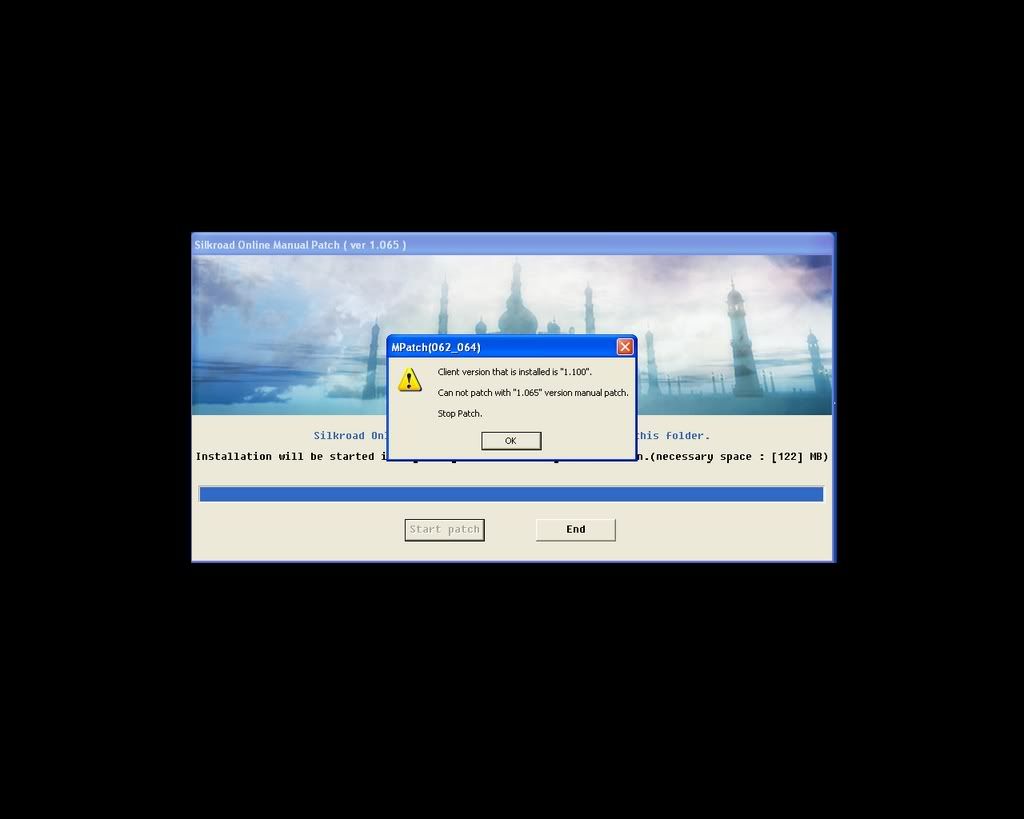
>_< here prof

Image

Image

Image

ehhh >_<!!!

gvidzz
Hi, I'm New Here
Posts: 2
Joined: Tue Jul 03, 2007 7:23 am

Post by gvidzz »

Image

Plz help i dont know what to do....

pandemonaeon
Common Member
Posts: 150
Joined: Wed Sep 27, 2006 3:31 am

Post by pandemonaeon »

dammit now silk wont open wtf
This is the theme to a better Armageddon
Nightchords rake the heavens
PANDAEMONAEAON

User avatar
flexo
Active Member
Posts: 861
Joined: Thu Jun 15, 2006 10:49 pm
Quick Reply: Yes
Location: Rome

Post by flexo »

gvidzz wrote:Plz help i dont know what to do....


this is not a patch for the current version if you can already use your client.
This is to fix a update-bug in the current client-download at the site. By the looks of your picture you already have the lastest client and fully updated so it should work already.

<<This forum went all down the drain. It's such a waste. I'm no longer proud to be a member here so bye>>

User avatar
jabbers
Loyal Member
Posts: 1674
Joined: Tue Mar 21, 2006 12:15 am
Quick Reply: Yes
Location: la revolucion

Post by jabbers »

UkRaiNeR wrote:>_< here prof

Image


ehhh >_<!!!


thtas weird i am trying to install and run the client on my laptop , it is working perfectly on my PC but when i try to connect after install it on the laptop i get that message but it says contact silkroad.co.kr instead of .net I know I didnt D/L the korean client I got it of filefront from the main site silkroadonline.net ....but that's odd I'm getting that message. I've tried all the previous fixes mentioned here, I use to run SRO on the laptop but never had this problem before?? any solution?
Image

Tethula
Hi, I'm New Here
Posts: 1
Joined: Sat Jul 07, 2007 6:33 pm

Post by Tethula »

The main issue is going to be firewalls.

It took me a while and a good google search to find the ports that needed to be opened.

15779
15881
15883

All three are TCP ports and needed to be opened or you will get the "The server is undergoing inspection....blah blah blah"

I opened these ports and refired up SRO and it worked fine.

My problem is that all the servers are crowded and will not let me join them......

Anyone know anything about this let me know.

~Tethula

User avatar
Joku
Casual Member
Posts: 91
Joined: Wed Aug 02, 2006 4:43 pm
Quick Reply: Yes
Location: Tibet

Post by Joku »

Doesn't work.
Image


My first sig. Not the best hehehe.

User avatar
redsnipe3
Common Member
Posts: 133
Joined: Sun May 06, 2007 2:02 am
Quick Reply: Yes
Location: Sparta

Post by redsnipe3 »

I got an error when i tried to save it it says

Cannot create the C:Windows\System32\drivers\etc\hosts file.

make sure that the path and filename are correct.

They are
Firefly_ro said
dear banned user,trading accounts is ilegal plus,dead people do not buy silk so we don't give a shit about him.have fun


Image

User avatar
BoomHeadshot
New Member
Posts: 44
Joined: Thu May 03, 2007 4:37 pm
Quick Reply: Yes
Location: Titan

Post by BoomHeadshot »

omfg i do all u say in ur post and still dont work..
Guild : F_UNIT
Server : Now on Titan <
Build : PURE ÄSSHOLE

User avatar
BoomHeadshot
New Member
Posts: 44
Joined: Thu May 03, 2007 4:37 pm
Quick Reply: Yes
Location: Titan

Post by BoomHeadshot »

ARGHHHHHHHHHHHHHHHHHHHHHHH HELP ME!!!
Guild : F_UNIT
Server : Now on Titan <
Build : PURE ÄSSHOLE

User avatar
Manhor
Valued Member
Posts: 448
Joined: Mon Mar 19, 2007 6:10 am
Quick Reply: Yes
Location: Uranus

Post by Manhor »

omgsh thnx alot :love:

deadcrapSB
Casual Member
Posts: 52
Joined: Sat Jul 21, 2007 8:08 pm

Post by deadcrapSB »

didnt fix it, reinstaleld about 4 tikmes now :x :x :x :x :x :x

QuickSandSlowly
New Member
Posts: 27
Joined: Sat Jul 21, 2007 6:18 pm

Post by QuickSandSlowly »

I have the same problem and the solution you provided does not help at all, however i am able to access the SRO website a proxy but not without one, is it possible that we are IP banned as a mistake?

User avatar
dikkuh
Hi, I'm New Here
Posts: 12
Joined: Wed Jul 11, 2007 7:17 pm
Quick Reply: Yes
Location: Venice

Post by dikkuh »

stupid silkroad :x :banghead: i hate silkroad (srry) i tryd like 2 wheeks in a row to get silkroad working and its still not working iam so pisst, JOYMAX if u read this publish a good working version of silkroad

my avatar: PISST LIKE HELL!!
(srry for my languidge)

User avatar
Ignent
New Member
Posts: 40
Joined: Sat Jun 16, 2007 4:04 pm
Quick Reply: Yes
Location: Aege

Post by Ignent »

I got an error when i tried to save it it says

Cannot create the C:Windows\System32\drivers\etc\hosts file.

make sure that the path and filename are correct.

They are

I get the same thing.
Image
Image

User avatar
Puma60
Advanced Member
Posts: 2241
Joined: Sat Apr 28, 2007 7:46 pm
Quick Reply: Yes
Location: The parents basement

Post by Puma60 »

Is anyone still having this problem? Ive tried everything....still cant get on :banghead:

Is it a bug or something?
Image

Retired from SRO

User avatar
Puma60
Advanced Member
Posts: 2241
Joined: Sat Apr 28, 2007 7:46 pm
Quick Reply: Yes
Location: The parents basement

Post by Puma60 »

UkRaiNeR wrote:>_< here prof

Image

Image

Image

ehhh >_<!!!


Thats exactly whats been happening to me :?
Image

Retired from SRO

User avatar
nicholastyc
Casual Member
Posts: 68
Joined: Sun Aug 12, 2007 5:14 pm
Quick Reply: Yes
Location: UK

Post by nicholastyc »

i did everything since friday night...i think mayb we are all from uk, kingston telecommunication?
its still does not work...
can somebody pls help... its same like the topic issue.

Sliver69
Casual Member
Posts: 61
Joined: Sun Dec 03, 2006 6:42 pm
Quick Reply: Yes
Location: Sparta

Post by Sliver69 »

sro dont work for me today :/ "extra inspection" i changed host
<<banned from SRF for the sale of digital items for cash. -SG>>

Darkpoet
Hi, I'm New Here
Posts: 7
Joined: Sat Jun 02, 2007 11:36 am
Quick Reply: Yes
Location: Lincoln, England

UK !!!!!

Post by Darkpoet »

Nic

I live and work in Lincoln, at work we are now Kingston Comms, at home I am NTL/Virgin Media SRO for the last 4 or 5 days has not worked at work yet at home it is fine !!!!! you may have something there !

I am on the Pesia server

Look for Darkpoet or Gandalf if you are also on

kind regards

DP

User avatar
nicholastyc
Casual Member
Posts: 68
Joined: Sun Aug 12, 2007 5:14 pm
Quick Reply: Yes
Location: UK

Post by nicholastyc »

yes... i guess it is the broandband services that causing the problem now.
dunno how to solve it. may b i cant play SRO anymore. =(

User avatar
nicholastyc
Casual Member
Posts: 68
Joined: Sun Aug 12, 2007 5:14 pm
Quick Reply: Yes
Location: UK

Post by nicholastyc »

yes... i guess it is the broandband services that causing the problem now.
dunno how to solve it. may b i cant play SRO anymore. =(

User avatar
Puma60
Advanced Member
Posts: 2241
Joined: Sat Apr 28, 2007 7:46 pm
Quick Reply: Yes
Location: The parents basement

Post by Puma60 »

nicholastyc wrote:i did everything since friday night...i think mayb we are all from uk, kingston telecommunication?
its still does not work...
can somebody pls help... its same like the topic issue.


Hmm....yeah, im on KC too, ive been having that problem for 4 or 5 days now..
Image

Retired from SRO

User avatar
Puma60
Advanced Member
Posts: 2241
Joined: Sat Apr 28, 2007 7:46 pm
Quick Reply: Yes
Location: The parents basement

Post by Puma60 »

Is there any way of changing the BroadBand settings to allow SRO?
Image

Retired from SRO

User avatar
Puma60
Advanced Member
Posts: 2241
Joined: Sat Apr 28, 2007 7:46 pm
Quick Reply: Yes
Location: The parents basement

Post by Puma60 »

ok, im gonna email them to try find out whats going on....il let you guys know if i get any news.. :)
Image

Retired from SRO

User avatar
Puma60
Advanced Member
Posts: 2241
Joined: Sat Apr 28, 2007 7:46 pm
Quick Reply: Yes
Location: The parents basement

Post by Puma60 »

Dear Customer,

Many thanks for your email to us.

Our customers are experiencing intermittent web-site connectivity issues
at present. This is due to a hardware failure on a complex piece of
equipment. Replacement equipment is being sourced with our supplier
Cisco and a plan of work is in place to implement this as soon as the
equipment arrives.

There are web-sites that are not affected by this problem and you should
be able to view some sites.

Let me take the time to apologise to you for any inconvenience this has
caused. Please rest assured that we are treating this issue with the
utmost urgency.

To receive any further updates please visit the Karoo status page
http://support.karoo.co.uk/cgi-bin/status.pl or call our automated
service status line on 01482 602197. Calls to the service status line
are free from your Kingston Communications telephone line.

Regards,

Internet Helpdesk

Image

Retired from SRO

User avatar
nicholastyc
Casual Member
Posts: 68
Joined: Sun Aug 12, 2007 5:14 pm
Quick Reply: Yes
Location: UK

Post by nicholastyc »

thankyou puma. i hope the issue is solved as soon as possible. now already 10.50pm... KC come on..fix it..

User avatar
nicholastyc
Casual Member
Posts: 68
Joined: Sun Aug 12, 2007 5:14 pm
Quick Reply: Yes
Location: UK

Post by nicholastyc »

thankyou puma. i hope the issue is solved as soon as possible. now already 10.50pm... KC come on..fix it..

User avatar
punkdeejay
Casual Member
Posts: 95
Joined: Mon Jul 02, 2007 4:46 pm
Quick Reply: Yes
Location: Zeus

Post by punkdeejay »

hell no.. i`ve allready formated the computer..ALL.... and first.. i can`t display the silkroad official webpage ...2nd .....SERVER IS UNDER INSPECTION... :|.....is 1 am....what the hell?.... :(....please help me.. others say that can play silk... can u help me?.... :cry: :cry:

User avatar
nicholastyc
Casual Member
Posts: 68
Joined: Sun Aug 12, 2007 5:14 pm
Quick Reply: Yes
Location: UK

Post by nicholastyc »

hi punkdeejay, do u live in UK?
is it Kingston Communication is your internet provider?
if yes...then it should not be your pc problem.
now KC network is under faulty status.
pls refer to Puma threads.
lets wait... it should be ok at 0200 wednesday, uk time.

Post Reply

Return to “Technical Help”