I'm really sorry if this is a retarded question...but I'm kinda frustrated. I tried to read the boards to figure out what to do. But I don't think it really helped fix the problem. The thing I did so far was I sent to the Host part under Windows and changed the information there to fit what was on the first page of this thread. However, that doesn't seem to be the problem.
I downloaded the following:
1) Silk Road client
2) Manual Patch File & I already have Direct X 9.0c
3) ATI driver for Windows 2000/Windows XP
4) Intel Chipset Mainboard Driver
When I installed all of this stuff though, an error popped up. I don't know what to do with this. Was I supposed to unzip the manual patch into some specific folder? I don't know where to unzip the manual patch file into.
http://img219.imageshack.us/my.php?imag ... uff5sf.jpg
http://img260.imageshack.us/my.php?imag ... oad2bl.jpg
http://img143.imageshack.us/my.php?imag ... ror6ad.jpg
The big technical thread [Q&A]
-
kelidimari
- Hi, I'm New Here
- Posts: 1
- Joined: Sun Jan 21, 2007 11:22 pm


Well, i got a decent computer, beats the recommended requirements and such. Ive got an NVidia 6600, good enough to run normal graphics, and 1gb ram. Although, whenever i play, after about 15 mins or so, my computer just freezes. Ive tried on low settings with everything off, and still it freezes. I saw that post about the NVidia but the link didnt work. Any help would be great! Thanks
- Hartman
- Hartman
-
lathebear

- Hi, I'm New Here
- Posts: 18
- Joined: Fri Oct 20, 2006 9:16 pm
- Quick Reply: Yes
- Location: usa
This is what i did on my new laptop that has the new Windows Vista installed & it worked. Good luck
(Sparta)morningdew
17 Jan 2007 00:11 am
Posts: 602
Posted: 28 Jan 2007 02:55 am
Post subject: Windows Vista Compatibility
--------------------------------------------------------------------------------
Posted by a user. Sorry I forgot your name. I will give you credit when you speak
All i done is right mouse button click on SRO exe, I did it on shortcut, select Properties-Compatibility- Click on check box saying Run this program in compatibility mode for and select Windows XP Service Pack 2 and press Apply button.
It works fine for me.
- Joymax Moderation Team
(Sparta)morningdew
17 Jan 2007 00:11 am
Posts: 602
Posted: 28 Jan 2007 02:55 am
Post subject: Windows Vista Compatibility
--------------------------------------------------------------------------------
Posted by a user. Sorry I forgot your name. I will give you credit when you speak
All i done is right mouse button click on SRO exe, I did it on shortcut, select Properties-Compatibility- Click on check box saying Run this program in compatibility mode for and select Windows XP Service Pack 2 and press Apply button.
It works fine for me.
- Joymax Moderation Team
-
undeveloped
- Hi, I'm New Here
- Posts: 14
- Joined: Mon Mar 12, 2007 9:38 pm
IVE TRIED SAVING THE 222.111.150.111 gwgt1.joymax.com
IVE TRIED SAVING THE 222.111.150.111 gwgt1.joymax.com ON HOST.. BUT IT DOESNT WORK..MANY OF US HAS A SAME PROBLEM.. IS THE TECHNICAL STAFF OF SRO IS AWARE OF THIS MATTER? DO THEY HAVE A SOLUTIONS FOR US?
PLEASE HELP
PLEASE HELP
-
Razzmatazz

- Regular Member
- Posts: 205
- Joined: Mon Mar 12, 2007 11:24 am
- Quick Reply: Yes
- Location: on your hair
same
i have the same problem, i cant access the official site, and i cant play the game, says under inspection or whatever.
but when i use a proxy i can access the site o.o
so does this mean that my ISP is the problem?
i think its been 14-16 hours now, i've been trying to connect every once in a while but to no avail
but when i use a proxy i can access the site o.o
so does this mean that my ISP is the problem?
i think its been 14-16 hours now, i've been trying to connect every once in a while but to no avail
-
kikomachine
- Hi, I'm New Here
- Posts: 5
- Joined: Tue Mar 13, 2007 5:21 pm
- Quick Reply: Yes
- Location: Philippines
- Contact:
same
i cant access the official site even the game itself... it says that the server is undagoing inspection or update.. i just keep on wondari'n coz its been 24hrs since i first saw that inspection thing.. my friends in here in the Philippines got the same problem.. what happen? i even checked my firewall and reconfigure the HOST setting..
pls give us the solution guys..
thanks..
pls give us the solution guys..
thanks..
error on startup
Hi all,
as most of u people i have an error in silkroad online. i have error #2, also named the microsoft error.Picture
A year ago i downloaded the game and i had the same error, i modified the C\WINDOWS\system32\drivers\etc\hosts file and it worked. but now after 1 year i reinstalled the game and i have the same problem. i editted the hosts file again and it doesn't work =( now when i start my game it says
ant that site is in chinese, and i'm not so good in chinese xD
Any body can help me with this error, anyone with same error ?
as most of u people i have an error in silkroad online. i have error #2, also named the microsoft error.Picture

A year ago i downloaded the game and i had the same error, i modified the C\WINDOWS\system32\drivers\etc\hosts file and it worked. but now after 1 year i reinstalled the game and i have the same problem. i editted the hosts file again and it doesn't work =( now when i start my game it says
The server is in examination or out of working time. Connect http://www.silkroadonline.co.kr to see more information
[OK]
ant that site is in chinese, and i'm not so good in chinese xD
Any body can help me with this error, anyone with same error ?
-
Sensi_Karate
- Hi, I'm New Here
- Posts: 18
- Joined: Mon Apr 30, 2007 9:35 am
lathebear wrote:This is what i did on my new laptop that has the new Windows Vista installed & it worked. Good luck
(Sparta)morningdew
17 Jan 2007 00:11 am
Posts: 602
Posted: 28 Jan 2007 02:55 am
Post subject: Windows Vista Compatibility
--------------------------------------------------------------------------------
Posted by a user. Sorry I forgot your name. I will give you credit when you speak
All i done is right mouse button click on SRO exe, I did it on shortcut, select Properties-Compatibility- Click on check box saying Run this program in compatibility mode for and select Windows XP Service Pack 2 and press Apply button.
It works fine for me.
- Joymax Moderation Team
I think that might've helped me download it, can't believe Vista is still in Beta 'testing' version, which I think is personally incorrect. Anyway's, when I finish my download (for the 5th time) hopefully your help will work.

~Sensi
-
deanlaing123
- Hi, I'm New Here
- Posts: 1
- Joined: Mon May 07, 2007 7:45 pm
- Quick Reply: Yes
cannot connect due to server traffic
i got a problen whenever i try to pay its always full i just started today i managed to get in onse but i had to get dinner then when i tryed to get bak in it was full all the way to the top even with the new servers. iv tryed over and over and over to log in but no luck its always full i think thsi game needs like another 10 servers minimum. if there is another way i can log in easy without problens plz tell me
-
anthony405
- Hi, I'm New Here
- Posts: 3
- Joined: Sun May 13, 2007 4:52 am
To play in window mode hold down the Windows(flag) key+Alt and press Enter. To restore back to full screen repeat the process.
Whenever I try to turn silkroad into window mode, and I press windows key + alt + enter, I always get some windows media center thing pop up and the game never goes into window mode. I was wondering how to fix this or if there was another command to make silkroad run in window mode.
-
wendys2tran
- Hi, I'm New Here
- Posts: 1
- Joined: Fri Feb 01, 2008 3:36 pm
Re: The big technical thread [Q&A]
I am wondering if you know what to do if everytime i log in, i can't see any words on silkroad besides what people say, what should i do?
P.S. the words looks like boxes [][][][]
P.S. the words looks like boxes [][][][]
Re: The big technical thread [Q&A]
what exact ports are used by this game?
-
mysterianah
- Hi, I'm New Here
- Posts: 1
- Joined: Sat Feb 02, 2008 11:42 pm
Re: The big technical thread [Q&A]
Hi,
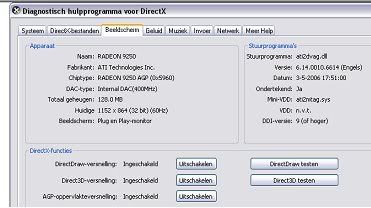
I just wanted to start playing this game and so I made a client and downloaded the game. It works almost perfectly, until I reach the character selection screen. The thing is, the background is moving and active, but there are no things to be seen on the foreground (like a character...). The map I see after clicking 'create' works perfectly, though. How is this possible, and can I fix it? Any help would be very much appreciated. I haven't downloaded anything additional such as updates and so, or is it just that my graphics card isn't good enough for these purposes?
I've added a ''dxdiag'' on my graphics card and drivers. Let me know if you need more information ^^
Mysterianah
I just wanted to start playing this game and so I made a client and downloaded the game. It works almost perfectly, until I reach the character selection screen. The thing is, the background is moving and active, but there are no things to be seen on the foreground (like a character...). The map I see after clicking 'create' works perfectly, though. How is this possible, and can I fix it? Any help would be very much appreciated.
I haven't downloaded anything additional such as updates and so, or is it just that my graphics card isn't good enough for these purposes?I've added a ''dxdiag'' on my graphics card and drivers. Let me know if you need more information ^^
Mysterianah