Inspection / Updates Error???

If your having problems installing or playing Silkroad Online, please post here. Includes general computer health and technical problems.
Post Reply
User avatar
pancreasboy
New Member
Posts: 26
Joined: Wed Mar 29, 2006 4:22 am
Quick Reply: Yes
Location: babel

Inspection / Updates Error???

Post by pancreasboy »

Is anyone else getting this error when they know others are online playing Silkroad?

Image

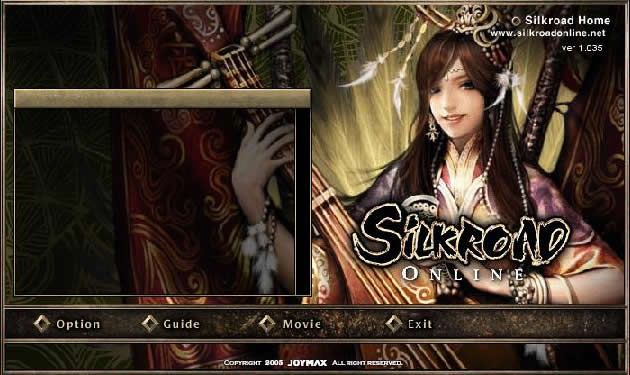
it still opens the intro window but there is no text and no start button (see below)

Image

thanks in advance

Coelus
New Member
Posts: 36
Joined: Sun Apr 09, 2006 10:00 am
Quick Reply: Yes

Post by Coelus »

I get that too sometimes.. But after a few more retries.. It usually works.. If it doesn't, you can try downloading the patch manually..
Image

Image

User avatar
woutR
Elite Member
Posts: 5573
Joined: Wed Feb 08, 2006 5:20 pm
Quick Reply: Yes
Location: Netherlands
Contact:

Post by woutR »

are you using wanadoo ?
Image

<< :giveup:>>

User avatar
pancreasboy
New Member
Posts: 26
Joined: Wed Mar 29, 2006 4:22 am
Quick Reply: Yes
Location: babel

Post by pancreasboy »

Sorry whats the direct link to the manual patch?

(im on a mac at work and the website doesn't work for macs :roll: )

and what's wanadoo?

User avatar
Xeroflair
New Member
Posts: 46
Joined: Sun Apr 09, 2006 7:09 am
Quick Reply: Yes
Location: Athens

Post by Xeroflair »

pancreasboy wrote:Sorry whats the direct link to the manual patch?

(im on a mac at work and the website doesn't work for macs :roll: )

and what's wanadoo?

The website is for all os...
:(

User avatar
pancreasboy
New Member
Posts: 26
Joined: Wed Mar 29, 2006 4:22 am
Quick Reply: Yes
Location: babel

Post by pancreasboy »

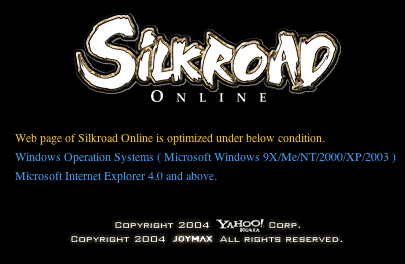
how come i always get this page for http://www.silkroadonline.net on the mac?

Image
Last edited by pancreasboy on Mon Apr 10, 2006 3:55 am, edited 1 time in total.

User avatar
Bakemaster
Senior Member
Posts: 4732
Joined: Fri Feb 10, 2006 7:06 pm
Quick Reply: Yes
Location: Babel

Post by Bakemaster »

You must be using an old or nonstandard browser. It works on the latest version of Firefox, IE and Slimbrowser, maybe others.
LOL

User avatar
pancreasboy
New Member
Posts: 26
Joined: Wed Mar 29, 2006 4:22 am
Quick Reply: Yes
Location: babel

Post by pancreasboy »

Sorry Bakemaster, this is viewing on a 3 month old mac G5, through Firefox, Netscape, Mozilla, and Opera. Explorer goes to the site, but the top navigation buttons don't appear. Safari just opens up a blank white page. (im a Flash designer, so im constantly checking sites in all browsers).

User avatar
Bakemaster
Senior Member
Posts: 4732
Joined: Fri Feb 10, 2006 7:06 pm
Quick Reply: Yes
Location: Babel

Post by Bakemaster »

Oh, I assumed since you were playing that you were surfing on a PC also. Can't even view the site on a Mac, unfortunately.
LOL

Nss
New Member
Posts: 37
Joined: Tue Apr 04, 2006 7:03 am

Post by Nss »

omg i'm getting that right now, like if you try starting the game, it dosen't even need 0.0000001 second to think it just pops up with that msg, i tried reinstalling it and everything but it just wo'nt work, in fact if i reinstall it then update using manual patch you can't even open it, it says the game occurred an error and the old ' would you like to send this bug report ' by microsoft or such.. i backed up my SR folder so right now i'm still trying but it wo'nt work >.> i know my gf is playing it fine right now :(


Edit: ok it works now, after the all taht i restarted my host comp and connect to net again now it works fine, hopefully this helped someone in some way ( i use two comps at once the host comp is just a ' leave over night to down load stuff comp ' and new copm was the one with all the restarting and didn't work )

User avatar
pancreasboy
New Member
Posts: 26
Joined: Wed Mar 29, 2006 4:22 am
Quick Reply: Yes
Location: babel

Post by pancreasboy »

hmm no im still getting the same error, and am looking at re-installing the game, but am worried after you're experience above

:(
Yourz Trooly,

PB

http://www.twistedpancreas.com

Character Name: Larry_Labrat (lvl 36)
Pet Wolf: Flea_Bagg (lvl 35)
Guild: Bushrangers
Skills: Spear + Fire/Lightning

User avatar
pancreasboy
New Member
Posts: 26
Joined: Wed Mar 29, 2006 4:22 am
Quick Reply: Yes
Location: babel

Post by pancreasboy »

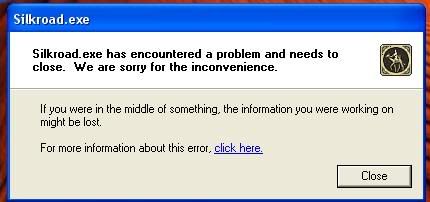
ok still not working, i unistalled the program, deleted all folders from the Program Folder, reinstalled and now i get this:
Image

GGGRRRRRRRRRRRRRRRR!!!!!!!!

now i can't access the game at all

NOT HAPPY JAN!!!!!!!!! (aussie humour)

PLEASE, PLEASE, someone help b4 i change to another game!!!!

Yourz Trooly,

PB

http://www.twistedpancreas.com

Character Name: Larry_Labrat (lvl 36)
Pet Wolf: Flea_Bagg (lvl 35)
Guild: Bushrangers
Skills: Spear + Fire/Lightning

User avatar
Myong
Casual Member
Posts: 85
Joined: Tue Apr 11, 2006 6:46 pm
Quick Reply: Yes
Location: Technical Help

Post by Myong »

..i'm getting that error too now. the game froze completely (while in window mode), and now i keep getting that pop-up window. Also the silkroadonline.net webpage isn't working anymore.. O.o

User avatar
pancreasboy
New Member
Posts: 26
Joined: Wed Mar 29, 2006 4:22 am
Quick Reply: Yes
Location: babel

Post by pancreasboy »

actually its working now for me, but still doenst solve why it wasn't working in the first place :(
Yourz Trooly,

PB

http://www.twistedpancreas.com

Character Name: Larry_Labrat (lvl 36)
Pet Wolf: Flea_Bagg (lvl 35)
Guild: Bushrangers
Skills: Spear + Fire/Lightning

User avatar
Myong
Casual Member
Posts: 85
Joined: Tue Apr 11, 2006 6:46 pm
Quick Reply: Yes
Location: Technical Help

Post by Myong »

and now a few seconds later again the webpage works superfast and the game works again. I think the server went boom for a while because it was so overloaded.

User avatar
pancreasboy
New Member
Posts: 26
Joined: Wed Mar 29, 2006 4:22 am
Quick Reply: Yes
Location: babel

Post by pancreasboy »

well 3 months later and im getting the same error again :banghead:

i've tried resetting the modem several times
restarting the machine
checking all connections
not running the game from a shortcut
turned firewall off

but alas i sit here looking at the same grey box and a dull beep

:(
Yourz Trooly,

PB

http://www.twistedpancreas.com

Character Name: Larry_Labrat (lvl 36)
Pet Wolf: Flea_Bagg (lvl 35)
Guild: Bushrangers
Skills: Spear + Fire/Lightning

User avatar
Lodbrok
New Member
Posts: 26
Joined: Mon Jul 24, 2006 9:24 am
Quick Reply: Yes
Location: Alps

Post by Lodbrok »

I'm getting the exact same error.....wtf is this? >.<

~edit

ok, I found the solution here
Image

User avatar
pancreasboy
New Member
Posts: 26
Joined: Wed Mar 29, 2006 4:22 am
Quick Reply: Yes
Location: babel

Post by pancreasboy »

Thanks Lodbrok,

I gave that a go and it's working again.

YAY!

Lets hope it stays that way :D
Yourz Trooly,

PB

http://www.twistedpancreas.com

Character Name: Larry_Labrat (lvl 36)
Pet Wolf: Flea_Bagg (lvl 35)
Guild: Bushrangers
Skills: Spear + Fire/Lightning

Post Reply

Return to “Technical Help”