Page 1 of 1
Desktop Icons Background Problem
Posted: Tue Jul 08, 2008 5:19 am
by Cerus
Ok, i was playing SRO then all of a sudden, SRO crashed.
I restart my computer and my desktop Icons background color changed...
I can't set it back to how it was b4. Any1 help pls?
BEFORE AFTER
AFTER
Notice how the Icon's background has changed from picture background to Blue in color?
Is there anyway to set it back to before?
Thanks.
Re: Desktop Icons Background Problem
Posted: Tue Jul 08, 2008 5:22 am
by kthnxbai
Right click and change the "web option"
idk how its called coz i use vista
but yeah theres an option for it after u right click on the desktop
Re: Desktop Icons Background Problem
Posted: Tue Jul 08, 2008 5:29 am
by Cerus
I tried right click this is wat i got.

I tried the properties n did some setting there... nothin seems to work =\
Btw i am using XP.
Re: Desktop Icons Background Problem
Posted: Tue Jul 08, 2008 5:32 am
by Poppin
Yeah the same thing happened to me as well

Re: Desktop Icons Background Problem
Posted: Tue Jul 08, 2008 5:35 am
by grejac
im on vista so im not sure
but it shoud be like this
right click on my computer then proptreties(or options)
go to advanced then where it say performance click settings and u have visual effects there. u can change it there
Re: Desktop Icons Background Problem
Posted: Tue Jul 08, 2008 5:36 am
by Pally
It happened on the old junky dell we had, never got it fixed.
Re: Desktop Icons Background Problem
Posted: Tue Jul 08, 2008 5:42 am
by welcomes
For xp users:
Right click on desktop
Go to properties
Go to desktop tab
Click Customize Desktop
Go to Web tab
Uncheck all
Click Ok
Re: Desktop Icons Background Problem
Posted: Tue Jul 08, 2008 5:44 am
by Cerus
grejac wrote:...but it shoud be like this right click on my computer then proptreties(or options)
go to advanced then where it say performance click settings and u have visual effects there. u can change it there


Every box is checked...
Pally wrote:It happened on the old junky dell we had, never got it fixed.
It is a Dell =\
Probably can't b fixed then...
Re: Desktop Icons Background Problem
Posted: Tue Jul 08, 2008 5:45 am
by Cerus
welcomes wrote:For xp users:
Right click on desktop
Go to properties
Go to desktop tab
Click Customize Desktop
Go to Web tab
Uncheck all
Click Ok

It workeddd~!!!
TY SO MUCHHH
Re: Desktop Icons Background Problem
Posted: Tue Jul 08, 2008 5:49 am
by welcomes
You are welcome.
I remember when i had the same issue and didnt know how to fix it, it really bothered me alot, i just simply dit hate it.
Re: Desktop Icons Background Problem
Posted: Tue Jul 08, 2008 5:50 am
by kthnxbai
welcomes wrote:For xp users:
Right click on desktop
Go to properties
Go to desktop tab
Click Customize Desktop
Go to Web tab
Uncheck all
Click Ok
yup thats it

Re: Desktop Icons Background Problem
Posted: Tue Jul 08, 2008 6:21 am
by Poppin
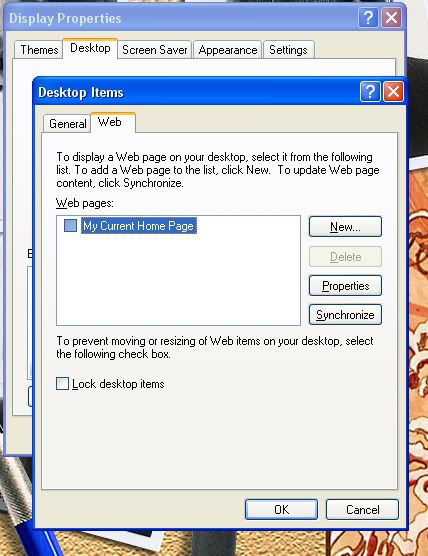
This is what mine looks like but it still doesn't work. What am i doing wrong?

Re: Desktop Icons Background Problem
Posted: Tue Jul 08, 2008 6:37 am
by Cerus
Poppin wrote:This is what mine looks like but it still doesn't work. What am i doing wrong?
All i did was uncheck the
Lock desktop items then its all gud...
Re: Desktop Icons Background Problem
Posted: Tue Jul 08, 2008 7:30 am
by welcomes
Poppin wrote:This is what mine looks like but it still doesn't work. What am i doing wrong?
Sorry, the pic is not showing at work due to proxy and surf control, so i dont know what the problem might be, and what have you tried ?