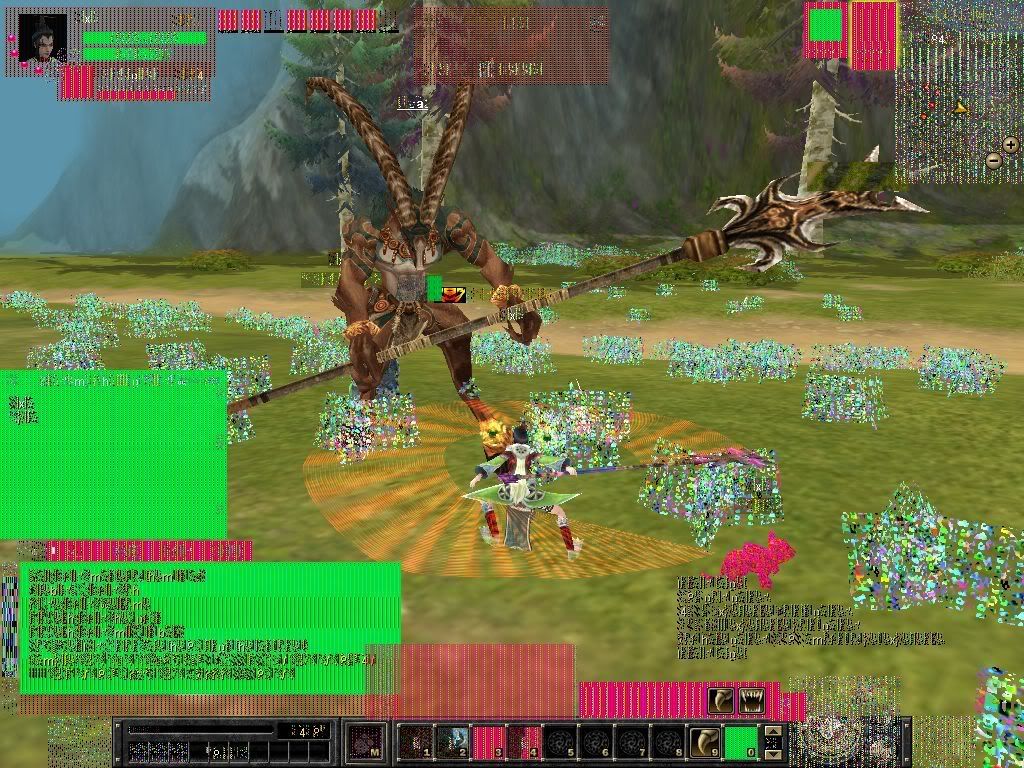
Graphics card overheat ^^

A place for general discussion about Silkroad Online. Talk about the game or ask questions. Please keep threads Silkroad Online related.
Post Reply
User avatar
Carbunkle
Common Member
Posts: 137
Joined: Mon Jun 16, 2008 11:05 pm
Quick Reply: Yes
Location: Hera

Graphics card overheat ^^

Post by Carbunkle »

my graphics started getting kind of funny, and then this happend

Image


Interesting! i guess having 2 bearded dragons and a chameleon in my room doesn't help, all that extra heat must of cooked it lol :P
Image

FaintSmile
Common Member
Posts: 142
Joined: Fri Feb 15, 2008 1:23 am
Quick Reply: Yes
Location: Troy

Re: Graphics card overheat ^^

Post by FaintSmile »

You still have a stock fan on your Graphics Card? I'd suggest upgrading it to a Zalman fan, or any other fan with a decent heatsink.
<<banned from SRF for remaking a banned account. -SG>>

User avatar
Carbunkle
Common Member
Posts: 137
Joined: Mon Jun 16, 2008 11:05 pm
Quick Reply: Yes
Location: Hera

Re: Graphics card overheat ^^

Post by Carbunkle »

im hoping to upgrade my pc soon anyway, this is after about 3 hours lol :P
Image

User avatar
peex
Active Member
Posts: 771
Joined: Fri Dec 08, 2006 4:12 pm
Quick Reply: Yes
Location: Off Topic

Re: Graphics card overheat ^^

Post by peex »

Time to buy a new one.. That card is busted. Same thing happened to me few months ago. luckily i had some warranty left and got a new card for free :p

Sleepy1338
Valued Member
Posts: 444
Joined: Sun Dec 02, 2007 1:26 pm
Quick Reply: Yes
Location: Oasis
Contact:

Re: Graphics card overheat ^^

Post by Sleepy1338 »

That happens to me a lot when it's warm out. Just open up the case and put a fan directly into it...works every time :)
<<banned from SRF for bot admission. -SG>>

User avatar
Carbunkle
Common Member
Posts: 137
Joined: Mon Jun 16, 2008 11:05 pm
Quick Reply: Yes
Location: Hera

Re: Graphics card overheat ^^

Post by Carbunkle »

ty ^^ it hasn't happened before lol :P
Image

User avatar
Redwire
Common Member
Posts: 115
Joined: Sun Feb 10, 2008 11:29 pm
Quick Reply: Yes
Location: U.S.

Re: Graphics card overheat ^^

Post by Redwire »

peex wrote:Time to buy a new one.. That card is busted. Same thing happened to me few months ago. luckily i had some warranty left and got a new card for free :p


It's still stable to use if heating is the only problem, that's fixable with a installing a zalman on the card.

The graphics card is displaying artifacts because it is overheating, likewise the graphics card may still work, let it cool, blow a fan into your PC and if it stops giving you artifacts once it's cool, you don't need to buy a new gfx card like peex says.

My room tends to heat up because my reef tank lights put off alot of heat, so I use a air conditioner to counter-balance my room temperature.

User avatar
Leon
Regular Member
Posts: 273
Joined: Thu Jan 17, 2008 2:55 pm
Quick Reply: Yes
Location: OTL

Re: Graphics card overheat ^^

Post by Leon »

lol my graphicscard wont overheat unless i play like crysis highest graphics, full anti-alialising on a 22inch screen ^_^
I'm Me

IC3
Common Member
Posts: 174
Joined: Sun Jun 22, 2008 11:09 pm
Quick Reply: Yes
Location: here

Re: Graphics card overheat ^^

Post by IC3 »

Carbunkle wrote:my graphics started getting kind of funny, and then this happend

Image


Interesting! i guess having 2 bearded dragons and a chameleon in my room doesn't help, all that extra heat must of cooked it lol :P


i want this version of sro, its something new, and look at teh awesome graphics! :P
<<banned from SRF for bot admission. -SG>>

User avatar
MiKe 51-50
Frequent Member
Posts: 1284
Joined: Sun Dec 10, 2006 8:19 pm
Quick Reply: Yes
Location: Xian

Re: Graphics card overheat ^^

Post by MiKe 51-50 »

Download riva tuner and set the stock fan speed to like 60%~80% unless it doesn't have a fan
Image
Image

User avatar
DotCom
Valued Member
Posts: 497
Joined: Thu Jul 20, 2006 1:44 am
Quick Reply: Yes
Location: Alexander

Re: Graphics card overheat ^^

Post by DotCom »

MiKe 51-50 wrote:Download riva tuner and set the stock fan speed to like 60%~80% unless it doesn't have a fan

60%-80%? It will sound like you have a V12 inside your case.
Server: Alexander

-=IMPERIAL FOREVER=-

[Quit]

User avatar
Redwire
Common Member
Posts: 115
Joined: Sun Feb 10, 2008 11:29 pm
Quick Reply: Yes
Location: U.S.

Re: Graphics card overheat ^^

Post by Redwire »

DotCom wrote:
MiKe 51-50 wrote:Download riva tuner and set the stock fan speed to like 60%~80% unless it doesn't have a fan

60%-80%? It will sound like you have a V12 inside your case.


I've got mine set to 100 percent and it sounds normal, depends on your graphics card's fan set.

/Pi
Senior Member
Posts: 4590
Joined: Fri May 18, 2007 3:49 am
Quick Reply: Yes
Location: Off Topic

Re: Graphics card overheat ^^

Post by /Pi »

I like that pink pussay. :D

User avatar
Asheru
Common Member
Posts: 178
Joined: Thu Apr 24, 2008 11:56 pm
Quick Reply: Yes
Location: Sugarcandy Mountain

Re: Graphics card overheat ^^

Post by Asheru »

Lol this was the other day during ctf...

Image

Image

I think its the same thing, the graphix card went cookoo and suddenly my pc crashes and everything looks like windows 98 >.<
Sin la mujer, la vida es pura prosa
~Rubén Darío

User avatar
mkzr
Regular Member
Posts: 227
Joined: Fri Apr 18, 2008 5:40 pm
Quick Reply: Yes
Location: Eldorado

Re: Graphics card overheat ^^

Post by mkzr »

Asheru wrote:Lol this was the other day during ctf...

Image

Image

I think its the same thing, the graphix card went cookoo and suddenly my pc crashes and everything looks like windows 98 >.<

windows 98 owns tbh, i've never had this before and my pc is on 24/7 only got a bad 7600gt
[Lynx]
Name: xXx_mike_xXx
Level: 110
Build: wiz/bard
FF: Yes, 3,1m sp left
Best drop: nova female armor shoulder
Weapon: Nova +6 Staff

User avatar
Carbunkle
Common Member
Posts: 137
Joined: Mon Jun 16, 2008 11:05 pm
Quick Reply: Yes
Location: Hera

Re: Graphics card overheat ^^

Post by Carbunkle »

it still ran fine, no lagging etc, jus looked funky ^^

after leaving my pc of for 1/2 hour it went back to normal :P a mini fridge with the door open next to my pc lolz.
Image

User avatar
Blurred
Addicted Member
Posts: 2894
Joined: Sun Nov 26, 2006 9:30 pm
Quick Reply: Yes
Location: Off Topic
Contact:

Re: Graphics card overheat ^^

Post by Blurred »

Carbunkle wrote:my graphics started getting kind of funny, and then this happend

Image


Interesting! i guess having 2 bearded dragons and a chameleon in my room doesn't help, all that extra heat must of cooked it lol :P



Atleast u dont have to cover ur HP lol
CTRL+W = ?

----------------------------------------------
xFire: blurred1
Steam: l33chie

Backfire
Valued Member
Posts: 434
Joined: Mon Mar 10, 2008 12:01 am
Quick Reply: Yes
Location: USA

Re: Graphics card overheat ^^

Post by Backfire »

I think he bots... Where are his yellow boxes :?
<<banned from SRF for rules violations. -SG>>

User avatar
Coocu
Casual Member
Posts: 90
Joined: Mon Jul 30, 2007 12:09 pm
Quick Reply: Yes
Location: olympus

Re: Graphics card overheat ^^

Post by Coocu »

Backfire wrote:I think he bots... Where are his yellow boxes :?


lol :P
bammm

User avatar
Carbunkle
Common Member
Posts: 137
Joined: Mon Jun 16, 2008 11:05 pm
Quick Reply: Yes
Location: Hera

Re: Graphics card overheat ^^

Post by Carbunkle »

Backfire wrote:I think he bots... Where are his yellow boxes :?


why am i not surprised to see this in a srf thread :P

Edit: and before im accused, AFTER you have used a skill, the yellow box your looking for fades, or in my case of my gfx, i think it shone yellow for a couple seconds. Go to hell Backfire, botting accusations drive people away from here.
Image

User avatar
BloodyBlade
Elite Member
Posts: 5219
Joined: Wed Nov 14, 2007 8:32 pm
Quick Reply: Yes
Location: Attending your mothers sexual needs :)

Re: Graphics card overheat ^^

Post by BloodyBlade »

Carbunkle wrote:
Backfire wrote:I think he bots... Where are his yellow boxes :?


why am i not surprised to see this in a srf thread :P

Edit: and before im accused, AFTER you have used a skill, the yellow box your looking for fades, or in my case of my gfx, i think it shone yellow for a couple seconds. Go to hell Backfire, botting accusations drive people away from here.

You must be really stupid to not notice that was a joke Backfire made there.
My sig died

User avatar
Carbunkle
Common Member
Posts: 137
Joined: Mon Jun 16, 2008 11:05 pm
Quick Reply: Yes
Location: Hera

Re: Graphics card overheat ^^

Post by Carbunkle »

BloodyBlade wrote:
Carbunkle wrote:
Backfire wrote:I think he bots... Where are his yellow boxes :?


why am i not surprised to see this in a srf thread :P

Edit: and before im accused, AFTER you have used a skill, the yellow box your looking for fades, or in my case of my gfx, i think it shone yellow for a couple seconds. Go to hell Backfire, botting accusations drive people away from here.

You must be really stupid to not notice that was a joke Backfire made there.


Yes. A complete idiot. Im sorry my internet detector doesn't pick up jokes/sarcasm, i can only read a post as text.
Image

Backfire
Valued Member
Posts: 434
Joined: Mon Mar 10, 2008 12:01 am
Quick Reply: Yes
Location: USA

Re: Graphics card overheat ^^

Post by Backfire »

Your pretty defensive for some1 who doesn't bot lol... And it was CLEARLY a joke imo... I realize you have a graphics problem and you cant even read what skills you have on your skill bar... Learn 2 take a joke/
<<banned from SRF for rules violations. -SG>>

User avatar
Carbunkle
Common Member
Posts: 137
Joined: Mon Jun 16, 2008 11:05 pm
Quick Reply: Yes
Location: Hera

Re: Graphics card overheat ^^

Post by Carbunkle »

im sorry i didnt take it as a joke :P im not into internet arguments. Im not defensive of accusations, im defensive of 'zomg bot' a lot of the time. im sure everybody else has noticed ^^ My apologies.

Image

User avatar
Sharp324
Senior Member
Posts: 4383
Joined: Tue Jan 30, 2007 4:24 am
Quick Reply: Yes
Location: Off Topic

Re: Graphics card overheat ^^

Post by Sharp324 »

Redwire wrote:
peex wrote:Time to buy a new one.. That card is busted. Same thing happened to me few months ago. luckily i had some warranty left and got a new card for free :p


It's still stable to use if heating is the only problem, that's fixable with a installing a zalman on the card.

The graphics card is displaying artifacts because it is overheating, likewise the graphics card may still work, let it cool, blow a fan into your PC and if it stops giving you artifacts once it's cool, you don't need to buy a new gfx card like peex says.

My room tends to heat up because my reef tank lights put off alot of heat, so I use a air conditioner to counter-balance my room temperature.

Zalman is nub sauce
------------------------------

User avatar
Pandaren Brewmaster
Casual Member
Posts: 91
Joined: Wed May 28, 2008 5:27 am
Quick Reply: Yes
Location: Xian

Re: Graphics card overheat ^^

Post by Pandaren Brewmaster »

Arctic Cooling Accelero S1 ftw :D

Vandango
Senior Member
Posts: 4143
Joined: Sat Jun 03, 2006 3:23 pm
Quick Reply: Yes
Location: Babel

Re: Graphics card overheat ^^

Post by Vandango »

Ok Cut the bot crap just let it die. Modding is a pain in the ass on my PS3!!!
FFS Anit go a highlight ¬¬
Anyways that pic is cool
<<banned from SRF for bot admission. -SG>>

User avatar
invisible
Hi, I'm New Here
Posts: 8
Joined: Sun Jun 22, 2008 5:22 pm
Quick Reply: Yes
Location: Off Topic

Re: Graphics card overheat ^^

Post by invisible »

looks real mess up on your graphics card. Maybe you need buy more cooler fun
so the graphics card not be so overheating

Post Reply

Return to “Silkroad General Discussion”