Page 1 of 1
Interesting graphics glitch - SRO Scarecrows
Posted: Thu Sep 17, 2009 12:24 pm
by PR0METHEUS
Well it's been a while since I've logged into SRO on my main computer at my house, so I thought I'd give it a shot. I opened the client, it updated and logged in without a problem. (Yay no server traffic). I decided to log in my wife's account to keep it from going inactive for too long. When I got to the character select screen, both of her characters were standing motionless with their arms sticking straight out like scarecrows. I selected her main and loaded Hotan.
When the city loaded, everyone's arms were sticking straight out like scarecrows, even NPCs. All pets had no animation and just slid across the screen as they moved. I went out to the mujigis and they even had their giant arms sticking straight out to the side. The game was fully functional though. I wish I took more screenshots, or even video, but it wasn't cooperating with me. I attached a screenshot to show you what I mean.
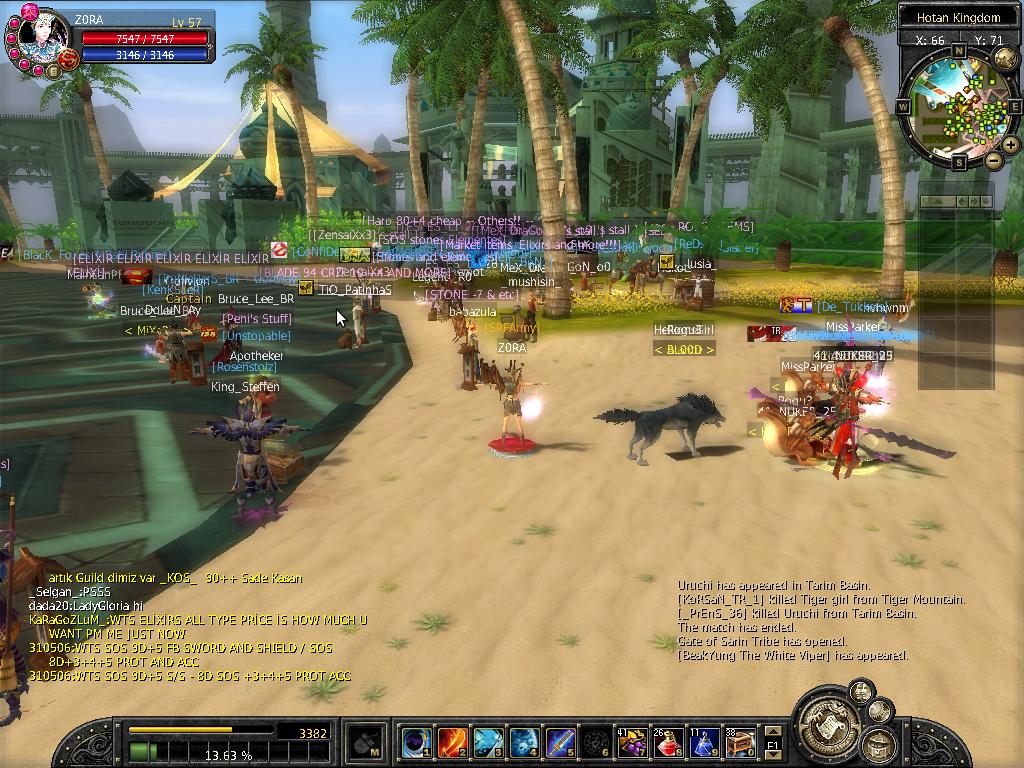
- SRO Scarecrows.JPG (181.14 KiB) Viewed 2572 times
Has anyone seen this before? It happens no matter what account I log into. I'll have to see if it continues the next time I reboot and open the client.
Re: Interesting graphics glitch - SRO Scarecrows
Posted: Thu Sep 17, 2009 12:40 pm
by PR0METHEUS
ofy1993 wrote:Looks amazing. YOu should teach how you did that to the guy who wanted to remove all the effects on ecsro

Just play around with the graphics settings. Seems like effects are turned off so try turning that on.
Other then that, I have no idea what would cause that. Maybe graphics/drivers problem.
Well the game has always worked on this system before. I have the proper drivers and haven't changed any in-game settings. I've simply let the game update itself from the launcher. I may just reinstall.
Re: Interesting graphics glitch - SRO Scarecrows
Posted: Thu Sep 17, 2009 1:19 pm
by firefox6
lol it is to scare away the bots...
Re: Interesting graphics glitch - SRO Scarecrows
Posted: Thu Sep 17, 2009 1:58 pm
by ltsune
I've seen this before but only with a wizard in pvp. The skill which just keeps kinda.. flaming and hitting like 4 times. I don't really know what the skills is called

Re: Interesting graphics glitch - SRO Scarecrows
Posted: Thu Sep 17, 2009 2:19 pm
by .AWAKE.
could be a sign of your video card frying out :S , I remember something similar to this happening to me and about 2 days later my GFX card was done

Re: Interesting graphics glitch - SRO Scarecrows
Posted: Thu Sep 17, 2009 2:38 pm
by Arcavian
lol "dont clock them things too high or else they fry.." a wise old man once told me. "oh and make sure you have enough powersupply..." xD
Re: Interesting graphics glitch - SRO Scarecrows
Posted: Thu Sep 17, 2009 3:24 pm
by jabbers
firefox6 wrote:lol it is to scare away the bots...
ahahha
Re: Interesting graphics glitch - SRO Scarecrows
Posted: Thu Sep 17, 2009 5:04 pm
by PR0METHEUS
Arcavian wrote:lol "dont clock them things too high or else they fry.." a wise old man once told me. "oh and make sure you have enough powersupply..." xD
I haven't done any overclocking. I have a 550w PSU in this system. It's an XFX GeForce 8200 Socket AM2/AM2+ Barebone Kit - AMD Phenom X4 9500 Retail CPU, 2GB DDR2-800 corsair, 250GB Seagate, ATX Mid-Tower, 550W PSU. Shouldn't 550w be enough? SRO isn't that graphic intensive of a game.
My nvidia graphics are integrated into the motherboard, so I hope it's not dieing...
@scaring away the bots... hahaha Maybe that's Joymax's new anti-bot system!
Re: Interesting graphics glitch - SRO Scarecrows
Posted: Thu Sep 17, 2009 5:05 pm
by .AWAKE.
i think from now on you should just hold down V indefinitely while playing , hehe
Re: Interesting graphics glitch - SRO Scarecrows
Posted: Thu Sep 17, 2009 5:06 pm
by Achilles990
Now we know thre all Cristians!!
Re: Interesting graphics glitch - SRO Scarecrows
Posted: Thu Sep 17, 2009 5:23 pm
by penfold1992
lol! Achilles may offend some hardcore jesus lovers here xD but its funny as hell so i dont care
WINRAR
Re: Interesting graphics glitch - SRO Scarecrows
Posted: Thu Sep 17, 2009 5:25 pm
by selenne
Nothing like some aerobics
Re: Interesting graphics glitch - SRO Scarecrows
Posted: Thu Sep 17, 2009 5:31 pm
by ltsune
selenne wrote:Nothing like some aerobics
Except on a Sunday morning
Re: Interesting graphics glitch - SRO Scarecrows
Posted: Fri Sep 18, 2009 1:02 am
by Insanity
its happened to me before. reloged and it went away.
Re: Interesting graphics glitch - SRO Scarecrows
Posted: Fri Sep 18, 2009 3:40 am
by Tig3ress
Same thing happend to me a while back, turns out my gcard had actualy melted :(
My laptop burst into flames a few minutes later.
Re: Interesting graphics glitch - SRO Scarecrows
Posted: Fri Sep 18, 2009 4:11 am
by Mirosuke
Graphic Card, update maybe?
Re: Interesting graphics glitch - SRO Scarecrows
Posted: Fri Sep 18, 2009 4:12 am
by dark_wizz
PR0METHEUS wrote:I haven't done any overclocking. I have a 550w PSU in this system. It's an XFX GeForce 8200 Socket AM2/AM2+ Barebone Kit - AMD Phenom X4 9500 Retail CPU, 2GB DDR2-800 corsair, 250GB Seagate, ATX Mid-Tower, 550W PSU. Shouldn't 550w be enough? SRO isn't that graphic intensive of a game.
My nvidia graphics are integrated into the motherboard, so I hope it's not dieing...
@scaring away the bots... hahaha Maybe that's Joymax's new anti-bot system!
what OS? go to MB manufacturers web and dl newest graphics driver cuz u have integrated graphics card. i had similar problem (graphics was kinda fuzzy) on ASRock MB with 6 series on board graphics. I tryed drivers from nvidia web and i didn't work, and then i dl drivers from ASRock site and now it's working fine
Re: Interesting graphics glitch - SRO Scarecrows
Posted: Fri Sep 18, 2009 5:22 am
by Shiver
That looks pretty funny, actually.
Re: Interesting graphics glitch - SRO Scarecrows
Posted: Fri Sep 18, 2009 11:57 am
by smoti
Ahahahahahaha
very nice indeed
is like all players saying " what the f**k are we here anyways ?! "
=))
Re: Interesting graphics glitch - SRO Scarecrows
Posted: Fri Sep 18, 2009 12:22 pm
by DotCom
Maybe you need a driver update on that Linux...
Re: Interesting graphics glitch - SRO Scarecrows
Posted: Fri Sep 18, 2009 12:33 pm
by PR0METHEUS
dark_wizz wrote:PR0METHEUS wrote:I haven't done any overclocking. I have a 550w PSU in this system. It's an XFX GeForce 8200 Socket AM2/AM2+ Barebone Kit - AMD Phenom X4 9500 Retail CPU, 2GB DDR2-800 corsair, 250GB Seagate, ATX Mid-Tower, 550W PSU. Shouldn't 550w be enough? SRO isn't that graphic intensive of a game.
My nvidia graphics are integrated into the motherboard, so I hope it's not dieing...
@scaring away the bots... hahaha Maybe that's Joymax's new anti-bot system!
what OS? go to MB manufacturers web and dl newest graphics driver cuz u have integrated graphics card. i had similar problem (graphics was kinda fuzzy) on ASRock MB with 6 series on board graphics. I tryed drivers from nvidia web and i didn't work, and then i dl drivers from ASRock site and now it's working fine
My OS is Ubuntu. I'll have to see if there's an updated nvidia driver for it. I also have SRO installed on a Crunchbang Linux bootable thumb drive. I could try booting the system with that since I know the thumb drive version works fine on other systems.
I was mostly just posting the screenshot to see what other people thought of the SRO scarecrows.
Re: Interesting graphics glitch - SRO Scarecrows
Posted: Fri Sep 18, 2009 3:41 pm
by Achilles990
penfold1992 wrote:lol! Achilles may offend some hardcore jesus lovers here xD but its funny as hell so i dont care
WINRAR
Hey am catholic i dont care lol
Re: Interesting graphics glitch - SRO Scarecrows
Posted: Fri Sep 18, 2009 5:06 pm
by *BlackFox
Shiver wrote:That looks pretty funny, actually.
+1
Re: Interesting graphics glitch - SRO Scarecrows
Posted: Fri Sep 18, 2009 5:24 pm
by PR0METHEUS
It's too bad I didn't get other pictures around town. Hotan looked a bit strange. All the buildings were intact, but some were different colors, some had different styles for the roofs or the siding kind of.
I did take my wife's character out to kill a few mujigis that day. Her character constantly stayed standing upright with her arms out like my original screenshot above, but when she would swing her blade, you could see bits of the blade swing around, her GDF moved forward, swinging back and forth, like it does when you run... almost like a second half-image of the character superimposed behind the scarecrow version of her.
Kind of neat to watch.
