Well first off. I GOOGLE IT, but was way to confusing. I have a 20" AQUOS tv and i would like to use as a computer monitor. Is this possible?
tv: http://www.amazon.com/Sharp-Aquos-LC-20 ... B0000639N5
Comp:
http://www1.shopping.com/xPF-Hewlett-Pa ... DL-Flash-M
If it is possible what will i need to buy? Is it worth it?
Tv as monitor?

Re: Tv as monitor?
Well I've never tried it, but a friend of mine did; with a pretty old tv.
AfaIk he just plugged a cable in his tv-out on the VGAcard and the other end in the SCART plug in the back of the tv, and apperantly that worked.
Then it will probably show in the dvd canal of the tv, well at least that's what I guess.
So videocard with tv-out + cable (my friend got a cable with his videocard when he bought it) + a tv with SCART.
Hope that was of any use lol
Or are there other aspects involved?
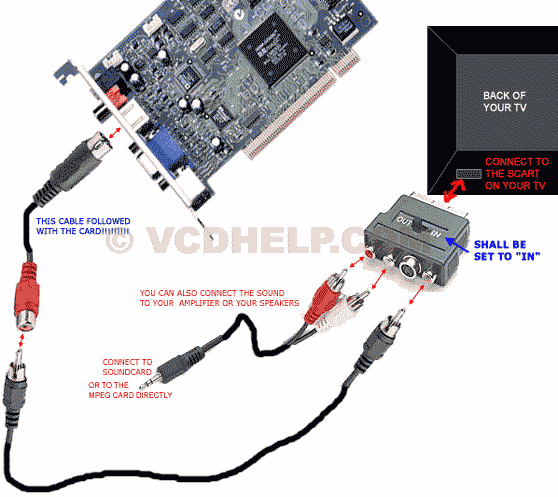
AfaIk he just plugged a cable in his tv-out on the VGAcard and the other end in the SCART plug in the back of the tv, and apperantly that worked.
Then it will probably show in the dvd canal of the tv, well at least that's what I guess.
So videocard with tv-out + cable (my friend got a cable with his videocard when he bought it) + a tv with SCART.
Hope that was of any use lol
Or are there other aspects involved?
Last edited by Wu on Wed Jan 23, 2008 7:32 am, edited 1 time in total.



-
cin
Re: Tv as monitor?
Reise wrote:All you need is the S-Video cables and a video card and TV that can take them.
indeed.
i usually plug my laptop in the tv when i go watch movies, saves me the time of
converting em to burn em on a disc. all i got is one s-video cable and an audio
cable. then you just add your tv to the screens (on most laptops thats SHIFT+F5),
not sure how that goes with pc's. but yeah, its very possible to use the tv as
your monitor.

-
cin
-
exality

- Loyal Member
- Posts: 1802
- Joined: Wed Mar 07, 2007 6:31 am
- Quick Reply: Yes
- Location: **** if i know
Re:
cin wrote:if your tv has that many inputs, then i suggest you try it out. if it works, nice.
but i've never seen a cable like that before lulz..
oh, and svideo isnt that expensive lol. especially not when you want to use your tv
as a monitor, cause that means you just need like what.. 1 meter cable?
but the new graphics card would cost a fourtune. ill prolly head to best buy tomo and see what i can come up with.


-
cin


-
Love

- Elite Member
- Posts: 5330
- Joined: Thu Nov 08, 2007 4:29 pm
- Quick Reply: Yes
- Location: guildwars2
Re: Tv as monitor?
i being wondering about this myself as well i got the cables and all will try it the next time i need to watch a movie

Guild Wars 2, Isle of Janthir (NA)
Peace is a lie, there is only passion. Through passion, I gain strength. Through strength, I gain power. Through power, I gain victory. Through victory, my chains are broken.
-
StealMySoda

- Ex-Staff
- Posts: 5245
- Joined: Sun Sep 03, 2006 2:37 pm
- Quick Reply: Yes
- Location: Off Topic
- Contact:
Re: Tv as monitor?
exality wrote:nope not got 1
If you can get one of those cables that you suggested, I don't see why cant use that. Assuming your computer has an output for a monitor that is

Ooh, I got a sexy ex-staff title!
-
agent420
- Active Member
- Posts: 952
- Joined: Mon Jun 25, 2007 6:35 pm
- Quick Reply: Yes
- Location: off topic
Re: Tv as monitor?
i just got a 60 in plasma for xmas and i tried plugging in my laptop using an s-video cable, but the image is grainy as hell. how do i get a crystal clear image for watching movies and shit???
<<banned from SRF for rules violations. -SG>>
-
Pilot
- Active Member
- Posts: 670
- Joined: Mon Jan 21, 2008 2:48 pm
- Quick Reply: Yes
- Location: Above you
Re: Tv as monitor?
I use my 40" monitor as a desktop sometimes too. This is what I do:
1. You will need a VIDEO OUT/IN port on your computer AND TV.

2. Next you will need a cable (dont know its name) but it looks like this:

3. Link it up-both your TV and computer should have matching jacks.
4. Configure your TV to adapt an outside source-obviously yours is different-for mine, I visit the menu and turn the monitor option to "PC"
5. By pressing FUNCTION "Fn" key and then pressing one of the F1-12 buttons (one of your F1-12 buttons will have blue lettering that says "crt/lcd". Click this after your PC and TV are successfully linked.
6. Done! You should be able to view your desktop from your tv after this.
1. You will need a VIDEO OUT/IN port on your computer AND TV.
2. Next you will need a cable (dont know its name) but it looks like this:
3. Link it up-both your TV and computer should have matching jacks.
4. Configure your TV to adapt an outside source-obviously yours is different-for mine, I visit the menu and turn the monitor option to "PC"
5. By pressing FUNCTION "Fn" key and then pressing one of the F1-12 buttons (one of your F1-12 buttons will have blue lettering that says "crt/lcd". Click this after your PC and TV are successfully linked.
6. Done! You should be able to view your desktop from your tv after this.
<<banned from SRF for rules violations. -SG>>
-
cin
Re: Tv as monitor?
agent420 wrote:i just got a 60 in plasma for xmas and i tried plugging in my laptop using an s-video cable, but the image is grainy as hell. how do i get a crystal clear image for watching movies and shit???
can you get a high enough resolution for your plasma?

Re: Tv as monitor?
Pilot wrote:I use my 40" monitor as a desktop sometimes too. This is what I do:
1. You will need a VIDEO OUT/IN port on your computer AND TV.
2. Next you will need a cable (dont know its name) but it looks like this:
3. Link it up-both your TV and computer should have matching jacks.
4. Configure your TV to adapt an outside source-obviously yours is different-for mine, I visit the menu and turn the monitor option to "PC"
5. By pressing FUNCTION "Fn" key and then pressing one of the F1-12 buttons (one of your F1-12 buttons will have blue lettering that says "crt/lcd". Click this after your PC and TV are successfully linked.
6. Done! You should be able to view your desktop from your tv after this.
High quality pron


Spoiler!


woutR wrote:Squirt, you're a genius when it comes to raping women.
-
CrimsonNuker

- Dom's Slut
- Posts: 13791
- Joined: Sun Aug 06, 2006 3:31 am
- Quick Reply: Yes
- Location: guildwars2
Re: Tv as monitor?
Squirt wrote:Pilot wrote:I use my 40" monitor as a desktop sometimes too. This is what I do:
1. You will need a VIDEO OUT/IN port on your computer AND TV.
2. Next you will need a cable (dont know its name) but it looks like this:
3. Link it up-both your TV and computer should have matching jacks.
4. Configure your TV to adapt an outside source-obviously yours is different-for mine, I visit the menu and turn the monitor option to "PC"
5. By pressing FUNCTION "Fn" key and then pressing one of the F1-12 buttons (one of your F1-12 buttons will have blue lettering that says "crt/lcd". Click this after your PC and TV are successfully linked.
6. Done! You should be able to view your desktop from your tv after this.
High quality pron
THATS THE CABLE I NEED, WHATS IT CALLED?



-
agent420
- Active Member
- Posts: 952
- Joined: Mon Jun 25, 2007 6:35 pm
- Quick Reply: Yes
- Location: off topic
Re: Tv as monitor?
cin wrote:agent420 wrote:i just got a 60 in plasma for xmas and i tried plugging in my laptop using an s-video cable, but the image is grainy as hell. how do i get a crystal clear image for watching movies and shit???
can you get a high enough resolution for your plasma?
i dunno...how would i check? its 1080p and all that shit, but i don't know where to check res
<<banned from SRF for rules violations. -SG>>
-
cin
Re: Tv as monitor?
on your laptop.
as you said, you plugin, then you Fn+F5 (probably, mostly its f5), to get both
the LCD and the CRT screen.
now, go to your desktop properties (on which you can change your desktop bg and
stuff), and go to the tab "Settings" (last tab).
there, you can fix a proper resolution for both screens.
you can also make this extend your laptop screen on your tv screen. that means, that
if you check that box, you can move with your mouse all the way to the right side of
your laptop screen, and then see it hopping over to the left side of your tv screen.
very handy if you want to watch a movie on your tv, but still want to msn on your
laptop ;]
idk if it can hurt or sumthin, but check if your graphics card can handle your tv's
resolution.
as you said, you plugin, then you Fn+F5 (probably, mostly its f5), to get both
the LCD and the CRT screen.
now, go to your desktop properties (on which you can change your desktop bg and
stuff), and go to the tab "Settings" (last tab).
there, you can fix a proper resolution for both screens.
you can also make this extend your laptop screen on your tv screen. that means, that
if you check that box, you can move with your mouse all the way to the right side of
your laptop screen, and then see it hopping over to the left side of your tv screen.
very handy if you want to watch a movie on your tv, but still want to msn on your
laptop ;]
idk if it can hurt or sumthin, but check if your graphics card can handle your tv's
resolution.
-
hemagoku

- Addicted Member
- Posts: 2720
- Joined: Sun Apr 29, 2007 11:42 pm
- Quick Reply: Yes
- Location: Artist Corner
Re: Tv as monitor?
i tried it but it had very low resolution ,i could even read anything on the screen
check my dA : http://hemagoku.deviantart.com/ 
-
agent420
- Active Member
- Posts: 952
- Joined: Mon Jun 25, 2007 6:35 pm
- Quick Reply: Yes
- Location: off topic
Re: Tv as monitor?
thanx cin, thats why u r my favorite mod!!!!!!!
<<banned from SRF for rules violations. -SG>>
-
cin
Re: Tv as monitor?
agent420 wrote:thanx cin, thats why u r my favorite mod!!!!!!!
he he np <3
hemagoku wrote:i tried it but it had very low resolution ,i could even read anything on the screen
did you try what i just explained in my large post?
cause what i tried works perfectly with a laptop, but like i said i've never tried it with
a pc before.. dont have one ;]
-
hemagoku
- Addicted Member
- Posts: 2720
- Joined: Sun Apr 29, 2007 11:42 pm
- Quick Reply: Yes
- Location: Artist Corner
Re: Tv as monitor?
i am using pc ,so i didn't try a laptop
check my dA : http://hemagoku.deviantart.com/
-
CrimsonNuker
- Dom's Slut
- Posts: 13791
- Joined: Sun Aug 06, 2006 3:31 am
- Quick Reply: Yes
- Location: guildwars2
-
Pilot
- Active Member
- Posts: 670
- Joined: Mon Jan 21, 2008 2:48 pm
- Quick Reply: Yes
- Location: Above you
Re: Tv as monitor?
CrimsonNuker wrote:whats the name of that cord above? >_<
Unfortunately, I dont know

Unless youre buying it off the internet, theres really no need to know the exact name of it. Just go to your local best buy/radio shack and ask them for a "pc to tv cable", and most staff members will know what youre talking about. At least thats what I did.
<<banned from SRF for rules violations. -SG>>