
My pc started making a loud noise that it has never made before, sort of like a grinding noise. I disconnected my hard drive and cd drive and turned on pc and the nous continued.
I think it was one of the fans or power supply. I laid the case on it side and the noise stop. But when I reconnected everything the noise started again and it just won't turn on now.
1.) what was the noise?
2.) did my power supply die or is it something else?
Loud noise, then bang
Loud noise, then bang

Spoiler!


woutR wrote:Squirt, you're a genius when it comes to raping women.




Re: Loud noise, then bang
Seeing as how you unplugged your HDD and DVD drive, I'm gonna have to say fan.
Maybe your psu auto stops if the fan doesn't work, or something along those lines.
Maybe your psu auto stops if the fan doesn't work, or something along those lines.
 Crumpets for Pres
-
CeLL

- Senior Member
- Posts: 4441
- Joined: Tue Nov 18, 2008 4:26 am
- Quick Reply: Yes
- Location: SHEEKA JOOM BA BOOM BAH!! BAM! BAM BAM BAM BAM BAM!!!!!!!!!!!!
Re: Loud noise, then bang
if i had to guess id say a ball bearing managed to break loose, was slapped by a fan, leaving it wobbly and making noise.

^^Thanks Thomas42
-
Vaya

- Loyal Member
- Posts: 1844
- Joined: Thu May 21, 2009 10:24 am
- Quick Reply: Yes
- Location: leagueoflegends
Re: Loud noise, then bang
-Completely unplug your power supply from everything.
-Get a paper clip and unfold it.

-stick the paper clip into the connector above, one side on the forth pin from the upper left, and the other one on the forth pin from the lower right, make sure they touch the metal part [to turn on the power supply without connecting it to the whole pc].
-plug in the power supply's power cable, then you can clearly know if it's the power supply, if not, you can test other fans each one alone.
-you can skip all this complication above and just unplug every other thing that can make noise and just leave the power supply to test it.
P.S. I had once a sound coming from my Rams, but it's different from a wire hitting a fan, sounds like a robot that's dieing, maybe you should check this too.
-Get a paper clip and unfold it.
-stick the paper clip into the connector above, one side on the forth pin from the upper left, and the other one on the forth pin from the lower right, make sure they touch the metal part [to turn on the power supply without connecting it to the whole pc].
-plug in the power supply's power cable, then you can clearly know if it's the power supply, if not, you can test other fans each one alone.
-you can skip all this complication above and just unplug every other thing that can make noise and just leave the power supply to test it.
P.S. I had once a sound coming from my Rams, but it's different from a wire hitting a fan, sounds like a robot that's dieing, maybe you should check this too.
Hi
-
CeLL
- Senior Member
- Posts: 4441
- Joined: Tue Nov 18, 2008 4:26 am
- Quick Reply: Yes
- Location: SHEEKA JOOM BA BOOM BAH!! BAM! BAM BAM BAM BAM BAM!!!!!!!!!!!!
Re: Loud noise, then bang
K.K wrote:-Completely unplug your power supply from everything.
-Get a paper clip and unfold it.
-stick the paper clip into the connector above, one side on the forth pin from the upper left, and the other one on the forth pin from the lower right, make sure they touch the metal part [to turn on the power supply without connecting it to the whole pc].
-plug in the power supply's power cable, then you can clearly know if it's the power supply, if not, you can test other fans each one alone.
-you can skip all this complication above and just unplug every other thing that can make noise and just leave the power supply to test it.
P.S. I had once a sound coming from my Rams, but it's different from a wire hitting a fan, sounds like a robot that's dieing, maybe you should check this too.
i was trying to think of a way for him to do exactly what you put up. GG.
^^Thanks Thomas42
-
Apy

- Frequent Member
- Posts: 1157
- Joined: Sat May 03, 2008 10:12 am
- Quick Reply: Yes
- Location: What's wrong with dreams ?
Re: Loud noise, then bang
Squirt wrote:My pc started making a loud noise that it has never made before, sort of like a grinding noise. I disconnected my hard drive and cd drive and turned on pc and the nous continued.
I think it was one of the fans or power supply. I laid the case on it side and the noise stop. But when I reconnected everything the noise started again and it just won't turn on now.
1.) what was the noise?
2.) did my power supply die or is it something else?
I'll be completly honest there, I first read the topic title, "Loud noise, then bang" then read the topic, wasn't even close to what I was thinking it should be about. While reading the topic I saw those lines which you added andI added in the bold text.
onT :I guess the power supply has some problems.

"Every person has 1000 wishes, a cancer patient only has one: to get better."
]

Re: Loud noise, then bang
try and see where the noise is coming from. take everything out to the point where it can start and that is it. so basically just the motherboard with cpu and heatsink then the psu.

Re: Loud noise, then bang
The noise seems to be coming from the main CPU fan that s in the middle. But the pc wouldn't power up for about 4 hours... It just turned on but the mouse keyboard and screen didn't turn on this time
Spoiler!
woutR wrote:Squirt, you're a genius when it comes to raping women.
-
Swindler

- Forum God
- Posts: 11256
- Joined: Tue Apr 10, 2007 7:49 am
- Quick Reply: Yes
- Location: Pimpas Paradise.
Re: Loud noise, then bang
That sounds exactly like the same problem I had, my monitor, mouse and keyboard doesn't start but if you kept the PC on for a while(could take up to 3 hours for me) they started up, but I bought a new motherboard and the problems stopped.
Re: Loud noise, then bang
Check your motherboard for bulging, busted, leaking caps.
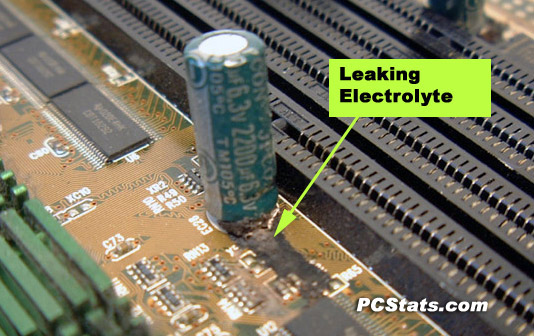
if it takes 4 hours for it to "start up" try to see if you can use another PSU (I do not recommended if you have a prebuilt to use a started PSU to test it. Dell and possibly others switch wires.)
Try reseating all cards/power cables (take everything out and put it back in) see if that helps (Don't do the CPU unless you have thermal paste).
Is your computer prebuilt or custom?
if it takes 4 hours for it to "start up" try to see if you can use another PSU (I do not recommended if you have a prebuilt to use a started PSU to test it. Dell and possibly others switch wires.)
Try reseating all cards/power cables (take everything out and put it back in) see if that helps (Don't do the CPU unless you have thermal paste).
Is your computer prebuilt or custom?

Re: Loud noise, then bang
Ok i disconnected everything and dusted the he'll out of it. There was so much dust o even found some cobwebs, no lies lol.
It turns on now,and the sound has stopped. But now the pc constantly restarts at the windows startup screen. ... What is it now? It won't even start in safe mode
It turns on now,and the sound has stopped. But now the pc constantly restarts at the windows startup screen. ... What is it now? It won't even start in safe mode
Spoiler!
woutR wrote:Squirt, you're a genius when it comes to raping women.
-
Gaigemasta

- Site Contributor
- Posts: 4474
- Joined: Sun Dec 24, 2006 3:12 pm
- Quick Reply: Yes
- Location: off topic
- Contact:
Re: Loud noise, then bang
its probably because when the HDD was reading and you powered it down, corrupting some window files, meh I just usually reformat and say **** it

Re: Loud noise, then bang
Squirt wrote:Ok i disconnected everything and dusted the he'll out of it. There was so much dust o even found some cobwebs, no lies lol.
It turns on now,and the sound has stopped. But now the pc constantly restarts at the windows startup screen. ... What is it now? It won't even start in safe mode
So it tries to boot into windows but randomly restarts? I had that at work once, Just reseat the RAM that's what solved it at work.
If that does not work try 1 RAM stick at a time and see if it is a bad stick.
-
jyushinshuu

- Frequent Member
- Posts: 1232
- Joined: Sat May 17, 2008 6:23 am
- Quick Reply: Yes
- Location: Off Topic
- Contact:
Re: Loud noise, then bang
I agree with the restarting issue is caused by ram,maybe not properly installed back.
And about the sound, you pc need a little bit of tapping in it will stop.
And about the sound, you pc need a little bit of tapping in it will stop.

-
MrTwilliger

- Frequent Member
- Posts: 1374
- Joined: Fri May 16, 2008 8:27 am
- Quick Reply: Yes
- Location: Hiding
Re: Loud noise, then bang
Do you have a linux live CD? If so, run a linux session off the CD drive and see if it will run through without resetting. If so, it may be a corruption error with one of the files needed for booting on your HDD. If not, you can basically rule the HDD out and pin it back to a corrupting error or even a power/heating issue. [though the later seems unlikely unless you've damaged a fan]