Page 1 of 1
Stupid Computer (again).
Posted: Fri Apr 10, 2009 9:43 am
by Snoopy
New problem today 
I was messing around with BF2. 'Cause its rainy and it's Good Friday so everything is closed (Including every bottle-o). So I was playing, then it kept crashing. So I went to Nvidia website and decided to download the latest Gfx Driver.
I downloaded it, I installed it. I got the restart computer prompt. I did so. When it came back on everything was sooo slow ;l. When I went on a webpage (SilkroadForums) I scrolled and it is as if line goes horizontally across my screen. Best way I can describe it is like a Windscreen wiper, coming across my screen and it happens really slowly gives an effect of lagginess.
Is there any way to fix this? Over the past week my computer has just annoyed the fcuuk out of me. Is it easier to just get a new computer? Or use my laptop (I can't really play games on Laptop though).
Any help is appreciated.
Re: Stupid Computer (again).
Posted: Fri Apr 10, 2009 9:59 am
by Puni
Snoopy wrote:New problem today
I was messing around with BF2. 'Cause its rainy and it's Good Friday so everything is closed (Including every bottle-o). So I was playing, then it kept crashing. So I went to Nvidia website and decided to download the latest Gfx Driver.
I downloaded it, I installed it. I got the restart computer prompt. I did so. When it came back on everything was sooo slow ;l. When I went on a webpage (SilkroadForums) I scrolled and it is as if line goes horizontally across my screen. Best way I can describe it is like a Windscreen wiper, coming across my screen and it happens really slowly gives an effect of lagginess.
Is there any way to fix this? Over the past week my computer has just annoyed the fcuuk out of me. Is it easier to just get a new computer? Or use my laptop (I can't really play games on Laptop though).
Any help is appreciated.
that sounds to me like the driver isnt compatible with either your OS/other software or your videocard.
Are you 100% sure you downloaded the right driver? (i know that might be a dumb question but u never know with some people

).
but if you are 100% sure you have the right driver i suggest uninstalling it and installing an older version to test if that helps.
Re: Stupid Computer (again).
Posted: Fri Apr 10, 2009 10:19 am
by Snoopy
As some may, or may not have picked up. I'm not the smartest person when it comes to computers.
My Computer stats (old cpu):
MS Windows XP Home SP2
Intel Pentium 4 CPU 3.20GHz, 1.5GB RAM.
Direct X 9.0c
GFX Card: Nvidia GeForce 7900 GS.
-----
Here's how I got my Gfx card driver.
I went to Nvidia site, and clicked on Download Drivers. I had no idea, so I clicked the thing where it scans your computer and finds the driver for you. I then downloaded the one it suggested and installed it. From there on in, I restarted my computer and drama from there.
I tried some System Restore thing, It failed. So I'm wondering, how it is I remove this last GFX Card Driver and go to a previous version?
Re: Stupid Computer (again).
Posted: Fri Apr 10, 2009 10:19 am
by Twist
Happened to me too, i think you downloaded wrong drivers.
Re: Stupid Computer (again).
Posted: Fri Apr 10, 2009 10:31 am
by Puni
Snoopy wrote:As some may, or may not have picked up. I'm not the smartest person when it comes to computers.
My Computer stats (old cpu):
MS Windows XP Home SP2
Intel Pentium 4 CPU 3.20GHz, 1.5GB RAM.
Direct X 9.0c
GFX Card: Nvidia GeForce 7900 GS.
-----
Here's how I got my Gfx card driver.
I went to Nvidia site, and clicked on Download Drivers. I had no idea, so I clicked the thing where it scans your computer and finds the driver for you. I then downloaded the one it suggested and installed it. From there on in, I restarted my computer and drama from there.
I tried some System Restore thing, It failed. So I'm wondering, how it is I remove this last GFX Card Driver and go to a previous version?
It is possible you have an onboard gfx card aswell and it might have detected that one in stead or it just gave you the wrong driver
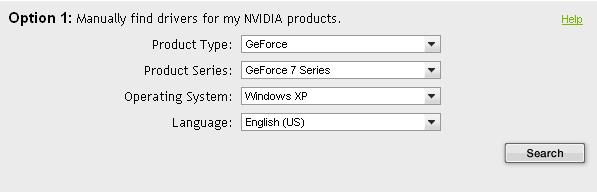
- nvidia.JPG (13.93 KiB) Viewed 670 times
I searched on that and it gave me
this linkif that is the driver you downloaded earlier then your gonna have to get a previous version
Re: Stupid Computer (again).
Posted: Fri Apr 10, 2009 10:35 am
by Snoopy
Yeah. That's the one I downloaded. I've downloaded it 3 times. Each time it's the same one.
Could you possibly tell me how it is I return to a previous Gfx Driver thing?
Re: Stupid Computer (again).
Posted: Fri Apr 10, 2009 10:42 am
by Puni
Snoopy wrote:Yeah. That's the one I downloaded. I've downloaded it 3 times. Each time it's the same one.
Could you possibly tell me how it is I return to a previous Gfx Driver thing?
go to control panel > software and search for the nvidia drivers in the list (may have "forceware" in the name) and uninstall
after googlin your gfx card I found
this driver which is an older version
i hope that will work
Re: Stupid Computer (again).
Posted: Fri Apr 10, 2009 2:16 pm
by Pally
I hope you uninstalled the old driver before you installed the new one.
That may be your problem, I don't see you mentioning that any where that I could see.
Re: Stupid Computer (again).
Posted: Fri Apr 10, 2009 3:44 pm
by Azilius
Many, many problems occur with updating drivers. I had some errors before and decided to take a look at nvidia forums and came across
this, made everything better.
Re: Stupid Computer (again).
Posted: Fri Apr 10, 2009 5:13 pm
by zShared
Pally wrote:I hope you uninstalled the old driver before you installed the new one.
That may be your problem, I don't see you mentioning that any where that I could see.
Yeah, that's what I was going to say.
The correct way to install new drivers is:
1. Uninstall old ones from CP or with driver cleaner
2. Reboot.
3. Your desktop should be a small resolution, making everything HUGE. Also laggy as shit, this is VGA mode. Install new drivers.
4. Reboot.
Re: Stupid Computer (again).
Posted: Fri Apr 10, 2009 6:20 pm
by wootpops
i lost the first cd to my battlefield2 installer

Re: Stupid Computer (again).
Posted: Fri Apr 10, 2009 10:57 pm
by Snoopy
zShared wrote:Pally wrote:I hope you uninstalled the old driver before you installed the new one.
That may be your problem, I don't see you mentioning that any where that I could see.
Yeah, that's what I was going to say.
The correct way to install new drivers is:
1. Uninstall old ones from CP or with driver cleaner
2. Reboot.
3. Your desktop should be a small resolution, making everything HUGE. Also laggy as shit, this is VGA mode. Install new drivers.
4. Reboot.
Ok. I don't think I removed my old one. This is what happened.
I installed the new one (without uninstalling the old one). I restarted, when I came back on everything was 800x600 and I was like  . Then I changed my resolution and it's been laggy ever since.
I'll try uninstall driver, and then add new one. I don't know
& Thanks everyone. I'll post outcome shortly.
Re: Stupid Computer (again).
Posted: Fri Apr 10, 2009 11:20 pm
by Midori
zShared wrote:Pally wrote:I hope you uninstalled the old driver before you installed the new one.
That may be your problem, I don't see you mentioning that any where that I could see.
Yeah, that's what I was going to say.
The correct way to install new drivers is:
1. Uninstall old ones from CP or with driver cleaner
2. Reboot.
3. Your desktop should be a small resolution, making everything HUGE. Also laggy as shit, this is VGA mode. Install new drivers.
4. Reboot.
I'm sorry, but i lol'd at this.
Re: Stupid Computer (again).
Posted: Fri Apr 10, 2009 11:32 pm
by zShared
X-Lax wrote:zShared wrote:Pally wrote:I hope you uninstalled the old driver before you installed the new one.
That may be your problem, I don't see you mentioning that any where that I could see.
Yeah, that's what I was going to say.
The correct way to install new drivers is:
1. Uninstall old ones from CP or with driver cleaner
2. Reboot.
3. Your desktop should be a small resolution, making everything HUGE. Also laggy as shit, this is VGA mode. Install new drivers.
4. Reboot.
I'm sorry, but i lol'd at this.
Cool story bro
Re: Stupid Computer (again).
Posted: Fri Apr 10, 2009 11:45 pm
by Snoopy
Thanks everyone. I just rolledback to my previous driver. Internet flows fine now. I think I'll do a virus scan seeing as I've never done one of them before.