Page 1 of 1
Speak with pc
Posted: Thu Apr 09, 2009 11:19 pm
by NuclearSilo
Hi. I need a program that let me send command to the pc, using voice recognition. Don't suggest me e-speaking coz i tried to install it, there is an error and i can't open the program.
Re: Speak with pc
Posted: Thu Apr 09, 2009 11:29 pm
by Brago
You mean like speech recognition where you type it in and it speaks for you?
Re: Speak with pc
Posted: Fri Apr 10, 2009 12:19 am
by Blindfire
Dragon Naturally Speaking.
Re: Speak with pc
Posted: Fri Apr 10, 2009 12:33 am
by LaloHao
First answer this
Brago wrote:You mean like speech recognition where you type it in and it speaks for you?
then we'll answer you
Re: Speak with pc
Posted: Fri Apr 10, 2009 12:35 am
by Blindfire
NuclearSilo wrote:Hi. I need a program that let me send command to the pc, using voice recognition.
Translation:
Hello, I desire an application that allows me to use my microphone to send voice commands to my personal computer.
Re: Speak with pc
Posted: Fri Apr 10, 2009 12:38 am
by Brago
Go to control panel, speech recognition, text to speech
vista is controlpanel>text to speech and you can type waterver in and the voice says it.. its win we do it in typing class and the teacher gets so mad.
Re: Speak with pc
Posted: Fri Apr 10, 2009 2:38 am
by hemagoku
there is one in vista ,don't u have vista ?
Re: Speak with pc
Posted: Fri Apr 10, 2009 3:18 am
by NuclearSilo
3 years ago, i got a program, but i forgot the name, that allows me to send command. For example, I talk "open Winamp", it opens winamp, "launch xyz", it launches, "close smt", etc... it also allows to type the text i said.
Dragon talking desktop is great but it's 900Mb. I need a smaller size program, but still do the job.
Re: Speak with pc
Posted: Fri Apr 10, 2009 3:20 am
by Brago
Sounds like win, I want it now...
OPEN SRO
GET LVL 36 ON ECSRO
WIN
Re: Speak with pc
Posted: Fri Apr 10, 2009 4:20 am
by NuclearSilo
Aha, i found it. Not only it's small 20Mb, it also allows to understand vietnamese words

VSpeech
http://freefr.dl.sourceforge.net/source ... _beta4.zip
Re: Speak with pc
Posted: Fri Apr 10, 2009 4:34 am
by HughGRection
Brago wrote:Go to control panel, speech recognition, text to speech
vista is controlpanel>text to speech and you can type waterver in and the voice says it.. its win we do it in typing class and the teacher gets so mad.
He's not talking about this, he's talking about this
Translation:
Hello, I desire an application that allows me to use my microphone to send voice commands to my personal computer.
Re: Speak with pc
Posted: Fri Apr 10, 2009 2:52 pm
by Miguez
Brago wrote:Sounds like win, I want it now...
OPEN SRO
GET LVL 36 ON ECSRO
WIN
lmao.
lol once my brother was next to me and there's a function on windows xp where you type w/e you want and a retarded male voice reads what you wrote, I lol'd so hard, I wrote: Francisco you're so gay, and the reading was so Farking hilarious.. good times x]
Re: Speak with pc
Posted: Fri Apr 10, 2009 3:28 pm
by NuclearSilo
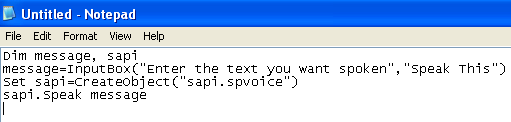
you can do that with SAPI programming. Require Speech Recognition SDK
Open a notepad, write:
Code: Select all
Dim message, sapi
message = InputBox ( "Entrez le texte que vous voulez parler", "Speak Cette")
Ensemble sapi = CreateObject ( "sapi.spvoice")
sapi.Speak message
Then save as a .vbs file and execute it.

Re: Speak with pc
Posted: Fri Apr 10, 2009 5:40 pm
by NuclearSilo
I don't give a shit what ppl think, I do what's best for me
Re: Speak with pc
Posted: Fri Apr 10, 2009 7:48 pm
by NuclearSilo
WinDGhost wrote:NuclearSilo wrote:Speak with pc
why you want Speak with a pc?..
sry the thread title sounded funny!
to give it orders
Re: Speak with pc
Posted: Fri Apr 10, 2009 9:04 pm
by Brago
Thee_UniQue wrote:Brago wrote:Sounds like win, I want it now...
OPEN SRO
GET LVL 36 ON ECSRO
WIN
lmao.
lol once my brother was next to me and there's a function on windows xp where you type w/e you want and a retarded male voice reads what you wrote, I lol'd so hard, I wrote: Francisco you're so gay, and the reading was so Farking hilarious.. good times x]
just go to control panel then text to speech and u can get that agin