Anyone knows how to make this setup work ? When you connect an older/typical home theater system via aux you can get it to produce LEFT RIGHT audio no problem but 5.1 sound doesn't work. Anyone knows how to get 5.1 on pc using a home theater ?
Pic of the back of home theater:
https://mail.google.com/mail/u/0/?ui=2& ... w1896-h835
Connecting normal Home Theater to PC, getting 5.1.
-
Love

- Elite Member
- Posts: 5330
- Joined: Thu Nov 08, 2007 4:29 pm
- Quick Reply: Yes
- Location: guildwars2
Connecting normal Home Theater to PC, getting 5.1.

Guild Wars 2, Isle of Janthir (NA)
Peace is a lie, there is only passion. Through passion, I gain strength. Through strength, I gain power. Through power, I gain victory. Through victory, my chains are broken.
-
Love
- Elite Member
- Posts: 5330
- Joined: Thu Nov 08, 2007 4:29 pm
- Quick Reply: Yes
- Location: guildwars2
Re: Connecting normal Home Theater to PC, getting 5.1.
Did my research last night, no longer need help with this so welcome to close thread.
Guild Wars 2, Isle of Janthir (NA)
Peace is a lie, there is only passion. Through passion, I gain strength. Through strength, I gain power. Through power, I gain victory. Through victory, my chains are broken.
-
iSinnnn

- Frequent Member
- Posts: 1172
- Joined: Mon Aug 18, 2008 2:18 am
- Quick Reply: Yes
- Location: mavnation.
Re: Connecting normal Home Theater to PC, getting 5.1.
do you still have the links that lead you to fixing/getting this to work? this is relevant to my interests. if not maybe i'll push myself into looking
-
Love
- Elite Member
- Posts: 5330
- Joined: Thu Nov 08, 2007 4:29 pm
- Quick Reply: Yes
- Location: guildwars2
Re: Connecting normal Home Theater to PC, getting 5.1.
give me til tomorrow to post something, bit late and tired.
Guild Wars 2, Isle of Janthir (NA)
Peace is a lie, there is only passion. Through passion, I gain strength. Through strength, I gain power. Through power, I gain victory. Through victory, my chains are broken.
-
Love
- Elite Member
- Posts: 5330
- Joined: Thu Nov 08, 2007 4:29 pm
- Quick Reply: Yes
- Location: guildwars2
Re: Connecting normal Home Theater to PC, getting 5.1.
It turns out I still need to learn more about this, thus unable to provide a proper answer.
Guild Wars 2, Isle of Janthir (NA)
Peace is a lie, there is only passion. Through passion, I gain strength. Through strength, I gain power. Through power, I gain victory. Through victory, my chains are broken.
-
Razorhead

- Active Member
- Posts: 820
- Joined: Tue Apr 22, 2008 9:19 pm
- Quick Reply: Yes
- Location: leagueoflegends
Re: Connecting normal Home Theater to PC, getting 5.1.
SO u want to play music/movie from your pc to a home theatre (which is a 5.1 setup?)?
Does your sound card even support 5.1?
Does your sound card even support 5.1?
-
Love
- Elite Member
- Posts: 5330
- Joined: Thu Nov 08, 2007 4:29 pm
- Quick Reply: Yes
- Location: guildwars2
Re: Connecting normal Home Theater to PC, getting 5.1.
http://forums.overclockers.com.au/showt ... p?t=418833
That helps.
My "old" home theater has hdmi 1.3 which doesn't receive audio, I think that if you have hdmi 1.4 you can simply plug it in to your video card and the 5.1 channel will work. The for sure way to get 5.1 sound with just your motherboard however is using 3 rca splitters, one for sub/center, another for L/R, and the last for the back speakers. Problem with that is your typical home theater in a box doesn't have those 3 dream setup connections, they usually have optical audio, perhaps hdmi, and crappy rca type connections x1 and if you are lucky x2 ( because you can do L/R in that case and bass/center which is plenty, you will soon find out that with those 2 connections your audio quality will be silly good )
with older none hdmi 1.4 ( anything prior to 2009 ) home theaters you also have the option of buying an audio card that will decode dts on the fly for you. With that your movies/video games will be able to receive 5.1 via optical audio connection ( optical cable is usually limited to 2 channel sound due to limitations of the cable itself, it can play 5.1 but only if its decoded, its normal bandwidth only has room for those 2 channels ).
and at this point I am not sure where I am in my information unload segment, not spell checking, I figured just typing info down should help "enough", for any questions pm me and I will be happy to clarify for you.
That helps.
My "old" home theater has hdmi 1.3 which doesn't receive audio, I think that if you have hdmi 1.4 you can simply plug it in to your video card and the 5.1 channel will work. The for sure way to get 5.1 sound with just your motherboard however is using 3 rca splitters, one for sub/center, another for L/R, and the last for the back speakers. Problem with that is your typical home theater in a box doesn't have those 3 dream setup connections, they usually have optical audio, perhaps hdmi, and crappy rca type connections x1 and if you are lucky x2 ( because you can do L/R in that case and bass/center which is plenty, you will soon find out that with those 2 connections your audio quality will be silly good )
with older none hdmi 1.4 ( anything prior to 2009 ) home theaters you also have the option of buying an audio card that will decode dts on the fly for you. With that your movies/video games will be able to receive 5.1 via optical audio connection ( optical cable is usually limited to 2 channel sound due to limitations of the cable itself, it can play 5.1 but only if its decoded, its normal bandwidth only has room for those 2 channels ).
and at this point I am not sure where I am in my information unload segment, not spell checking, I figured just typing info down should help "enough", for any questions pm me and I will be happy to clarify for you.
Guild Wars 2, Isle of Janthir (NA)
Peace is a lie, there is only passion. Through passion, I gain strength. Through strength, I gain power. Through power, I gain victory. Through victory, my chains are broken.
-
Love
- Elite Member
- Posts: 5330
- Joined: Thu Nov 08, 2007 4:29 pm
- Quick Reply: Yes
- Location: guildwars2
Re: Connecting normal Home Theater to PC, getting 5.1.
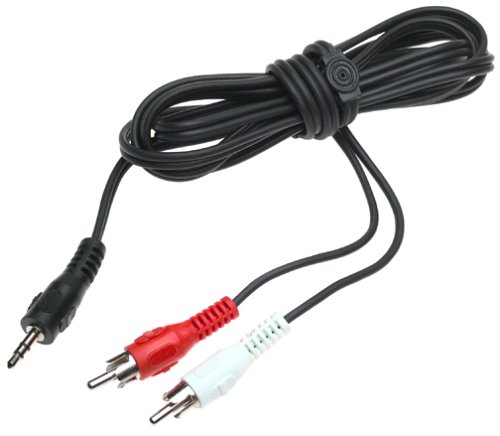
That's the type of rca splitter that will get you the best 5.1 audio in my opinion ( you need enough connections to support 3 of those, the side with 1 end goes on your pc ). Problem is having a receiver that supports it, usual stand alone ones have no problem supporting it, HTiB not so much.
Guild Wars 2, Isle of Janthir (NA)
Peace is a lie, there is only passion. Through passion, I gain strength. Through strength, I gain power. Through power, I gain victory. Through victory, my chains are broken.
-
Razorhead
- Active Member
- Posts: 820
- Joined: Tue Apr 22, 2008 9:19 pm
- Quick Reply: Yes
- Location: leagueoflegends
Re: Connecting normal Home Theater to PC, getting 5.1.
To start; that topic was last edited in 2009 >.<
So not quite up to date
Some info about HDMI
http://en.wikipedia.org/wiki/HDMI#Version_1.0_to_1.2
Check out the chart (halfway the page)
HDMI has always supported audio; 1.4 offers ARC (Audio Return Channel) -> if both devices support 1.4; the sound can be sent BOTH ways; but this isn't what u are looking for
Could u maybe post a picture of the inputs on your Home Theatre (brand & model too?)
What motherboard are u using? (just to verify the 5.1 support & wether it's a Realtek or w/e)
So not quite up to date
Some info about HDMI
http://en.wikipedia.org/wiki/HDMI#Version_1.0_to_1.2
Check out the chart (halfway the page)
HDMI has always supported audio; 1.4 offers ARC (Audio Return Channel) -> if both devices support 1.4; the sound can be sent BOTH ways; but this isn't what u are looking for
Could u maybe post a picture of the inputs on your Home Theatre (brand & model too?)
What motherboard are u using? (just to verify the 5.1 support & wether it's a Realtek or w/e)
-
Love
- Elite Member
- Posts: 5330
- Joined: Thu Nov 08, 2007 4:29 pm
- Quick Reply: Yes
- Location: guildwars2
Re: Connecting normal Home Theater to PC, getting 5.1.
Sony DAV-FX500 is my home theater, I have an hdmi connected to it and no signal is received. Perhaps is my receiver not being able to pick up the signal.
Guild Wars 2, Isle of Janthir (NA)
Peace is a lie, there is only passion. Through passion, I gain strength. Through strength, I gain power. Through power, I gain victory. Through victory, my chains are broken.
-
Razorhead
- Active Member
- Posts: 820
- Joined: Tue Apr 22, 2008 9:19 pm
- Quick Reply: Yes
- Location: leagueoflegends
Re: Connecting normal Home Theater to PC, getting 5.1.
Went through 104 pages of manual..
http://esupport.sony.com/US/p/model-home.pl?mdl=DAVFX500&template_id=1®ion_id=1&tab=manuals#/manualsTab
https://docs.sony.com/release/DAVFX500.pdf
1/ I really hope you connected the speakers correctly to your home theatre, or u will never get sound
2/ did you already check the home theatre settings?
3/ It's HDMI OUT, so it sends out image/sound - not receive it
4/ Outputting 2 channel sources like CDs by 5.1channel (page 32) "soundfield"
5/ I see 3 easy options to connect your pc for sound purposes (page 93 - back panel):
* TV/VCR 2 (OPTICAL DIGITAL IN) jack
* TV/VCR 1 (DIGITAL IN COAXIAL) jack
* AUDIO IN/A.CAL MIC jack (frontpanel)
As I'm reading this manual; the home theatre focused on playing dvd's
DVD's hold 2.0 - 2.1 - 5.1 (- 7.1) audio on the disc -> home theatre playing 5.1 perfectly
Other devices can be connected (VHS player, hello 90's), BR player, normal TV - But then
it takes the sound (and video) using the old school connectors (component & Audio R/L (we call it Tulip connectors)
But it takes it in as STEREO sound (L & R)
There the "soundfield" comes in & emulates the 2.0 -> 5.1
Simply getting sound, should be easy peasy
Pptical or coaxial or simple stereo jack should work (front panel)
Stereo (what's in a name) -> 5.1 will be emulated
Optical or coaxial; not quite sure if it sends out 5.1
But home theatre settings also come into play for this, they have to be set correctly
Now, I'm going to bed
http://esupport.sony.com/US/p/model-home.pl?mdl=DAVFX500&template_id=1®ion_id=1&tab=manuals#/manualsTab
https://docs.sony.com/release/DAVFX500.pdf
1/ I really hope you connected the speakers correctly to your home theatre, or u will never get sound
2/ did you already check the home theatre settings?
3/ It's HDMI OUT, so it sends out image/sound - not receive it
4/ Outputting 2 channel sources like CDs by 5.1channel (page 32) "soundfield"
5/ I see 3 easy options to connect your pc for sound purposes (page 93 - back panel):
* TV/VCR 2 (OPTICAL DIGITAL IN) jack
* TV/VCR 1 (DIGITAL IN COAXIAL) jack
* AUDIO IN/A.CAL MIC jack (frontpanel)
As I'm reading this manual; the home theatre focused on playing dvd's
DVD's hold 2.0 - 2.1 - 5.1 (- 7.1) audio on the disc -> home theatre playing 5.1 perfectly
Other devices can be connected (VHS player, hello 90's), BR player, normal TV - But then
it takes the sound (and video) using the old school connectors (component & Audio R/L (we call it Tulip connectors)
But it takes it in as STEREO sound (L & R)
There the "soundfield" comes in & emulates the 2.0 -> 5.1
Simply getting sound, should be easy peasy
Pptical or coaxial or simple stereo jack should work (front panel)
Stereo (what's in a name) -> 5.1 will be emulated
Optical or coaxial; not quite sure if it sends out 5.1
But home theatre settings also come into play for this, they have to be set correctly
Now, I'm going to bed
-
Love
- Elite Member
- Posts: 5330
- Joined: Thu Nov 08, 2007 4:29 pm
- Quick Reply: Yes
- Location: guildwars2
Re: Connecting normal Home Theater to PC, getting 5.1.
Thanks for your hard work and yeah it doesn't look like my receiver can receive hdmi signal.
lol all this time my bass and my center speakers had their cables switched, no shit it wasn't working for me.
Problem now is that is crazy loud ....
lol all this time my bass and my center speakers had their cables switched, no shit it wasn't working for me.
Problem now is that is crazy loud ....
Guild Wars 2, Isle of Janthir (NA)
Peace is a lie, there is only passion. Through passion, I gain strength. Through strength, I gain power. Through power, I gain victory. Through victory, my chains are broken.
-
Razorhead
- Active Member
- Posts: 820
- Joined: Tue Apr 22, 2008 9:19 pm
- Quick Reply: Yes
- Location: leagueoflegends
Re: Connecting normal Home Theater to PC, getting 5.1.
Love wrote:Thanks for your hard work and yeah it doesn't look like my receiver can receive hdmi signal.
lol all this time my bass and my center speakers had their cables switched, no shit it wasn't working for me.
Problem now is that is crazy loud ....
It's your neighbour's problem

I'm glad it's working out now