Page 1 of 1

NLPR - Life

Posted: Sun Sep 23, 2007 3:42 pm
by 0l3n

Posted: Sun Sep 23, 2007 3:44 pm
by Shadowman20818
Teragen+PS or all by hand?

Either way, it looks clean.

Posted: Sun Sep 23, 2007 3:45 pm
by Tatianasaphira
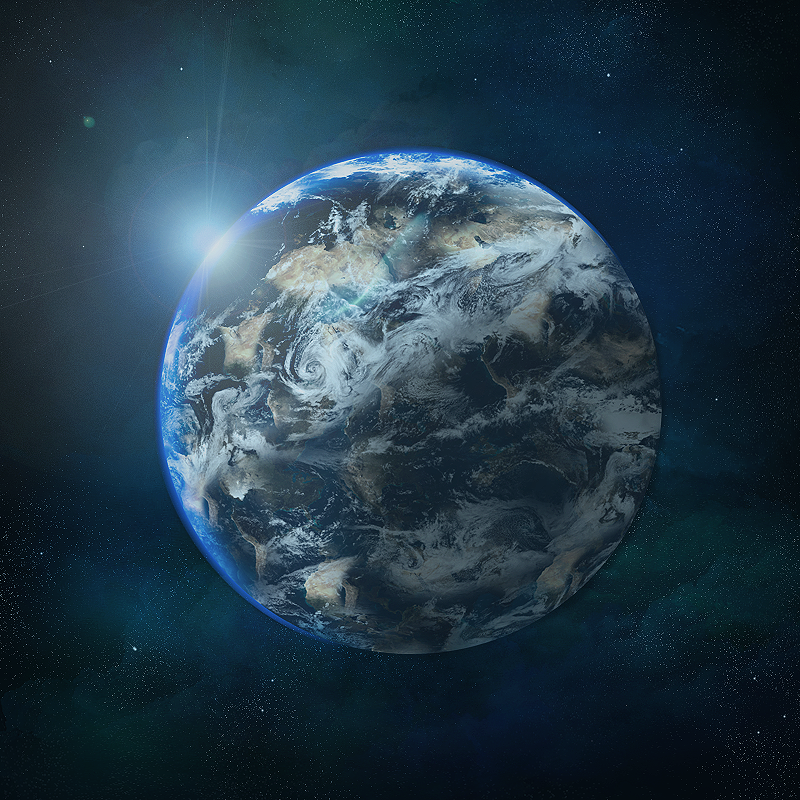
As said in Vent, the blue along the horizon looks a bit off, and too bright blue. Lower it a bit, making it darker as it leaves the horizon

Overall, an amazing image

Posted: Sun Sep 23, 2007 4:41 pm
by binnosh
looks amazing, and i agree with the blue, it's too pure blue, should be a bit darker and might look better when it isn't so tidy, idunno :p

Posted: Sun Sep 23, 2007 5:01 pm
by doa_master0
Very Nice Indeed And as the others said the blue is too Noticable u want it to blend as the that is the reflection of water which would be darker..

Posted: Sun Sep 23, 2007 6:26 pm
by 0l3n
You guys do know that's the atmosphere of the planet not the reflection of the water.

Posted: Sun Sep 23, 2007 6:31 pm
by Tatianasaphira
Yes

Try making the edges at the bottom this colour: 30556f

Then at the top where the horizon is this: acc6d9

Posted: Sun Sep 23, 2007 7:14 pm
by Luoma
yea a little too tidy but man thats awsome 9/10 :D

Posted: Sun Sep 23, 2007 9:24 pm
by aazumak
alright a space artist !!! yay :) i didnt think any1 else knew how

this one is great

my crits
that blue looks horrible, its a solid shade, (the blue horizon) make it blur in

(its also off the planet man)


also, no dark side(since i can see the suns glare, that means that the other side of the planet should be dark(unless theres a second sun))

take the shape of the planet, fill it solid black, go to gaussian blurr and blur it alot, that you basicly have a blurr in the middle of the planet

press ctrl + T to transform, and drag one of the corners way off the screen
heres what im talking about {http://img217.imageshack.us/img217/4126/ol3nbasiclyxm1.jpg}

when you made the planet you would have a better outline so you wouldn't do a shitty erasing job like mine. but you get the basic idea


but your clouds are great, ive always failed at clouds, can you show me how you did them?


when i myself do the blueish glow, i make a new layer in the shape of the planet, make it black and set it to screen, the just do an outer and inner glow, make the outer glow very small and the inner much larger, requires a bit of touch up on the dark side of teh planet

but is good besides those facts.
infact its really wonderfull, you did a very good job on the change between land and see (that light colored water) wonderfull


ill post some tutorials by alan and shadow tm when i find them, they r really helpfull, im friends with shadowtm and he is great

and your quit a good artist, do you know terragen aswell?

and if i havent mentioned it already, create background space

Posted: Sun Sep 23, 2007 9:29 pm
by Xyzzzy
Wow, thats amazing!

marry me? :love:

Posted: Mon Sep 24, 2007 9:59 am
by 0l3n
Thanks aazumak, the planet has a dark side but its not that dark :P

And for the atmospher, it wasnt solid before and when I took a look at it now I could see what you mean. Maybe I sharpened it to much?

To make the clouds I used stocks and brushes (I cut out the clouds in the stock and made a brushes :D ).

Posted: Mon Sep 24, 2007 10:15 am
by aazumak
wanna send me some of these brushes ? :P

Posted: Mon Sep 24, 2007 10:16 am
by cin
no shit

in pshop? oO

just heard theres a program to make it, very easy :P

u makin it too hard for yourself <_>

good job tho :)

Posted: Mon Sep 24, 2007 10:24 am
by 0l3n
aazumak wrote:wanna send me some of these brushes ? :P


BrushPack

Posted: Mon Sep 24, 2007 8:10 pm
by TwelveEleven
0l3n wrote:
aazumak wrote:wanna send me some of these brushes ? :P


BrushPack


Woo? I actually already have that :shock:

Anyways itsa nice