Page 1 of 1
My 1st Vector style sig...
Posted: Sat Jun 09, 2007 5:58 pm
by Dystopia
Well, im not really satisfied with this but, whatever

here..
Edittt

well, i put a boarder i fix the gun so it would be parallel to teh top line
comments, suggestions, CnC -/10 plz
Posted: Sat Jun 09, 2007 6:02 pm
by exality
im not sure it has an odd feel to it
7/10
i like how it all kinda fits together
add a border
Posted: Sat Jun 09, 2007 6:13 pm
by CrimsonNuker
Throw in more vector brushes in it lol
Posted: Sat Jun 09, 2007 6:15 pm
by Dystopia
theres no vector brushes at all

just a couple of splatter brushes for the line and the backround..
how come my boarder wont show up?
im making a new layer and pressign ctrl+a and going to edit>stroke making a 3px boarder black and and on the inside saving as png and i dont see a boarders? am i doing somthing wrong?
Posted: Sat Jun 09, 2007 8:11 pm
by Rizla
how is it vector?
Posted: Sat Jun 09, 2007 10:06 pm
by exality
IT wrote:theres no vector brushes at all
just a couple of splatter brushes for the line and the backround..
how come my boarder wont show up?
im making a new layer and pressign ctrl+a and going to edit>stroke making a 3px boarder black and and on the inside saving as png and i dont see a boarders? am i doing somthing wrong?
make sure the layer is on the top of everything?
Posted: Sat Jun 09, 2007 10:33 pm
by Rizla
okay I just need to clear one thing up lol.
Raster == Photoshop, images that when scaled up lose resolution because the image is based on pixels, if pixels are made bigger they stretch and look horrible. Most everything you see, including this piece, is raster.
Vector == Illustrator, AutoCad -- Images are drawn using math, so regardless of how much it is scaled it will always look the same, because the images are mathematically calculated.
Posted: Sun Jun 10, 2007 12:56 am
by Dystopia
exality wrote:IT wrote:theres no vector brushes at all
just a couple of splatter brushes for the line and the backround..
how come my boarder wont show up?
im making a new layer and pressign ctrl+a and going to edit>stroke making a 3px boarder black and and on the inside saving as png and i dont see a boarders? am i doing somthing wrong?
make sure the layer is on the top of everything?
yeah it is.. 3px is visible right? what do you reccomend?
@rizla, i though it didnt look like vector so i said vector style
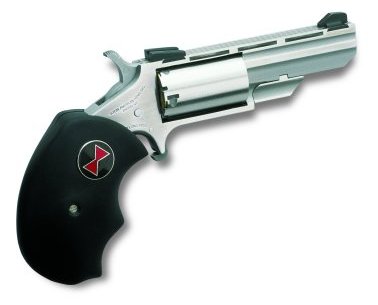
what i did is take the original pic which would be the gun or the rose give it a dropshadow, made the shadows and highlights up to 100 for both and duplicated the layer and then filter>stylize>find edges and i put that layer on soft light
this is what the gun looked liek from b4
http://www.naaminis.com/pix/bw01.jpg
i cant find the rose but yeah thats what i did
Posted: Sun Jun 10, 2007 1:49 am
by Rizla
I dont like it. None of the colors match, the hues used conflict, I see the concept you had which is quite original, but in delivery I think you lost it.