light source

Digital art design, renderings, signatures and anything art related. Upload pictures of your newest work or ask for feedback. Post graphics requests or discuss art in general.
Post Reply
User avatar
[SD]happynoobing
Advanced Member
Posts: 2349
Joined: Thu Jan 04, 2007 2:06 am
Quick Reply: Yes
Location: Off Topic

light source

Post by [SD]happynoobing »

how do you create a decent light source? i've tried again and again and they look ugly. and if u use a pre-made light render for light source then can you give me a site with good renders?

Image

pherball
Valued Member
Posts: 398
Joined: Wed Jul 19, 2006 6:16 am
Quick Reply: Yes
Location: Xian

Post by pherball »

I've been looking for a great render site too.. :S
It would be nice if someone posted one
:)
Image

User avatar
Quyxz
Advanced Member
Posts: 2364
Joined: Tue Apr 11, 2006 4:47 pm
Quick Reply: Yes
Location: The Netherlands

Post by Quyxz »

Light source? Well, just white brushing can allready fit.
Or apply image and the go to filter > render > lightning effects. Then choose omni for the easiest way.

Just some easy ways. :)
One oldskool matherfacker
Image

User avatar
CrimsonKnight
Valued Member
Posts: 352
Joined: Wed Jan 31, 2007 4:59 pm
Quick Reply: Yes
Location: Venus

Post by CrimsonKnight »

Filter > Render > Lens Flare for light source.

For rays, try using the polygonal lasso tool. Fill white, then change opacity.
Image
ImageImage[Ninjitsu] -x- [Sheppard] -x- [6X]

Geedunk
Active Member
Posts: 787
Joined: Sat Jan 13, 2007 3:30 pm

Post by Geedunk »

CrimsonKnight wrote:Filter > Render > Lens Flare for light source.

For rays, try using the polygonal lasso tool. Fill white, then change opacity.


Lens flare is a -.

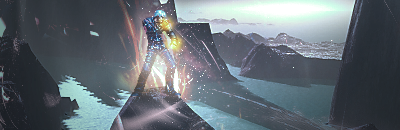
Lighting effects is the easy way - white/creamy brushing is the hard but sexy way.
Image
XxYODAxX wrote:Thank you Geedunk you are friggin awesome!

RuYi wrote:Geedunk for president!! :D

Post Reply

Return to “Artists Corner”