Page 1 of 1
Latest Master Piece (Hardly)
Posted: Thu Feb 01, 2007 8:58 am
by Sol
Ok Here's one i just wiped up.

(it sucks but i couldn't stop messing around on it

)
""P.S"" i don't rly like it tbh.
Posted: Thu Feb 01, 2007 12:55 pm
by Draquish
Would've looked 10x better if you didn't smudge :/
Posted: Thu Feb 01, 2007 1:11 pm
by Geedunk
You mean blurred

Posted: Thu Feb 01, 2007 2:12 pm
by naljamees51
yea...blurr makes it look baaad

Posted: Thu Feb 01, 2007 2:15 pm
by Geedunk
naljamees51 wrote:yea...blurr makes it look baaad
Definetly not.
Sharpen x3, 1,9-5,0 gaussian blur set to lighten, then erase a part from the render. That's hawt
Posted: Thu Feb 01, 2007 2:54 pm
by Quyxz
Geedunk wrote:naljamees51 wrote:yea...blurr makes it look baaad
Definetly not.
Sharpen x3, 1,9-5,0 gaussian blur set to lighten, then erase a part from the render. That's hawt
Yes, could be. But not on a stock like this.
Next time try it on a more detailed stock.

Posted: Thu Feb 01, 2007 5:25 pm
by Sol
ty for the info it was mainly smudge tool that i used.
yeh i kinda turned his face into a mask but bomber man doesn't have a nose
i think that i suck at brushing and making backgrounds
i used a simple gradiant with custom colors.
however, i love the sparkly stars
i'll upload one i did of optimus prime for a clan m8.
-edit-
Here it is
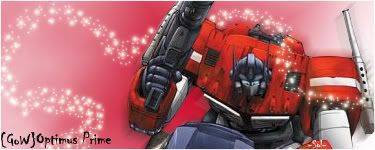
P.S if anyone wants this they can have it. cuz the guy got some1 else to make him one before i completed it so its just taking up webspace i got a plain version on my psp files
Posted: Thu Feb 01, 2007 6:55 pm
by naljamees51
i think this 1 is better ^.~
only...i belive u shold make an dark red or black border

not white
Posted: Thu Feb 01, 2007 7:54 pm
by Miyoko
Geedunk wrote:naljamees51 wrote:yea...blurr makes it look baaad
Definetly not.
Sharpen x3, 1,9-5,0 gaussian blur set to lighten, then erase a part from the render. That's hawt
5 gaussian blur o_O? That's overkill!
Draquish was right tho, it's smudged
Posted: Thu Feb 01, 2007 11:10 pm
by Draquish
Miyoko wrote:Geedunk wrote:naljamees51 wrote:yea...blurr makes it look baaad
Definetly not.
Sharpen x3, 1,9-5,0 gaussian blur set to lighten, then erase a part from the render. That's hawt
5 gaussian blur o_O? That's overkill!
Draquish was right tho, it's smudged
I usually do 1.5.....2.5....five...maybe, I did six in "Project: Too much C4Ds"

If you don't know how to add a border:
New layer. Crtl+A. Edit>Stroke. Set how big you want your border.
Kind of better...beginner...of course. Keep sigging!
Posted: Fri Feb 02, 2007 12:41 am
by ranger4life
just turn it into a smudge sig and it'll look cooler
if u dont no what i meant just go to my topic on graphic dictionary