Page 1 of 1
Sig Making + DP Making in image ready.
Posted: Sun Jan 21, 2007 10:01 am
by Hudders
On imageready when I'm trying to animate it, every frame i edit it does the same to every frame so its a bit pointless.
Any way i can change just 1 frame?
Any other tips for photoshop are much appreciated.
Thanks
Posted: Sun Jan 21, 2007 2:47 pm
by Padawin
i never read a tutorial for image ready, and i found out that, dunno if theres an easier way, but this one works fine for me:
i have a specific layer for each frame i want to animate... and i only have some specific layers showing for each frame... it works for me, but you end with a lot of layers :/
Posted: Sun Jan 21, 2007 2:58 pm
by Padawin
this is some
lame tutorial showing how that works
http://www.megaupload.com/es/?d=HOXB8VBR
i underline the word lame, i did in 15 min to teach a friend... and he understood it and now is able to make decent animations, so maybe it helps you

this is the result:
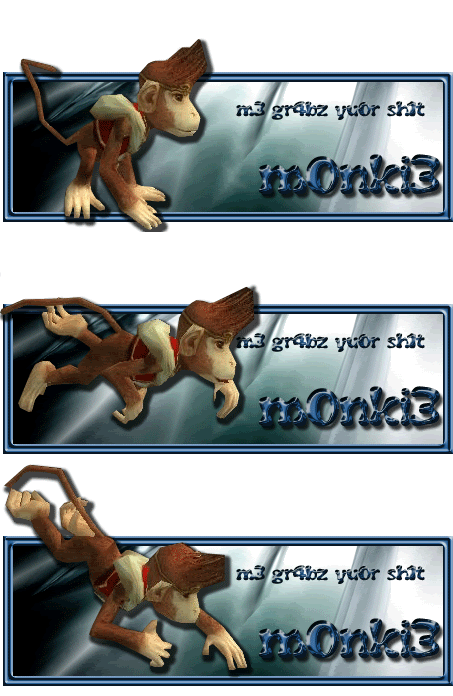
notice that this is a very simple animation, only 3 frames.. but it works quite good (i was lucky to be able to take those screenies)
the animation on my avatar used the same technique..... with more frames

Posted: Sun Jan 21, 2007 9:24 pm
by Luoma
Padawin wrote:this is some
lame tutorial showing how that works
http://www.megaupload.com/es/?d=HOXB8VBRi underline the word lame, i did in 15 min to teach a friend... and he understood it and now is able to make decent animations, so maybe it helps you
this is the result:
notice that this is a very simple animation, only 3 frames.. but it works quite good (i was lucky to be able to take those screenies)
the animation on my avatar used the same technique..... with more frames
Thanks!

Posted: Sun Jan 21, 2007 9:59 pm
by Padawin
you tried it and it helped ? :O
remember, i found that out by trial and error.. maybe if you google it or something u find an easier way (i would appretiate if you tell me then
)
Posted: Sun Jan 21, 2007 10:12 pm
by Luoma
Padawin wrote:you tried it and it helped ? :O
remember, i found that out by trial and error.. maybe if you google it or something u find an easier way (i would appretiate if you tell me then
)
it did help
but i found this one too which cleared it up a little
http://www.myjanee.com/tuts/animation/animation.htm
Posted: Sun Jan 21, 2007 10:35 pm
by Priam
the monkey one is actually kinda cool is you resize it to a smaller one. 150x400 or something. and resize the monkey aswell ofc.
Posted: Sun Jan 21, 2007 10:44 pm
by Padawin
yeh, that one is written with more than 10 min :p
but basically its the same system.... well u dont have to duplicate a layer to duplicate a frame.... just duplicate the frame and use the same layer than the previous one :o
Posted: Sun Jan 21, 2007 11:00 pm
by Padawin
Priam wrote:the monkey one is actually kinda cool is you resize it to a smaller one. 150x400 or something. and resize the monkey aswell ofc.
well as you can see... the moneky one doesnt have a name or anything.. i never meant to use it as a sig :o
the fact is that i was grinding at the bandit den with all those funny lvl 16 ppl... and some monkey tried to steal my gold, but it got stuck with a corner.... and it spent like 5 min stuck there (before using ninja skills and teleporting).... so i took screenies
i just had to cut it out, not resizing or fixing perspective problems (that i would have got if it wasnt stuck)

Posted: Mon Jan 22, 2007 9:59 am
by Hudders
Thanks For all your help.
I'll post my result on here when i'm done
Posted: Mon Jan 22, 2007 5:46 pm
by Padawin
good luck with it
Posted: Mon Jan 22, 2007 6:49 pm
by Hudders
Thanks for yourhelp...
my first ever animation...
Thanks to you guys...
And the Result is...
Below...

Posted: Mon Jan 22, 2007 7:50 pm
by Padawin
nice
34 frames, and looks quite good, without jumps and all that stuff
good job!
Posted: Mon Jan 22, 2007 9:28 pm
by Hudders
Thanks.... Means alot.
I'm going to Edit it so it starts small at the top and gets bigger towards the bottom. Will use it as my Dp when its done.
Posted: Mon Jan 22, 2007 10:17 pm
by Padawin
just a tip, animations, like stuff popping out of sigs, can be very annoying in a sig/avatar, dont let animated stuff replace nice PS skills
Posted: Tue Jan 23, 2007 4:48 am
by MastaChiefX

HMMMMM? lol
Posted: Tue Jan 23, 2007 5:19 pm
by Padawin
hey, i did a nice cutting, resizing and rotating job... i added a backgound and shadows too :O
those are great PS skillz!!