Page 1 of 1
Shimohime's Simple Avatar Tutorial
Posted: Sun Dec 03, 2006 5:57 am
by Shimohime
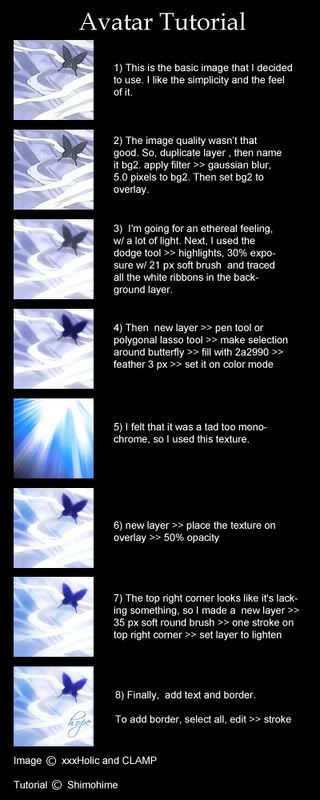
There are many ways to transform a simple image into an avatar. This is only one of the many ways one can use Photoshop to create avatars.

This is a beginner tutorial and very easy to do, however, knowing the basics such as where the layer options are, and all the tools is necessary.
Original:
Texture:

Final:
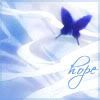
Tada~ I'm done!
I hope this tutorial helps ^^ feel free to ask me any question if this wasn't clear enough.
Posted: Sun Dec 03, 2006 10:00 am
by naljamees51
oo really nice and eazy tut..
but maby some1 dunno how to make a border

(it dont mean that i don't gnow^^ lol)
Posted: Sun Dec 03, 2006 11:50 am
by woutR
oooor, you just make a screenshot of an avatar from this forum and just color it in the colors you want..... IN PAINT !!!
<------------- It's what I did

Posted: Thu Dec 07, 2006 6:41 am
by nightbloom
Props...
Im too lazy to write tuts and I take a lotta shortcuts. Apparently ppl dont think sigs are good unless you use a lot of layers.
I dont use a lot of layers. Only enough to get the right order of images.
Posted: Thu Dec 07, 2006 11:20 pm
by dom
You have to watch what images you use in any creations - copyright and ripping problems.
Posted: Tue Dec 12, 2006 10:10 am
by pingpongboss
pretty crazy how you can turn
into
Only image editing program i know how to use is paint

Posted: Tue Dec 12, 2006 3:43 pm
by Snudge
pingpongboss wrote:Only image editing program i know how to use is paint
WoutR would be proud
Posted: Tue Dec 12, 2006 3:56 pm
by iGFX
This looks like a longer way then to just duplicate the layer, Gaussian blur it, Then set it on lighten and apply a underwater or cooling photo filter.
Either way the outcome is great.
Posted: Sun Dec 17, 2006 10:23 pm
by Shimohime
iGFX wrote:This looks like a longer way then to just duplicate the layer, Gaussian blur it, Then set it on lighten and apply a underwater or cooling photo filter.
Either way the outcome is great.
True, but it's easier to make minute color adjustments when u're not just taking the whole layer and altering it. Also, gaussian blur doesn't always give the right amount of glow or color.
Posted: Wed Jan 24, 2007 5:22 pm
by Key-J
Nice, we have a couple of SIG tuts, but none for Avy. So ill give this a stick. Give it more details, hints and tips. It could be a great guide
GG
Posted: Mon Jan 29, 2007 9:00 am
by timtam
so complicated =(
Paint avatars ftw.
Posted: Sun Feb 11, 2007 8:23 am
by sinblesser
Cool, nice guide btw. xD
Posted: Tue Feb 13, 2007 1:45 am
by linange
Simple, Easy, Beautiful!
Very well done...
Posted: Sun Feb 18, 2007 5:40 pm
by Shimohime
Thanx for the compliments; and fixed with extra stuff and placed in standard tutorial format ^^
Posted: Sun Feb 18, 2007 5:42 pm
by 0l3n
Nice, so much smaller now
Posted: Tue Feb 20, 2007 2:46 pm
by TokiWartooth
can some1 make me a sig and avatar O_o i suk at drawing so...paint doesnt cut it either lol

Posted: Fri Feb 23, 2007 10:34 am
by timtam
TokiWartooth wrote:can some1 make me a sig and avatar O_o i suk at drawing so...paint doesnt cut it either lol
Paint doesnt cut it?
Blasphemy!
there you go! Luke Skywalker eating his own lightsaber!

Posted: Sun Mar 11, 2007 7:13 pm
by Discipleuk
i agree with timtam:) paint is great lol
Posted: Sat Apr 14, 2007 8:15 pm
by mmsicis
paint is for patian you have to change color on every pixel if you want perfect quality on paint! acctuly its hard programm i think photoshop is much easyer!
Posted: Tue Apr 24, 2007 5:25 pm
by UkRaiNeR
kool ^_^.. look i just resize my pic
<------------------------------------
Posted: Wed Apr 25, 2007 2:46 am
by the.dead.illusion
i dont really use effects for avatars, i just use paint for some of them
Posted: Fri May 11, 2007 9:22 pm
by pherball
Looks real nice, simple and to the point.
I might use this one day... Lol
Posted: Fri Jun 08, 2007 2:45 pm
by Ze_ToKiN
wanna teach me how to do it with paint?
Posted: Fri Jun 08, 2007 6:55 pm
by Mugen†
UkRaiNeR wrote:kool ^_^.. look i just resize my pic
<------------------------------------
+1
way easyer
this is more usefull for makeing sig thou ill try it later( lazy a$$ here
)