Simple & Clear (B&W) Lighting Manipulation Guide?

Digital art design, renderings, signatures and anything art related. Upload pictures of your newest work or ask for feedback. Post graphics requests or discuss art in general.
Post Reply
User avatar
Skyve
Forum Legend
Posts: 7320
Joined: Thu Apr 13, 2006 4:42 pm
Quick Reply: Yes
Location: Canada

Simple & Clear (B&W) Lighting Manipulation Guide?

Post by Skyve »

After my Photoshop class that I had for a semester, I decided to *cough* get *cough* Photoshop CS3 Extended. I'm really interested into Portrait/Self-Portrait editing,such as adding cool light effects,glowing lines,etc.

-----------------------------------------------------------------------------

Anyways, back on topic. As I said I'm more into Portrait/SelfPortrait editing. I'm looking for a simple and clear guide to make awesome light effects. There's many guides around the Internet but I can't seem to find one that is more "noob friendly". I know the basics of Photoshop but most Lighting guide out there seems to be aimed for pros,and confuses me.

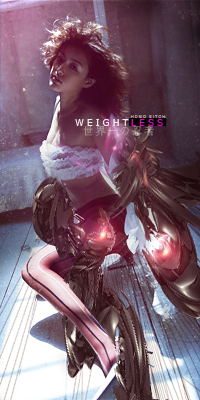
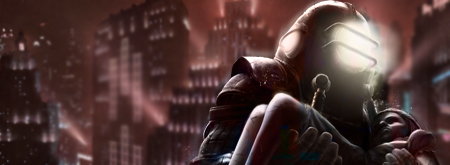
I'm looking to be able to do something like this ;
Spoiler!

Spoiler!


I don't mind if its a long guide,as long as the steps are clear and simple.

Hope you guys can help me :)

-Ex
Image

ExSoldier/Skyve/Loki

what is life even


User avatar
Kraq
Advanced Member
Posts: 2076
Joined: Sat Dec 15, 2007 3:44 am
Location: ☮☮☮

Re: Simple & Clear (B&W) Lighting Manipulation Guide?

Post by Kraq »

Or, you could expirement and find out that Burn and Dodge tool can do this.
Also, black soft brush on soft light blending mode.
Image

User avatar
Skyve
Forum Legend
Posts: 7320
Joined: Thu Apr 13, 2006 4:42 pm
Quick Reply: Yes
Location: Canada

Re: Simple & Clear (B&W) Lighting Manipulation Guide?

Post by Skyve »

Thanks for the guides Noobs_Slayer =) I'll also try some some stuff with Dodge & Burn tool. Atm Im playing around with "Render Light".
Image

ExSoldier/Skyve/Loki

what is life even

User avatar
Kraq
Advanced Member
Posts: 2076
Joined: Sat Dec 15, 2007 3:44 am
Location: ☮☮☮

Re: Simple & Clear (B&W) Lighting Manipulation Guide?

Post by Kraq »

Burn and dodge imo is tons better than Render>Light.
It has a more natural effect.
Image

User avatar
Skyve
Forum Legend
Posts: 7320
Joined: Thu Apr 13, 2006 4:42 pm
Quick Reply: Yes
Location: Canada

Re: Simple & Clear (B&W) Lighting Manipulation Guide?

Post by Skyve »

Ok,Burn and Dodge kinda just makes the color Darker or Brighter =/. I really want to be able to make a huge shadows just like in the first picture. Hope you guys understand me =P
Image

ExSoldier/Skyve/Loki

what is life even

User avatar
dom
Global Moderator
Global Moderator
Posts: 9962
Joined: Wed Mar 08, 2006 10:46 pm
Quick Reply: Yes
Location: västkustskt

Re: Simple & Clear (B&W) Lighting Manipulation Guide?

Post by dom »

Like this? (quick, like 3 mins)

Image

Spoiler!
Image

User avatar
Skyve
Forum Legend
Posts: 7320
Joined: Thu Apr 13, 2006 4:42 pm
Quick Reply: Yes
Location: Canada

Re: Simple & Clear (B&W) Lighting Manipulation Guide?

Post by Skyve »

dom wrote:Like this? (quick, like 3 mins)

Image

Spoiler!

Yes,this exactly.
Image

ExSoldier/Skyve/Loki

what is life even

User avatar
Skyve
Forum Legend
Posts: 7320
Joined: Thu Apr 13, 2006 4:42 pm
Quick Reply: Yes
Location: Canada

Re: Simple & Clear (B&W) Lighting Manipulation Guide?

Post by Skyve »

BUMP,please show me how to oh great dom :D
Image

ExSoldier/Skyve/Loki

what is life even

User avatar
Brago
Loyal Member
Posts: 1541
Joined: Wed Mar 26, 2008 2:48 am
Quick Reply: Yes
Location: The world has an ending, now you must find this ending.

Re: Simple & Clear (B&W) Lighting Manipulation Guide?

Post by Brago »

Image>Adjustment> Black White XD, im working on
something but i need a good ghost :[
Image


Image

User avatar
Melez
Veteran Member
Posts: 3009
Joined: Thu Jul 10, 2008 10:22 am
Location: лол шта
Contact:

Re: Simple & Clear (B&W) Lighting Manipulation Guide?

Post by Melez »

I believe it was all done with burn/dodge tool only. As well as using b/w gradient maps on dif opacities and layer modes helps.
Image

User avatar
0l3n
Elite Member
Posts: 5184
Joined: Fri Jun 16, 2006 1:45 pm
Quick Reply: Yes
Location: Artists Corner

Re: Simple & Clear (B&W) Lighting Manipulation Guide?

Post by 0l3n »

Melez wrote:I believe it was all done with burn/dodge tool only. As well as using b/w gradient maps on dif opacities and layer modes helps.


My guess aswell, the burn and dodge tools are your best friends.
Image
Image

User avatar
dom
Global Moderator
Global Moderator
Posts: 9962
Joined: Wed Mar 08, 2006 10:46 pm
Quick Reply: Yes
Location: västkustskt

Re: Simple & Clear (B&W) Lighting Manipulation Guide?

Post by dom »

1) levels
2) Contrast
3) Burn/dodge tools
4) levels again
5) Contrast again
6) Colour > select high/mid/low ranges and add highlights in monochrome
7) blend highlights
8) gradients
9) levels

For stuff like this you shouldn't follow tutorials. Just play with the tools and keep practicing.
Image

User avatar
Noobs_Slayer
Frequent Member
Posts: 1196
Joined: Fri Jan 18, 2008 10:56 am
Location: AioN

Re: Simple & Clear (B&W) Lighting Manipulation Guide?

Post by Noobs_Slayer »

Filter -> Render -> Lightining effects -> Soft Omni
Image
Sig by me.
Pride-Spatalos

Post Reply

Return to “Artists Corner”