Back to Photoshop
Posted: Mon Dec 21, 2009 12:25 am
Yes, I decided to give another go at Photoshop, some months ago I was really into it but during summer I lost my interest, but now I feel inspired and since there's not much I can do on my computer...
Well, I forgot so much that I had to follow a very detailed and simple tutorial, but I'm starting to remember some things like flow and stuff like that.
So here are a couple examples of my old (not that good) pieces:
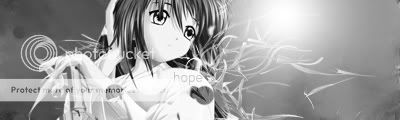


And here's the piece I just made by following said tutorial, it's very basic but I think it's actually nice for a come-back:

So, comment, tell me where I failed, you know, the usual stuff. I'll try to keep 'em coming.
Well, I forgot so much that I had to follow a very detailed and simple tutorial, but I'm starting to remember some things like flow and stuff like that.
So here are a couple examples of my old (not that good) pieces:
And here's the piece I just made by following said tutorial, it's very basic but I think it's actually nice for a come-back:
So, comment, tell me where I failed, you know, the usual stuff. I'll try to keep 'em coming.