Beauty Tutorial By: 0l3n

Digital art design, renderings, signatures and anything art related. Upload pictures of your newest work or ask for feedback. Post graphics requests or discuss art in general.
Post Reply
User avatar
0l3n
Elite Member
Posts: 5184
Joined: Fri Jun 16, 2006 1:45 pm
Quick Reply: Yes
Location: Artists Corner

Beauty Tutorial By: 0l3n

Post by 0l3n »

Happy photoshopping :P

and sorry if I misspelled any words.


Image
Image
Image

WaX
Active Member
Posts: 659
Joined: Mon Sep 24, 2007 8:36 pm
Quick Reply: Yes
Location: Artist Corner

Post by WaX »

o cool tut,very nicely done.
<<banned from SRF for bot admission. -SG>>

User avatar
binnosh
Regular Member
Posts: 201
Joined: Sun Aug 19, 2007 9:11 pm
Quick Reply: Yes
Location: Red Sea

Post by binnosh »

yay at this tut, i know what i'm gonna be doing tommorow
tnx a lot m8 :)
Image


lvl 6x [Warrior/Cleric]
lvl 5x [Rogue/Warlock]
lvl 4x [Str/Bow]
Red Sea
still going strong

User avatar
SuicideGrl
Retired Admin
Posts: 8004
Joined: Fri Jan 27, 2006 4:17 pm
Location: World of Warcraft

Post by SuicideGrl »

thanks ol3n! i need to better learn how to use the burn tool and its relatives. in fact, i don't think i have ever used it......

Image
Thx IceCrash for my awesome sig :)
SRF Name Change Policy
Having trouble accessing SRF?

dom wrote:
RuYi wrote:Are you from outer space or something?
He's from Jersey. Close enough.

Snudge
Senior Member
Posts: 4200
Joined: Sun Jun 11, 2006 8:20 pm
Quick Reply: Yes
Location: Artist Corner
Contact:

Post by Snudge »

SuicideGrl wrote:thanks ol3n! i need to better learn how to use the burn tool and its relatives. in fact, i don't think i have ever used it......


Burn/dodge is unerrated in 'sig-land'. You won't see many tuts reccomending it, yet it's great to enhance a small light spot on your sig to be a proper light/lightsource, and even reflect(Heavy(75%) pressure in middle, then lower precentages as you move away from the actual light).

I guess I'll make a tut on it sometime.
<<banned from SRF for proof of botting. -SG>>

User avatar
Panu
Veteran Member
Posts: 3536
Joined: Mon Aug 27, 2007 8:43 pm
Quick Reply: Yes
Location: Around

Post by Panu »

i like it alot, just the font is getting to me . thats all :)
Image

User avatar
MasterKojito
Ex-Staff
Posts: 1923
Joined: Mon Apr 30, 2007 6:16 am
Quick Reply: Yes
Location: November the 15th

Post by MasterKojito »

nice tut, 8/10
Image

User avatar
0l3n
Elite Member
Posts: 5184
Joined: Fri Jun 16, 2006 1:45 pm
Quick Reply: Yes
Location: Artists Corner

Post by 0l3n »

_Panu_ wrote:i like it alot, just the font is getting to me . thats all :)


Used the same font as I did in the sig, I usually do that :D
Image
Image

Luoma
Veteran Member
Posts: 3895
Joined: Thu Sep 14, 2006 8:23 am
Quick Reply: Yes
Location: Artists Corner & Aege

Post by Luoma »

i love that sig =)
<<banned from SRF for proof of botting. -SG>>

User avatar
SuicideGrl
Retired Admin
Posts: 8004
Joined: Fri Jan 27, 2006 4:17 pm
Location: World of Warcraft

Post by SuicideGrl »

_Panu_ wrote:i like it alot, just the font is getting to me . thats all :)

i actually think the font choice was perfect. mind sharing what font it was, ol3n?
Image
Thx IceCrash for my awesome sig :)
SRF Name Change Policy
Having trouble accessing SRF?

dom wrote:
RuYi wrote:Are you from outer space or something?

He's from Jersey. Close enough.

walnut206
Casual Member
Posts: 84
Joined: Sun Oct 28, 2007 3:35 pm

Post by walnut206 »

The font is awesome, Nice tut

User avatar
pineapples
Common Member
Posts: 108
Joined: Fri Oct 27, 2006 3:23 am
Quick Reply: Yes
Location: Jon's tummy.

Post by pineapples »

Wow. Great tut, 0l3n! I'll be sure to try this out when I have time during the weekend.

Mind telling me who the stock is?

User avatar
0l3n
Elite Member
Posts: 5184
Joined: Fri Jun 16, 2006 1:45 pm
Quick Reply: Yes
Location: Artists Corner

Post by 0l3n »

SuicideGrl wrote:
_Panu_ wrote:i like it alot, just the font is getting to me . thats all :)

i actually think the font choice was perfect. mind sharing what font it was, ol3n?


Trebuchet or something like that I think. And thanks guys for the positive response.
Image
Image

cin

Post by cin »

added it to the tuts sticky <3

User avatar
iNunoPT
Common Member
Posts: 154
Joined: Thu Aug 09, 2007 9:20 pm
Quick Reply: Yes
Location: quit sro long time ago

Post by iNunoPT »

I'm a total noob in PS and i really like that signature and i would like to make something looked like that :P
I've tried the tut but I'm just to noob...right at the pattern i feel i fail, i cant make it right (the web and smudge) and i don't know what to do (where?) to put the layer in sharp light mode
a few steps after that, how to cut out the face?
and i don't rally know what "overlay" is - lol - xD
what are "c4d"s?? where to get them?
thats all i think, much appreciate!! :D
great tut u have there ;)

User avatar
aazumak
Active Member
Posts: 918
Joined: Sat Jun 09, 2007 12:56 pm
Quick Reply: Yes
Location: Artist Corner
Contact:

Post by aazumak »

yay thnks :)
Image
Image
_____________________!!!!!!Rogue 7X !!!!!!
Image

User avatar
brentonsbbe359
Addicted Member
Posts: 2615
Joined: Tue Mar 06, 2007 10:09 pm
Quick Reply: Yes
Location: I poopid :o
Contact:

Post by brentonsbbe359 »

nice... lol maybe now i can make my own sig.
Image
Spoiler!

User avatar
binnosh
Regular Member
Posts: 201
Joined: Sun Aug 19, 2007 9:11 pm
Quick Reply: Yes
Location: Red Sea

Post by binnosh »

iNunoPT wrote:I'm a total noob in PS and i really like that signature and i would like to make something looked like that :P
I've tried the tut but I'm just to noob...right at the pattern i feel i fail, i cant make it right (the web and smudge) and i don't know what to do (where?) to put the layer in sharp light mode
a few steps after that, how to cut out the face?
and i don't rally know what "overlay" is - lol - xD
what are "c4d"s?? where to get them?
thats all i think, much appreciate!! :D
great tut u have there ;)


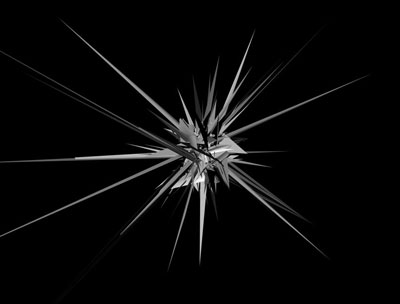
C4D's are 3d images wich are used in backgrounds regulary example:
Image

"overlay" is an potion fr your layer opacity and how it shows it's colors, you can adjust is in your layerspallet in PS

cutting out the face can be done with the lasso tool just select the edges of her face and you got it
Image


lvl 6x [Warrior/Cleric]
lvl 5x [Rogue/Warlock]
lvl 4x [Str/Bow]
Red Sea
still going strong

User avatar
iNunoPT
Common Member
Posts: 154
Joined: Thu Aug 09, 2007 9:20 pm
Quick Reply: Yes
Location: quit sro long time ago

Post by iNunoPT »

thanks, maybe now i can complete a few more steps from this tut

User avatar
_UnKnOwN
Casual Member
Posts: 84
Joined: Mon Nov 19, 2007 6:19 pm
Quick Reply: Yes
Location: Artist Corner

Post by _UnKnOwN »

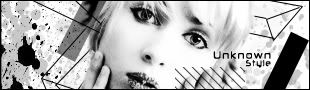
I have been meaning to try this tut out for a few weeks now and i have finally got round to doing it. i am very pleased with he outcome! :D

As you can see i followed it very closely. thanks, great work!

mabe drop me a comment, i would love to hear what other people thought about it. :)

Image
Image

Image
^^ Followed 0l3n's tutorial :)

Luoma
Veteran Member
Posts: 3895
Joined: Thu Sep 14, 2006 8:23 am
Quick Reply: Yes
Location: Artists Corner & Aege

Post by Luoma »

Looks good Unknown! ^^
<<banned from SRF for proof of botting. -SG>>

User avatar
fena
Ex-Staff
Posts: 4441
Joined: Sun May 06, 2007 5:15 am
Quick Reply: Yes
Location: Life

Post by fena »

_UnKnOwN wrote:I have been meaning to try this tut out for a few weeks now and i have finally got round to doing it. i am very pleased with he outcome! :D

As you can see i followed it very closely. thanks, great work!

mabe drop me a comment, i would love to hear what other people thought about it. :)

Image

Wow! In terms of following 0l3n's tutorial, I like your outcome alot.
Text is good. Border is good. Render is a cutie, hehe. Nothing to say about it, except that I only wish it was a tad larger.

Overall, IMO, great Sig. 9/10.

User avatar
0l3n
Elite Member
Posts: 5184
Joined: Fri Jun 16, 2006 1:45 pm
Quick Reply: Yes
Location: Artists Corner

Post by 0l3n »

_UnKnOwN wrote:I have been meaning to try this tut out for a few weeks now and i have finally got round to doing it. i am very pleased with he outcome! :D

As you can see i followed it very closely. thanks, great work!

mabe drop me a comment, i would love to hear what other people thought about it. :)

Image


Yay first outcome :D
And it looks really good to, you did a great job with that one.
Image
Image

User avatar
Sol
Regular Member
Posts: 321
Joined: Tue Jan 30, 2007 9:21 am
Quick Reply: Yes
Location: Sparta
Contact:

Post by Sol »

Maybe this should be sticked? its a very good tut and i learned some cool tips , thanks 0l3n i always get some tips off u :)
Image
Image

Post Reply

Return to “Artists Corner”