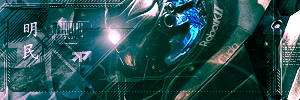
My siggy XD

Digital art design, renderings, signatures and anything art related. Upload pictures of your newest work or ask for feedback. Post graphics requests or discuss art in general.
Post Reply
blu3_boi
Hi, I'm New Here
Posts: 8
Joined: Tue Jun 13, 2006 3:19 am

My siggy XD

Post by blu3_boi »

Here's a sig that i did today...
it was kinda a quickie, oh and if you want rate it lol

there was suppose to be an animation for the text but my animation shop thingy was being evil and didn't let me open the transparent word....
i think it maybe a bit too big for this forum requirements....what is the maximum size for signatures in this forum anyways??? (i'm new here XD)

oh well enjoy XD


Image
--currently making one--

bleaK
Active Member
Posts: 782
Joined: Thu May 25, 2006 12:09 am

Post by bleaK »

- too plain
- no depth
- dont stroke ur render
- bad border
- no style (well not on i can see)
- no effort?

we were all bad once thou. i was horrible. so just keep trying.
[Tranquility] [HotTextChat] - [Venice]

blu3_boi
Hi, I'm New Here
Posts: 8
Joined: Tue Jun 13, 2006 3:19 am

Post by blu3_boi »

- too plain
- no depth
- dont stroke ur render
- bad border
- no style (well not on i can see)
- no effort?

we were all bad once thou. i was horrible. so just keep trying.


-i don't find my sig "too" plain
-i'm use to doing flat sigs, and not all sigs *should* have depth
-didn't stroke my render (my render=the guild name?)
-it's a simple border and i find it very appealing
-my sig styles are more FLAT and "Plain and Simple"
-if you were unsure about the "effort" i think you should have left that out, cause i always put effort into my creations and it took a very long for me to cut my character out and outlining it.

Other than that, thanks for your input!
--currently making one--

User avatar
Cuda
New Member
Posts: 45
Joined: Sun Jun 04, 2006 6:47 pm

Post by Cuda »

I dont know if you intentionally did that, but there is a visible black stroke around the render. I Highly suggest that you take it back into Photoshop and take it out. also, you might want to amp up the lens flare and make it look more realistic other than the blank white one from the game.
Image


Name:-
Guild:-
build:-
Selling:-

User avatar
STEALTHippo
Casual Member
Posts: 87
Joined: Thu Apr 06, 2006 1:43 am
Quick Reply: Yes
Location: Pacific

Post by STEALTHippo »

Haha mine is better!
ImageImageImage

blu3_boi
Hi, I'm New Here
Posts: 8
Joined: Tue Jun 13, 2006 3:19 am

Post by blu3_boi »

hahaha sure it is ;D!

hey CUDA what is my render'ing??? if it's around the character, that is intentional to make it stand out more, and it also helped me cut out the character.

oh the background is a picture i took in game, and didn't want to modify it's "natural" look lol (meaning the sun)

thanks for your suggestions Cuda, i'm not making any more sigs after this one, until i play a new game or something haha!
--currently making one--

User avatar
Shimohime
Active Member
Posts: 788
Joined: Tue Feb 28, 2006 11:40 pm
Quick Reply: Yes
Location: Xian

Post by Shimohime »

yea, by render, he meant ur character. I agree with him, it will look better if u take out the black border around the character. There are better ways to emphasize the character than to have a black border.

Note: U shouldn't be cutting out characters using anything involving borders, there are three good ways to cut out a render that I found really good

1. polygonal lasso
2. pen tool
3. quickmask

:!: Only use the magic wand tool if the background is completely one color
Lvl 5x- Ice Archer

Read my avatar tutorial here

Post Reply

Return to “Artists Corner”