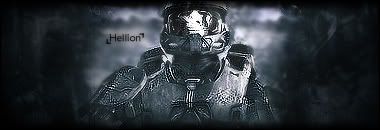
New sig

Digital art design, renderings, signatures and anything art related. Upload pictures of your newest work or ask for feedback. Post graphics requests or discuss art in general.
Post Reply
_HeLLioN_
Valued Member
Posts: 358
Joined: Tue Jul 10, 2007 12:58 am
Quick Reply: Yes
Location: Mercury
Contact:

New sig

Post by _HeLLioN_ »

Image

Any criticism is welcomed, I'm nowhere near half the people here.
<<banned from SRF for bot admission. -SG>>

cin

Post by cin »

i like it.

2 things i would do differently

- i would try and get more depth into it.
i know, you have a background that shows a little depth, but if you make the
left and right of the bg more clear, like they come towards us more, it would look
even better.

- i think i would like a movieborder on this one
thats a border which is a bit thicker on the top and bottom

but, as i said, i like it. 7.5/10

_HeLLioN_
Valued Member
Posts: 358
Joined: Tue Jul 10, 2007 12:58 am
Quick Reply: Yes
Location: Mercury
Contact:

Post by _HeLLioN_ »

I thought about a movie border, but it's late so I decided on 1px black border.

I'll change that tomorrow.

I'll also try to fix the depth too. How would I go about doing that exactly?
<<banned from SRF for bot admission. -SG>>

cin

Post by cin »

well i'm not a pro at photoshop...

but i might give it a try myself on your piece and post my findings afterwards ;)
what i thought of so far is, like i said, to bring up the left and right side of the
background a bit, so you will have the char in front, the left and right of the bg
a meter or so behind it, and the middle of the bg far behind it

_HeLLioN_
Valued Member
Posts: 358
Joined: Tue Jul 10, 2007 12:58 am
Quick Reply: Yes
Location: Mercury
Contact:

Post by _HeLLioN_ »

Well I'm not exactly greatness either, but I'll try to do that.

Thanks for the input.
<<banned from SRF for bot admission. -SG>>

User avatar
0l3n
Elite Member
Posts: 5184
Joined: Fri Jun 16, 2006 1:45 pm
Quick Reply: Yes
Location: Artists Corner

Post by 0l3n »

Try to make MC pop out just a little bit more using the blur tool on the backround and the sharpen tool on MC.

And make the text bigger.
Image
Image

User avatar
aazumak
Active Member
Posts: 918
Joined: Sat Jun 09, 2007 12:56 pm
Quick Reply: Yes
Location: Artist Corner
Contact:

Post by aazumak »

i think its wonderfull, it has good depth, but i would make the edges darker , it would just be spectacular that way

text is nice, thats my only criticism, your up there with teh best man, dont degrade yourself
Image
Image
_____________________!!!!!!Rogue 7X !!!!!!
Image

_HeLLioN_
Valued Member
Posts: 358
Joined: Tue Jul 10, 2007 12:58 am
Quick Reply: Yes
Location: Mercury
Contact:

Post by _HeLLioN_ »

0l3n wrote:Try to make MC pop out just a little bit more using the blur tool on the backround and the sharpen tool on MC.

And make the text bigger.


Alright. Blur and sharpen tool. Thanks. I'll update it later.

aazumak wrote:i think its wonderfull, it has good depth, but i would make the edges darker , it would just be spectacular that way

text is nice, thats my only criticism, your up there with teh best man, dont degrade yourself


Ironic. When I was doing this, I thought the edges were too dark. I'll fix them a bit, and also apply what 0l3n said.

Thanks for the comments.

Edit:
Update -
Image

Blurred the background and sharpened the MC. Made the sides darker and added a movie border as cin suggested.
<<banned from SRF for bot admission. -SG>>

User avatar
SuicideGrl
Retired Admin
Posts: 8004
Joined: Fri Jan 27, 2006 4:17 pm
Location: World of Warcraft

Post by SuicideGrl »

i like it. i <3 MC. i think you may have sharpened him TOO much though.
Image
Thx IceCrash for my awesome sig :)
SRF Name Change Policy
Having trouble accessing SRF?

dom wrote:
RuYi wrote:Are you from outer space or something?

He's from Jersey. Close enough.

_HeLLioN_
Valued Member
Posts: 358
Joined: Tue Jul 10, 2007 12:58 am
Quick Reply: Yes
Location: Mercury
Contact:

Post by _HeLLioN_ »

Another friend said that.

He suggested that I use eraser with the flow set real low and touch it up a bit.
<<banned from SRF for bot admission. -SG>>

User avatar
SuicideGrl
Retired Admin
Posts: 8004
Joined: Fri Jan 27, 2006 4:17 pm
Location: World of Warcraft

Post by SuicideGrl »

_HeLLioN_ wrote:Another friend said that.

He suggested that I use eraser with the flow set real low and touch it up a bit.

the blur tool would work as well.

OR, something i do often that i think works well here, is you could apply image and then do a pretty heavy gaussian blur on the image (like 4px), and then set the opacity of the applied one real low (like 10-20%) and just erase the parts of that layer you want sharp. just a thought.
Image
Thx IceCrash for my awesome sig :)
SRF Name Change Policy
Having trouble accessing SRF?

dom wrote:
RuYi wrote:Are you from outer space or something?

He's from Jersey. Close enough.

_HeLLioN_
Valued Member
Posts: 358
Joined: Tue Jul 10, 2007 12:58 am
Quick Reply: Yes
Location: Mercury
Contact:

Post by _HeLLioN_ »

I'll figure something out and post it here.

Thanks for the tips.
<<banned from SRF for bot admission. -SG>>

Post Reply

Return to “Artists Corner”

