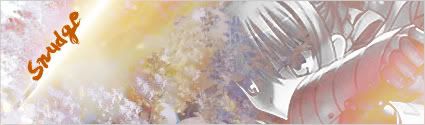
NSR-WOOOOOOOOT!

Digital art design, renderings, signatures and anything art related. Upload pictures of your newest work or ask for feedback. Post graphics requests or discuss art in general.
Post Reply
Snudge
Senior Member
Posts: 4200
Joined: Sun Jun 11, 2006 8:20 pm
Quick Reply: Yes
Location: Artist Corner
Contact:

NSR-WOOOOOOOOT!

Post by Snudge »

Yay, it was the render! Or PS. >.> Anyway, I got going again :D
I immediately made 2 versions, because I was just fooling around and i found out I like the B&W on this one. Only one question, how do you make all the layers B&W? <.>

Anyway, version 1:

Image

And version 2:
Image

And now I look at it, the border has been removed on version 2 <.> Ah well, can be fixed later.
<<banned from SRF for proof of botting. -SG>>

cin

Post by cin »

i like the top one better :P

all layers&way 3 ways i can think of atm

1) ctrl-shift-E, then ctrl-shift-U; merge visible, then mode-adjustments-desaturate;
you will have no seperate layers after that
2) set to greyscalel you will lose layers
3) to keep layers, click on layer, ctrl-shift-u to desaturate
do this for each layer.

User avatar
Riggs
Common Member
Posts: 159
Joined: Mon May 07, 2007 8:13 am
Quick Reply: Yes
Location: Canada

Post by Riggs »

cin wrote:i like the top one better :P

all layers&way 3 ways i can think of atm

1) ctrl-shift-E, then ctrl-shift-U; merge visible, then mode-adjustments-desaturate;
you will have no seperate layers after that
2) set to greyscalel you will lose layers
3) to keep layers, click on layer, ctrl-shift-u to desaturate
do this for each layer.


Or you can create a new layer, go to Image - Apply Image. Then desaturate the layer. So you'll have a layer with the whole sig desaturated and all the original layers still there.
Image

cin

Post by cin »

cool didnt know that last one. thnx.

Snudge
Senior Member
Posts: 4200
Joined: Sun Jun 11, 2006 8:20 pm
Quick Reply: Yes
Location: Artist Corner
Contact:

Post by Snudge »

Thanks for the help :D
Any more C&C? :P
<<banned from SRF for proof of botting. -SG>>

Post Reply

Return to “Artists Corner”