Hey guys, i have a problem with my photoshop.
My strokes wont appear!
I'm pretty sure i'm doing everything right :S
Can anybody help me?
Because it's getting annoying >.<''
Photoshop problem, help. Case solved! Can lock ze thread plx
-
IceCrash

- Forum Legend
- Posts: 6816
- Joined: Thu Nov 09, 2006 4:49 pm
- Quick Reply: Yes
- Location: Anything goes
Photoshop problem, help. Case solved! Can lock ze thread plx
Last edited by IceCrash on Sun Jul 13, 2008 8:58 am, edited 1 time in total.


Re: Photoshop problem, help.
make sure you pit *inside* and more than 2 pixels. Also make sure its a visible color.

Spoiler!


woutR wrote:Squirt, you're a genius when it comes to raping women.
-
Grandpa

- Active Member
- Posts: 867
- Joined: Tue Feb 26, 2008 5:54 am
- Quick Reply: Yes
- Location: Off Topic
Re: Photoshop problem, help.
Pardon the dumb questions, just jotting stuff that happens to me.
We used to have a rule when I was a tech, for every one question you ask, I get to ask seven:
~Granps
P.S. It's probably the one thing I didn't think of, I'm lucky like that.
To Squirt: I find new admiration ever time I see your sig. cin did a good job for you there!
We used to have a rule when I was a tech, for every one question you ask, I get to ask seven:
- Is your BG locked?
- Is your BG transparent?
- Is your FG a different color than your BG?
- Do you see the 'select' ants around your selection?
- Have you just resized and haven't applied?
- What layer is highlighted?
- Is it covered by a higher layer?
- Hmmmmmm.... did your monitor run out of ink?

~Granps
P.S. It's probably the one thing I didn't think of, I'm lucky like that.
To Squirt: I find new admiration ever time I see your sig. cin did a good job for you there!
-
IceCrash
- Forum Legend
- Posts: 6816
- Joined: Thu Nov 09, 2006 4:49 pm
- Quick Reply: Yes
- Location: Anything goes
Re: Photoshop problem, help.
Grandpa wrote:Pardon the dumb questions, just jotting stuff that happens to me.
We used to have a rule when I was a tech, for every one question you ask, I get to ask seven:lol it could be! xD
- Is your BG locked?
- Is your BG transparent? nah
- Is your FG a different color than your BG? FG? sorry >.<''
- Do you see the 'select' ants around your selection? yes
- Have you just resized and haven't applied? no
- What layer is highlighted? the one with the picture, but doesnt matter, i've tryed applying same things to all of em
- Is it covered by a higher layer? i dont think so, maybe a colour balance layer
- Hmmmmmm.... did your monitor run out of ink?
~Granps
P.S. It's probably the one thing I didn't think of, I'm lucky like that.
To Squirt: I find new admiration ever time I see your sig. cin did a good job for you there!
It's wierd, the only thing that does sometimes its like.
I'll
Make a new document, transparent
fill it with white, Pain with a brush, and if i "Stroke" it after, it seems like it "Strokes" the Brush lines, and not the whole thingy, bah, idk >.<''
EDIT: nvm, you know i registered on gfx void, and on the shout box i was talking to someguy and he helped me out so meaning, i'm a big noob lol
still thx for your help guys

-
Grandpa
- Active Member
- Posts: 867
- Joined: Tue Feb 26, 2008 5:54 am
- Quick Reply: Yes
- Location: Off Topic
Re: Photoshop problem, help.
lol, sorry - Sometimes I don't understand my limitations. There's probably many more ways to use 'stroke' than I've discovered - been using Photoshop for about 2 months now. My first thought was from the Edit menu where you stroke your selection.IceCrash wrote:It's wierd, the only thing that does sometimes its like.
I'll Make a new document, transparent
fill it with white, Paint with a brush, and if i "Stroke" it after, it seems like it "Strokes" the Brush lines, and not the whole thingy, bah, idk >.<''
The other way I 'stroke' would be to stroke a path.
After using the pen tool to define a path you right click on it and choose various options. Looks like this:
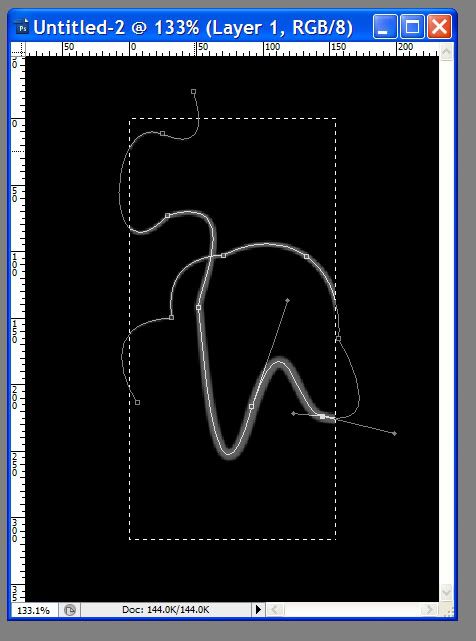
I like to do it that way for various effects (applied the motion blur filter to the example above for the result below):

_____________________________________________________
I'm lost when I try to duplicate your method (pardon) - what I did:
Create New Document (Background White)
<D> - Drop default colors (black and white)
<B> - Brush Tool (Normal Mode)
Added Layer
---> Make some scribble brush strokes
At that point in your example above you've said, 'and if i "Stroke" it after, it seems like it "Strokes" the Brush lines, and not the whole thing'
So that's where I was lost a little. I was unable to stroke anything because nothing was selected. It's probably something that I'm just ignorant about but what steps came next?
NOTE: If any experts read this - jump in, I'm hardly the guy to offer advice while I use my stumble method of learning - (The Grandps "Ooopsie - oh, hey - that looks cool" method)
[EDIT] Read your message and finally saw your "Edit: Nevermind" -- and I thought I could read. /smacks head "Doh"
Speaking of which, and to Squirt: In your sig, are you sure you want to bow and not vow? Sig quote, "I bow no PLEDGE to one day Facepalm Reise!"
-
IceCrash
- Forum Legend
- Posts: 6816
- Joined: Thu Nov 09, 2006 4:49 pm
- Quick Reply: Yes
- Location: Anything goes
Re: Photoshop problem, help. Case solved! Can lock ze thread plx
lol nice Grandpa
that stuff looks nice but yeah my prob was, i tryed ctrl+A the sig, and Edit-Stroke it.. but the Stroke text wouldnt appear black, because i had the text layer selected, and not the pic layer selected, thats why it wouldnt get the "Stroke" thingy.
btw, the reason why its hard for me to express myself in these terms is that, for most of you, these words have meanings, for me their considered actions because idk their meanings, i could look their meanings up but i dont feel its necessessary, right now at least
that stuff looks nice but yeah my prob was, i tryed ctrl+A the sig, and Edit-Stroke it.. but the Stroke text wouldnt appear black, because i had the text layer selected, and not the pic layer selected, thats why it wouldnt get the "Stroke" thingy.
btw, the reason why its hard for me to express myself in these terms is that, for most of you, these words have meanings, for me their considered actions because idk their meanings, i could look their meanings up but i dont feel its necessessary, right now at least

