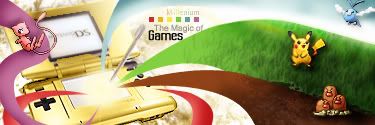
My very hard work signature

Digital art design, renderings, signatures and anything art related. Upload pictures of your newest work or ask for feedback. Post graphics requests or discuss art in general.
Post Reply
User avatar
ShadeMoon
Regular Member
Posts: 330
Joined: Fri Sep 07, 2007 6:23 pm
Quick Reply: Yes
Location: off topic

My very hard work signature

Post by ShadeMoon »

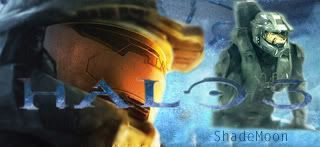
I suck at photoshop,but now i have learned very much about it and have read tutorials.
So this is what i have done with hard work.
plz constructive criticism.

Image
Image

User avatar
aazumak
Active Member
Posts: 918
Joined: Sat Jun 09, 2007 12:56 pm
Quick Reply: Yes
Location: Artist Corner
Contact:

Re: My very hard work signature

Post by aazumak »

what i dont like, is how there are 2 renders, i normally only like 1 render,

but its not bad for beginning, just keep working hard like your doing man.
Image
Image
_____________________!!!!!!Rogue 7X !!!!!!
Image

User avatar
ShadeMoon
Regular Member
Posts: 330
Joined: Fri Sep 07, 2007 6:23 pm
Quick Reply: Yes
Location: off topic

Re: My very hard work signature

Post by ShadeMoon »

I thought about 1 render,but then i thought i make something special
Image

User avatar
Faiien
Active Member
Posts: 889
Joined: Sun Oct 28, 2007 5:10 pm
Quick Reply: Yes
Location: Artist Corner

Re: My very hard work signature

Post by Faiien »

move the second masterchief on the right down

User avatar
Swindler
Forum God
Posts: 11256
Joined: Tue Apr 10, 2007 7:49 am
Quick Reply: Yes
Location: Pimpas Paradise.

Re: My very hard work signature

Post by Swindler »

Faiien wrote:move the second masterchief on the right down


i agree with you it looks like you have cut off his legs and let him float in a water or something

User avatar
Millenium
Ex-Staff
Posts: 2732
Joined: Tue Oct 24, 2006 6:36 pm
Quick Reply: Yes
Location: Waterloo
Contact:

Re: My very hard work signature

Post by Millenium »

Congrats in your effort of making our own sigs <3 The blue color is really nice and I actually like how you attempted to blend the renders in. One thing is about the colors though. You see the left guy he's orange, the background is blue and the guy to the right is gray? The colors are colliding with each other so what you might want to do is add some gradient map and lower the opacity to make the colors blend.

Yeah one more thing is the gray guy xD how come his legs do look like its cut off?
DID YOU KNOW? Milly has retired!!!!


Status: Into Minecraft

ImageImage

Post Reply

Return to “Artists Corner”