
C'n'C - Fate

Digital art design, renderings, signatures and anything art related. Upload pictures of your newest work or ask for feedback. Post graphics requests or discuss art in general.
Post Reply
User avatar
fena
Ex-Staff
Posts: 4441
Joined: Sun May 06, 2007 5:15 am
Quick Reply: Yes
Location: Life

C'n'C - Fate

Post by fena »

So I haven't made anything in a while. :]

Image

Edit:
Updated: v2
Image

v3
Image

Came to a standstill and I don't know what else to add. How can I make it better?
I tried to do HOLLA's font thing - you know, different colors and all like he told me last time. I think it came out decent.

Anyway, C'n'C, please. :] And thank you!

& does anybody know how to make a rounded border?
Last edited by fena on Sat Feb 23, 2008 6:48 am, edited 2 times in total.

User avatar
Faiien
Active Member
Posts: 889
Joined: Sun Oct 28, 2007 5:10 pm
Quick Reply: Yes
Location: Artist Corner

Re: C'n'C - Fate

Post by Faiien »

nice and simple
which version of photoshop do you have? later versions should have a rounded rectangle tool
if not
http://www.tutorio.com/tutorial/photoshop-round-corners

User avatar
fena
Ex-Staff
Posts: 4441
Joined: Sun May 06, 2007 5:15 am
Quick Reply: Yes
Location: Life

Re: C'n'C - Fate

Post by fena »

I'm running on PS CS3:E. Thanks for the link. I'll check it out. :]

User avatar
HOLLAstir
Loyal Member
Posts: 1637
Joined: Tue Aug 28, 2007 7:17 pm
Quick Reply: Yes
Location: 206
Contact:

Re: C'n'C - Fate

Post by HOLLAstir »

Yeah, I was going to suggest the rounded marquee tool. Anyways, I like the concept. Text could be closer to the couple, and the light behind the girl could be toned down a bit. But it's a cute concept, I like it.
Image

Image

User avatar
fena
Ex-Staff
Posts: 4441
Joined: Sun May 06, 2007 5:15 am
Quick Reply: Yes
Location: Life

Re: C'n'C - Fate

Post by fena »

Grrr. I don't get how to do this... :(

I got the rounded rectangle tool out but nothing's happening. I drag it over and it just makes a rounded rectangle. How do I actually make my tag have rounded edges?

(n I'll adjust the font after I get this worked out. Thnx, HOLlA!)

User avatar
Hostage
Veteran Member
Posts: 3119
Joined: Thu Jan 25, 2007 8:34 pm
Quick Reply: Yes
Location: Canada,On

Re: C'n'C - Fate

Post by Hostage »

Ummmm, select inverse> via cut. I'm guessing I'm not sure because I've never tried it myself.

User avatar
fena
Ex-Staff
Posts: 4441
Joined: Sun May 06, 2007 5:15 am
Quick Reply: Yes
Location: Life

Re: C'n'C - Fate

Post by fena »

Grrr.
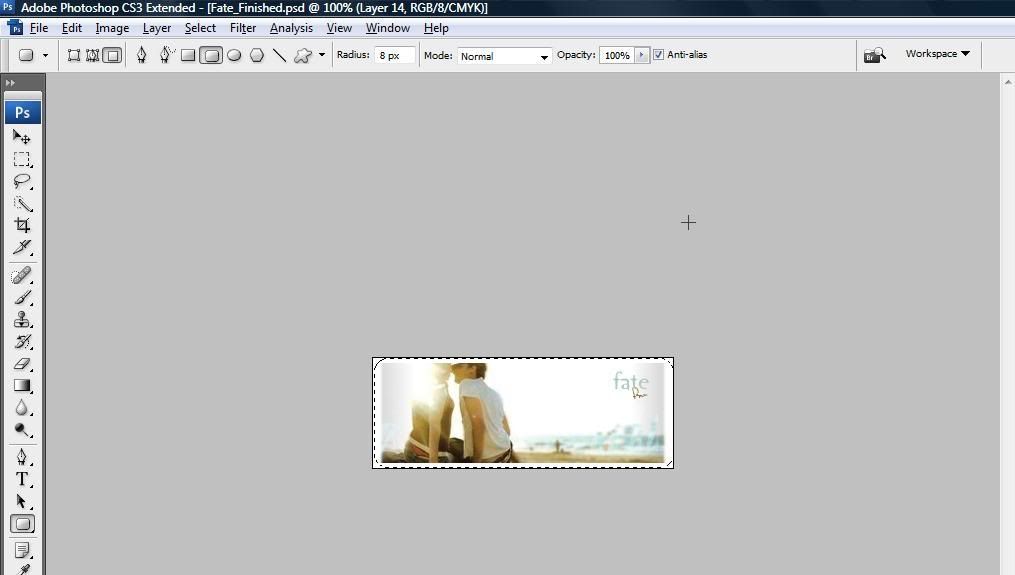
I got this:

Image

As you can see, the corners are rounded. Now how do I actually round the tag?

User avatar
Hostage
Veteran Member
Posts: 3119
Joined: Thu Jan 25, 2007 8:34 pm
Quick Reply: Yes
Location: Canada,On

Re: C'n'C - Fate

Post by Hostage »

Ok, I just tried it myself after you get that far switch over to the lasso tool right click and select " select inverse". Then just select "layer via cut" and delete that layer all together and if your background is set on transparent it should work.

User avatar
Millenium
Ex-Staff
Posts: 2732
Joined: Tue Oct 24, 2006 6:36 pm
Quick Reply: Yes
Location: Waterloo
Contact:

Re: C'n'C - Fate

Post by Millenium »

Its cute!! I would tone down the light source like HOLLA said though. Good work!!
DID YOU KNOW? Milly has retired!!!!


Status: Into Minecraft

ImageImage

User avatar
fena
Ex-Staff
Posts: 4441
Joined: Sun May 06, 2007 5:15 am
Quick Reply: Yes
Location: Life

Re: C'n'C - Fate

Post by fena »

Doesn't work, Hostage. My background's set to transparent too. :( Thanks for the help, though!

& thnx, Milly. :] Yuh, I would totally fix it. I agree that it's a little too bright, but that's how the original stock was. Guh. How's v3? I think I like the font/text the most!

User avatar
Hostage
Veteran Member
Posts: 3119
Joined: Thu Jan 25, 2007 8:34 pm
Quick Reply: Yes
Location: Canada,On

Re: C'n'C - Fate

Post by Hostage »

Image

There, not sure why it didn't work for you.

User avatar
Millenium
Ex-Staff
Posts: 2732
Joined: Tue Oct 24, 2006 6:36 pm
Quick Reply: Yes
Location: Waterloo
Contact:

Re: C'n'C - Fate

Post by Millenium »

^ I personally prefer it with a square border. Just me though <3
DID YOU KNOW? Milly has retired!!!!


Status: Into Minecraft

ImageImage

User avatar
Hostage
Veteran Member
Posts: 3119
Joined: Thu Jan 25, 2007 8:34 pm
Quick Reply: Yes
Location: Canada,On

Re: C'n'C - Fate

Post by Hostage »

I do too but it's what he asked for.

User avatar
fena
Ex-Staff
Posts: 4441
Joined: Sun May 06, 2007 5:15 am
Quick Reply: Yes
Location: Life

Re: C'n'C - Fate

Post by fena »

Ooh. I see now. I forgot to delete the extra layer that was created. I get it now.

Thanks so much for explaining it, Hostage. :]

User avatar
Hostage
Veteran Member
Posts: 3119
Joined: Thu Jan 25, 2007 8:34 pm
Quick Reply: Yes
Location: Canada,On

Re: C'n'C - Fate

Post by Hostage »

No prob always happy to help in any way. ^^

User avatar
fena
Ex-Staff
Posts: 4441
Joined: Sun May 06, 2007 5:15 am
Quick Reply: Yes
Location: Life

Re: C'n'C - Fate

Post by fena »

Hm. I keep on looking at this and wondering how I could make it better. But my mind keeps coming out blank. Any advice, guys?
Also, what direction would the flow in this tag be in?

User avatar
HOLLAstir
Loyal Member
Posts: 1637
Joined: Tue Aug 28, 2007 7:17 pm
Quick Reply: Yes
Location: 206
Contact:

Re: C'n'C - Fate

Post by HOLLAstir »

I don't really see a flow. So you'll probably have to just create your own. I'd maybe do some stuff around the couple, make them stand out a little more, make them the attention grabber. I think it looks fine right now though, with those simple ones you don't want to over do it.
Image

Image

User avatar
fena
Ex-Staff
Posts: 4441
Joined: Sun May 06, 2007 5:15 am
Quick Reply: Yes
Location: Life

Re: C'n'C - Fate

Post by fena »

Yuh, that's what I was thinking to.
What do you think about the text on v3, HOLLA?

:]

User avatar
HOLLAstir
Loyal Member
Posts: 1637
Joined: Tue Aug 28, 2007 7:17 pm
Quick Reply: Yes
Location: 206
Contact:

Re: C'n'C - Fate

Post by HOLLAstir »

It looks fine. It's hard to position it when you have that many words. But it looks fine.
Image

Image

Post Reply

Return to “Artists Corner”